A sales rep is staring at a 50-question security questionnaire due by EOD Monday. The one engineer who knows the encryption specs is OOO, and the internal wiki hasn’t been updated since 2023. Desperate to hit their number, the rep opens a personal browser tab, pastes forty rows of sensitive prospect data into ChatGPT, and asks it to fill the gaps. It takes ten seconds. Problem solved - until it isn’t.
This is the frontline of shadow AI: a "quick fix" that feels like a productivity win but leaves a trail of unmanaged risk. Months later, when that same sales team requests a budget for a secure, sanctioned AI tool, that one Friday afternoon becomes the exact reason your security team says no. Understanding why reps turn to unsanctioned tools is the first step toward reclaiming visibility and unblocking your AI strategy.
What Is Shadow AI? A Definition for Sales and Revenue Teams
Shadow AI is any use of artificial intelligence tools for work that happens without approval, oversight, or visibility from IT and security. That covers a rep using a personal ChatGPT account to draft a questionnaire answer, a marketer running customer quotes through a free summarizer, and a sales engineer with an AI note-taker sitting in every call nobody signed off on.
The term borrows from shadow IT, though the two behave differently in one way that matters. Shadow IT usually leaves a trace. Somebody installs software, expenses a subscription, or requests a login, and a scan picks it up eventually. Shadow AI often leaves nothing behind. A rep opens a browser tab, pastes text, copies the response, and closes the tab. No install, no invoice, no ticket.
On a sales team it shows up in four main forms:
- Personal accounts on public chatbots
ChatGPT, Claude, Gemini, and Copilot used from a personal login rather than a company one.
- Browser extensions
Writing assistants and summarizers that read whatever page is open, including your CRM.
- AI note-takers
Bots that join customer calls, record them, and store transcripts somewhere your security team has never reviewed.
- AI features inside approved tools
This is the trickiest kind, since the software passed a review before the AI feature shipped.
Scale is also an important consideration here. One rep pasting one paragraph is a small thing. Forty reps doing it several times a week for two years builds a body of company and customer information sitting in systems you have no contract with and no way to audit. Not every tool on that list carries the same risk, and it helps to know what kinds of AI sales teams actually use before deciding which ones to worry about.
Why Sales Reps Turn to Unsanctioned AI Tools at Work
Most coverage of shadow AI treats it as a discipline problem. The truth is, it’s a supply problem. The rep needs an answer that exists somewhere inside the company, and the path to it often runs through a wiki nobody updated, a Slack thread from March, and a subject matter expert sitting on 40 unread messages. A public chatbot returns something in four seconds. Not always correct, but fast, and usually close enough to edit into shape.
That trade gets made hundreds of times a week across a revenue org, and nobody writes it down. Reps do not think of it as moving data outside the company, because the screen looks like a conversation instead of a file transfer. Which is a large part of why the habit stays invisible from the inside.
What Sales Reps Actually Paste Into ChatGPT
Common inputs that sales representatives frequently input into public AI tools include:
Security Questionnaires and DDQs
Blocks of questions from prospective buyers, often paired with older answers to serve as a template
Customer and Deal Information
Specific account names, contact details, and deal notes pasted to assist with drafting follow-up emails
Sensitive Pricing and Contract Data
Pricing structures, discount floors, and contract language related to ongoing, open deals.
Compliance and Architecture Documents
Sections of SOC 2 reports, penetration test summaries, or architecture documentation meant to be rewritten for prospective buyers.
Call Transcripts
Full recordings of sales calls, often pasted to generate summaries before renewal conversations.
Internal Strategy Documents
Competitive battlecards, internal win-loss notes, and strategic documentation.
These inputs often contain data belonging to customers or prospects, which creates significant data exposure risks, such as potential breaches of NDAs or GDPR compliance issues.
Shadow AI Statistics: 39.7% of All interactions with AI tools involve Sensitive Data
Cyberhaven Labs measures this in their 2026 AI Adoption & Risk Report. They do this at the browser and endpoint level instead of asking people to self-report, which matters, because self-reported numbers on this always come in low. They found close to 40 percent of everything employees put into AI tools counts as sensitive. That works out to the average employee handing over proprietary information about once every three days. Around a third of workplace ChatGPT use runs through personal accounts, where a security team has no visibility whatsoever.
Personal accounts are a bigger issue than corporate ones. A corporate AI subscription comes with a contract, retention settings, admin controls, and a data processing agreement. A personal account doesn’t come with any of these failsafes. Pasting the same data into a personal versus a corporate account creates vastly different legal risks and expecting sales reps to consistently distinguish between them is unrealistic.
How Shadow AI Can Breach the NDA You Signed With Your Buyer
Sales teams sign mutual NDAs at the start of most enterprise deals. Those agreements usually cover the questionnaire the buyer sends over, since it describes their internal controls and expectations. When a rep pastes that questionnaire into a personal ChatGPT account, your company has arguably shared a counterparty's confidential material with a third party that was never named in the agreement. Handling those documents well is part of writing security questionnaire responses that close deals rather than stall them.
This angle rarely comes up in shadow AI conversations, which tend to focus on protecting your own secrets. The sharper exposure runs the other direction. Your rep may be leaking the buyer's information while trying to close the buyer. A breach discovered during negotiations can immediately derail the sale. Worse, discovering such an exposure post-contract can escalate into a formal legal conflict with an established customer.
Why Unsourced AI Answers Become Contractual Commitments
A second cost has nothing to do with data leaving the building. Questionnaire and RFP answers are not marketing copy. They get attached to contracts. A claim about data residency or breach notification timelines becomes something your company owes a customer, and a general chatbot has no way to check that claim against your actual documentation. It writes a plausible sentence and moves on.
Reps rarely catch it, because a confident wrong answer reads exactly like a confident right one. The gap is structural rather than a bug waiting on a patch; it sits alongside other common issues like single-threaded responses, challenges with 200-row spreadsheets, and ChatGPT's limitations for RFPs. Shadow AI creates a security exposure and an accuracy exposure at the same time, and the second one may end up in a signed document.
Why Security Teams Block Sales AI Purchases Over Shadow AI
Sales leaders often read a blocked purchase as a budget issue or a slow procurement cycle. Security teams see the same meeting differently. A vendor review is one of the few moments in the year when they have real say over how company data moves. If those same reps have been funneling customer data into unmonitored personal accounts for two years, security will exercise that authority to say no.
The evidence backing them up is public. IBM's 2025 Cost of a Data Breach report found that one in five organizations studied reported a breach involving shadow AI, and those incidents added roughly $670,000 to the average breach cost. They skewed toward the worst kind of exposure too, with customer personal data compromised in 65 percent of shadow AI cases and intellectual property in 40 percent.
When security teams lack visibility into current AI usage, they default to a position of risk. Moving from a 'no' to a 'yes' requires more than just vendor promises. They require concrete proof of rep behavior and source transparency.
Why Blocking GenAI Tools Fails to Stop Shadow AI
The knee-jerk reaction is a network block on ChatGPT and everything like it. That holds for about a week. Then the rep pulls out a phone, opens the same tool on cellular data, and pastes the same paragraph. Identical exposure, and now zero logging. The policy passed its audit while the risk went up.
Bans also lose the argument on merit. The rep knows the tool produced a better answer faster than the wiki did. A rule that asks for slower work with nothing offered in exchange gets followed while managers are watching and ignored the rest of the time. Policies that depend on people choosing the worse option every Friday afternoon fail eventually, and they fail without telling you. Approaches that hold up look more like AI governance for enterprise knowledge, where the rules come with a working alternative attached.
The Real Solution: Replace Shadow AI With a Sanctioned Tool Reps Will Actually Use
The best approach to the shadow AI problem is providing reps with a sanctioned path that beats the unsanctioned one on speed.
1up answers sales questions, RFPs, and security questionnaires from your own connected sources, and every answer links back to the document it came from, so a rep can check a claim in one click before it goes anywhere near a contract. Documents connected to 1up are never used to train AI models and stay isolated to your workspace, which clears the two objections security raises first.
Convenience decides adoption more than policy does. An approved tool sitting behind three clicks and another login loses to the tab already open on the second monitor. 1up works inside Slack, Microsoft Teams, and Google Chat, and the browser extension covers web portals like Whistic, OneTrust, and Panorays, where a lot of questionnaires now live. Getting reps to switch is its own project, and this guide to internal AI assistant adoption covers what tends to work.

How to See What Your Sales Team Is Asking AI With 1up’s KB Insights
Speed alone still leaves security in the dark. The second half is visibility, and this is where most sales AI conversations stop short. 1up's reporting turns rep behavior into something you can put in front of a reviewer.
KB Insights
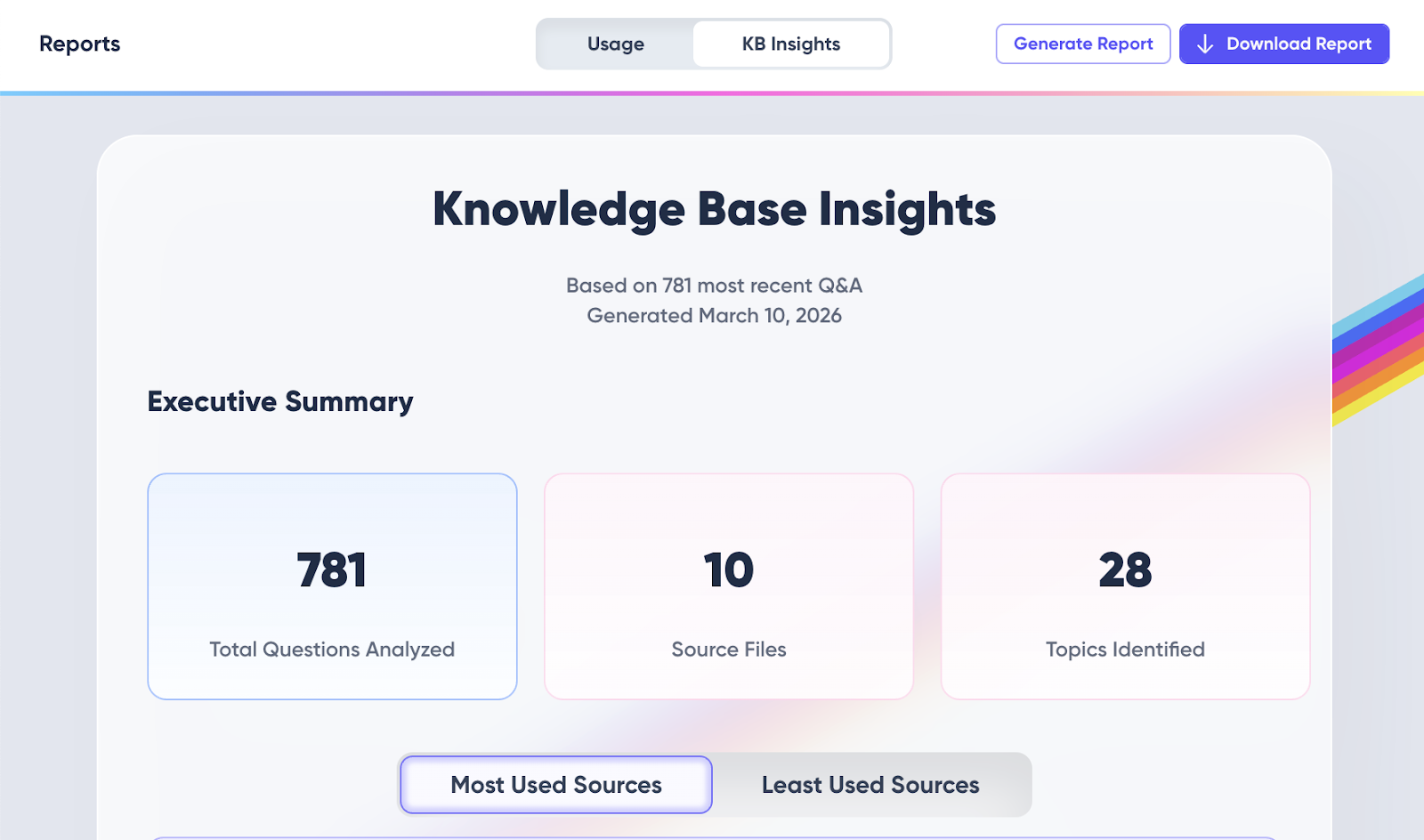
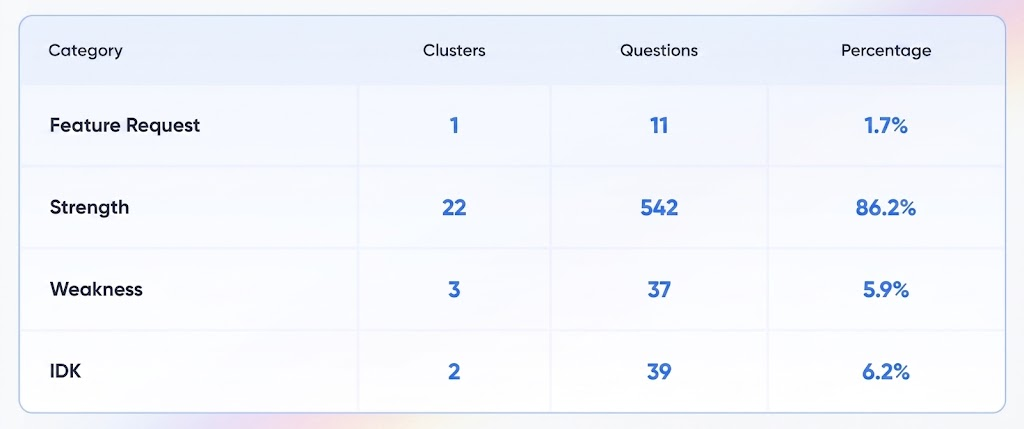
Under Reports, the KB Insights tab reviews a large sample of recent answers, for example the last 1,000 responses, and groups them into topics.
Usage Reports
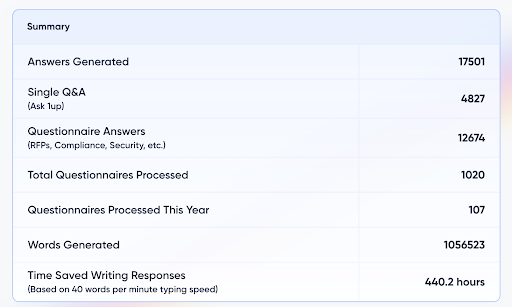
The Usage Reports page tracks Answers Generated, Single Q&A through Ask 1up, Questionnaire Answers, and Words Generated across the workspace, then breaks usage down per teammate. Messaging Platform Usage shows where the work happens, whether that is the web app, Slack, Microsoft Teams, Google Chat, or the browser extension.
Between these pages, eight views do most of the work in a security review.
The IDKs list is a key insight to consider. An unanswered question is the moment a rep opens another tab, so that list works as a leading indicator of shadow AI rather than a report on it. Every gap you close removes a reason to go looking somewhere public. Teams that work through it monthly watch the list shrink. Teams that ignore it watch the same twenty questions reappear quarter after quarter.
A 90 Day Shadow AI Plan That Survives a Security Review
- Inventory before you police
Check browser extensions, expensed AI subscriptions, and SSO logs. Most teams find more tools than they expected, and that surprise is useful ammunition for the budget conversation.
- Ask reps what they paste, and do not punish the answer
People will tell you honestly once, when the question is framed as a workflow problem. They will never tell you a second time if the first answer cost somebody their job.
- Get vendor answers in writing
Model training, retention, data residency, subprocessors, deletion, and SOC 2 Type II status. Have it in hand before the review meeting rather than promising to follow up.
- Demo the reporting, not just the answers
Pull up KB Insights and Usage Reports live in the review. A screenshot of real usage moves a security reviewer further than a policy document ever will.
- Assign an owner to the IDKs list.
One named person, one hour a month, working the missing knowledge and Weaknesses lists. Unowned cleanup stops happening by week three, and those gaps turn straight back into shadow AI.
Teams that run this well end up with something more useful than compliance. They get a map of what their revenue org actually needs to know, refreshed every month, built from real questions instead of guesses about which documents matter.
FAQs
Any AI tool used for work without approval or oversight from IT and security. On revenue teams that usually means personal ChatGPT, Claude, Gemini, or Copilot accounts used to draft emails, summarize calls, or answer questionnaire questions. Browser extensions and note-taking bots that join calls count too, and those often slip past an inventory because nobody expensed them.
Depends on the account and the settings, which change over time. Consumer plans have historically used conversations to improve models unless a user turns that off, while business and enterprise plans exclude customer content by default. Check the vendor's current terms before you quote a number to anyone. Retention and training are separate questions as well, so ask about both.
Usually it is a contract and policy problem before it becomes a legal one. Pasting a buyer's confidential questionnaire can breach an NDA, and pasting personal data about EU residents into a tool with no data processing agreement raises GDPR issues. Talk to your legal team about your specific situation instead of relying on a blog post.
Blocking moves the behavior to phones and personal laptops, where nothing gets logged. The exposure stays and your visibility disappears. A sanctioned tool that answers faster than the public one does more to reduce shadow AI than a firewall rule, and it gives you a record you can show a reviewer.

.png)
AI Made Writing Code Free and Moved the Bottleneck to Code Review
The Payoff of Connecting Questionnaire work to your Sales Pipeline

How to Write an RFP Response That Survives AI Scoring
SIG vs CAIQ vs VSA: A Simple Guide to the Big Three

Why Most Internal AI Assistants Get Built and Then Abandoned