AI shows up in just about every sales tool now. Some of it actually helps. A lot of it doesn't. It can be hard to tell which tools deserve a spot in your stack and which ones are just hype with a logo.
We've found it helps to break sales AI into three buckets. Each one solves a different problem. Each one fits a different part of the sales motion.
Most sales leaders are trying to make sense of dozens of AI tools for their sales teams, so we've found it helps to zoom out. Sales AI really breaks into three buckets, and each one solves a different kind of problem.
Before getting into the buckets, a quick reality check. The AI sales market is loud right now. Every vendor claims to have an AI assistant, an AI agent, or an AI copilot. The features blur together. Buyers get confused. Reps end up using maybe 20 percent of what they pay for. The goal of this guide is to cut through that noise and help you figure out where AI actually moves the needle for your team.
Here are the three types of AI every sales team should understand, plus what to actually look for in each one.
1. Internal-Facing AI
This is the AI your team uses behind the scenes. The customer never sees it. The whole point is to make reps faster, smarter, and less buried in busywork.
Most sales orgs lose hours a day to internal friction. Research that should take 5 minutes takes 30. Questions that should be answered in Slack go unanswered for a day and a half. By the time a rep is actually ready to hop on a call, half their week is gone.
Internal-facing AI fixes that. There are two main use cases here.
Prospecting
Before a rep sends an email or hops on a call, they need context. What does the company do? Who runs sales? Did they announce a new product last quarter? Are they hiring like crazy or doing layoffs? In the old days, this took an hour and 20 browser tabs.
Now there are tools like Perplexity that do real-time research and pull together summaries from across the web. A rep can ask a question in plain English and get a clean answer with sources attached. That cuts research time from an hour to maybe five minutes. It also gives reps the kind of context that makes a cold email feel personal instead of recycled.

The teams getting the most out of prospecting AI usually pair it with two things. One is a clear prompt template, so every rep digs for the same kind of signals (recent news, leadership changes, tech stack, hiring patterns). The other is a human gut check at the end. AI can pull facts, but it can't always tell you whether a buyer actually cares about a specific pain point this quarter. That last bit is still a human job.
Answer Automation
Reps also burn a lot of time looking for internal answers.
- Where's the latest pricing deck?
- Did Product ever ship that new integration?
- What does Legal say about MSAs in Germany?
- How do we beat Competitor X on security?
These are the questions reps spam each other with in Slack every single day.
The cost is hard to see, but it's huge. A 20-person sales team can easily lose 30 to 40 hours a week to this kind of internal back-and-forth. Multiply that across a year and you're looking at the equivalent of a few full-time hires worth of lost productivity.
This is where a tool like 1up earns its keep. We built 1up so reps can ask any sales question and get a clear answer pulled straight from your trusted docs. No more pinging your SE at 9pm. No more digging through Google Drive at midnight. The answer comes back with sources attached, so reps know it's based on real, vetted content instead of a guess.

The bonus is what happens during onboarding. New reps usually take 90 days or more to ramp. A big chunk of that time is just learning where stuff lives. With a good answer automation tool, new reps can ask questions like a senior rep on day one. That kind of shift is part of why the role of a sales rep is changing so fast, with reps now spending less time hunting for info and more time actually selling.
What to watch out for with internal AI
The biggest mistake teams make here is treating internal AI like a search bar. Search gives you a list of links. AI should give you a real answer. If your tool is just returning documents, you've bought a fancy version of CTRL-F.
The other thing to watch for is data freshness. If the AI is pulling from a doc that was last updated in 2022, the answer is going to be wrong. The best tools either flag stale content or auto-refresh from your connected systems. Before you buy anything in this category, ask the vendor exactly how they handle outdated content. The good ones have a clear answer. The weak ones don't.
2. Customer-Facing AI
This is AI that talks to people outside your company. Prospects, buyers, current customers. The bar is way higher here because everything the AI says is on the record. You can't have it making things up. One bad hallucination in a sales conversation, and your champion loses confidence in your product.
AI That Automates External Answers
Customer support has been doing this for years now. Intercom, (now Fin) can resolve a huge chunk of support tickets without a human ever stepping in. It reads your help docs and answers customer questions in chat. Companies like Klarna have reported that AI agents now handle the equivalent work of hundreds of human reps.

Sales has been slower to catch up here, but that's changing fast. With 1up's Answer Hub, you give your prospects a branded page where they can ask any question about your product and get a verified answer. Pricing questions. Security questions. "Do you integrate with X" questions. The AI only pulls from your approved content, so it doesn't go off-script. If it doesn't know something, it loops in a human instead of guessing. Here’s how:
This kind of tool reshapes the buying experience. Instead of waiting two days for a rep to reply, buyers get answers in seconds. Deals move faster because the back-and-forth shrinks. And reps get a log of what buyers are actually asking, which turns out to be gold for product marketing and product teams who want to understand real demand.
A common worry we hear is, "If the AI answers everything, won't reps get cut out of the conversation?" Not really. The AI handles the boring, repeatable 80 percent. Reps get pulled in for the nuanced 20 percent that actually moves deals. That's a much better use of a rep's time than copy-pasting the same security blurb 40 times a quarter.
Outreach
The other big customer-facing use case is email outreach at scale. Tools like Outreach help reps write better cold emails, sequence follow-ups, and time their messages around buyer activity. The AI personalizes based on what it knows about the account. It also flags which prospects are most likely to reply, so reps can spend their time on real opportunities instead of dead leads.

Used well, this kind of AI helps small teams punch above their weight. A 5-person team can run outreach that used to require 20 people. Used poorly, it floods inboxes with the same recycled junk everyone else is sending. The inputs matter a lot. If you feed the AI a weak value prop and a generic ICP, the output will be weak and generic too.
The teams that win with outreach AI usually do two things differently. First, they invest serious time in the inputs. The value prop, the case studies, the persona research, the proof points. Second, they keep humans in the loop. The AI drafts. Humans polish, send, and learn. Fully autonomous outreach is still mostly a recipe for spam at this point.
What to watch out for with customer-facing AI
Hallucinations are the big one. If the AI makes something up in front of a buyer, you have a real problem. The best customer-facing tools work from a closed knowledge base of approved content and refuse to answer when they don't know something. The weak ones invent plausible-sounding answers that turn out to be wrong. Always ask vendors how they handle the "I don't know" case before signing anything.
The second thing to watch is tone. AI tools default to sounding like every other AI tool, which means polite, generic, and slightly hollow. The brands that get this right train the AI to sound like their actual sales team, not like a chatbot.
3. Bulk Operations AI
The third bucket might be the favorite of every rep we talk to. This is AI for the work no human actually wants to do. Long forms. Repetitive data entry. Hundreds of questions at a time. The kind of stuff that eats whole weeks if you grind through it by hand.
This is also where AI shows the cleanest, easiest-to-measure ROI. You can point at a specific task, measure how long it used to take, and show how much faster it is now. Finance teams love that. Procurement teams love that. Even skeptical reps usually come around once they see what a few hours of saved work looks like.
RFPs, DDQs, and Security Questionnaires
Anyone who's worked on an RFP knows the pain. Hundreds of questions, often the same ones you answered last quarter, all with a tight deadline. Multiply that by every deal that needs one. Throw in a security questionnaire or a DDQ for good measure. Whole departments lose their week.
1up's RFP automation is built for exactly this. You upload the questionnaire, point it at your knowledge base, and 1up drafts the answers in minutes. Your team reviews and edits, but the heavy lifting is done. Some teams have cut their RFP response time by 80 to 90 percent. That's hours back in the week for actual selling.
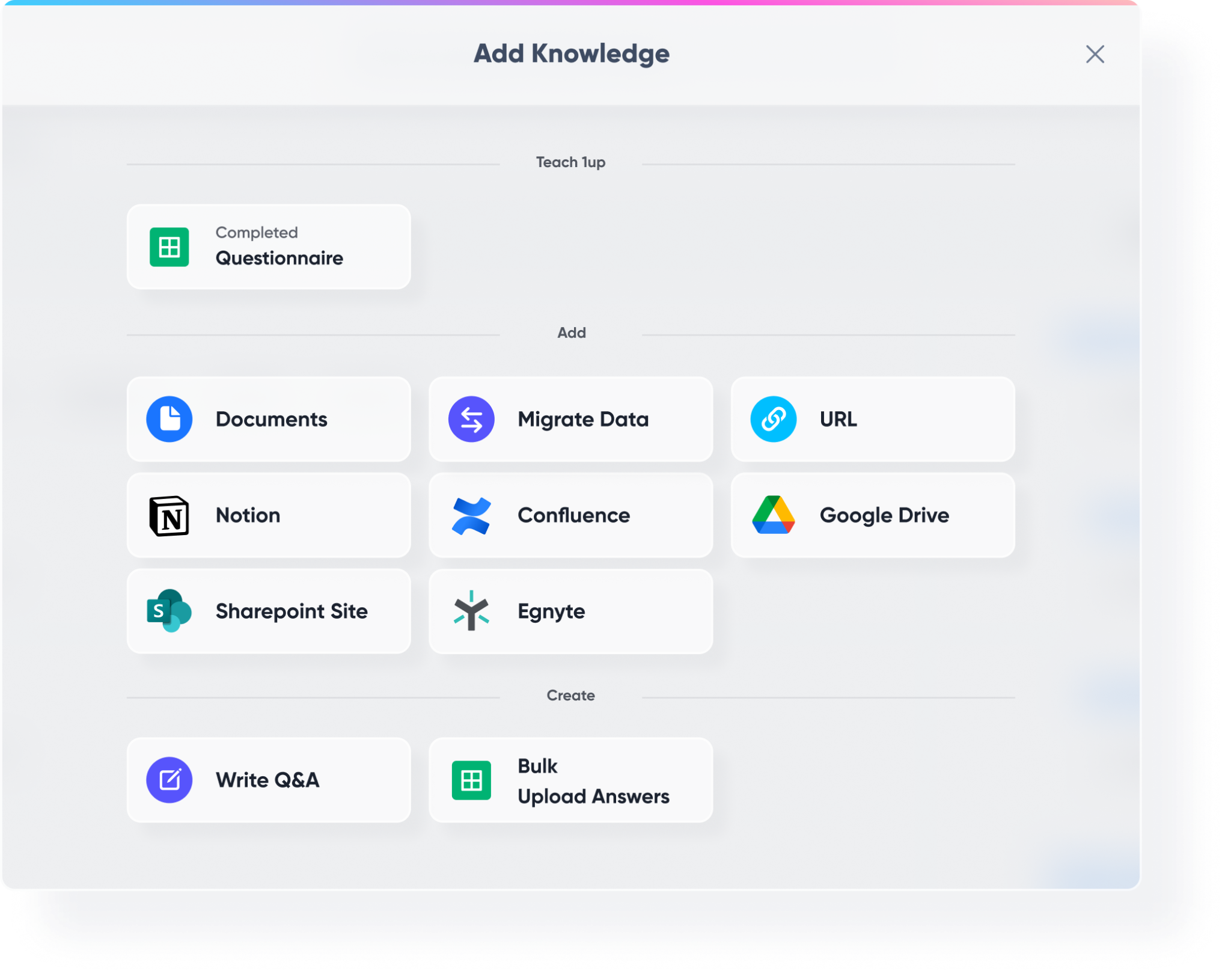
The wins compound over time. Every RFP you complete becomes training data for the next one. The system learns which answers work, which versions get used most often, and which questions tend to come from which industries. By the third or fourth RFP, the draft quality is usually good enough that a quick review is all you need.
DDQs (due diligence questionnaires) and security questionnaires follow the same pattern. They're long, painful, and they show up at the worst possible time, usually right before a deal is ready to close. Automating these used to be a nice-to-have. For mid-market and enterprise deals, it's now table stakes.
CRM Updates
The other painful bulk operation is keeping the CRM clean. Reps hate logging calls. Managers hate chasing them about it. The data ends up half-complete, and forecasts get fuzzy because of it.

This is where tools like HubSpot's Breeze AI Agents come in handy. The AI listens to a call, summarizes what happened, logs it in the CRM, and updates the deal stage automatically. The rep doesn't have to think about it. The data is cleaner. The forecasts get more accurate. Everyone wins, especially the RevOps team and the finance folks trying to plan headcount three quarters out.
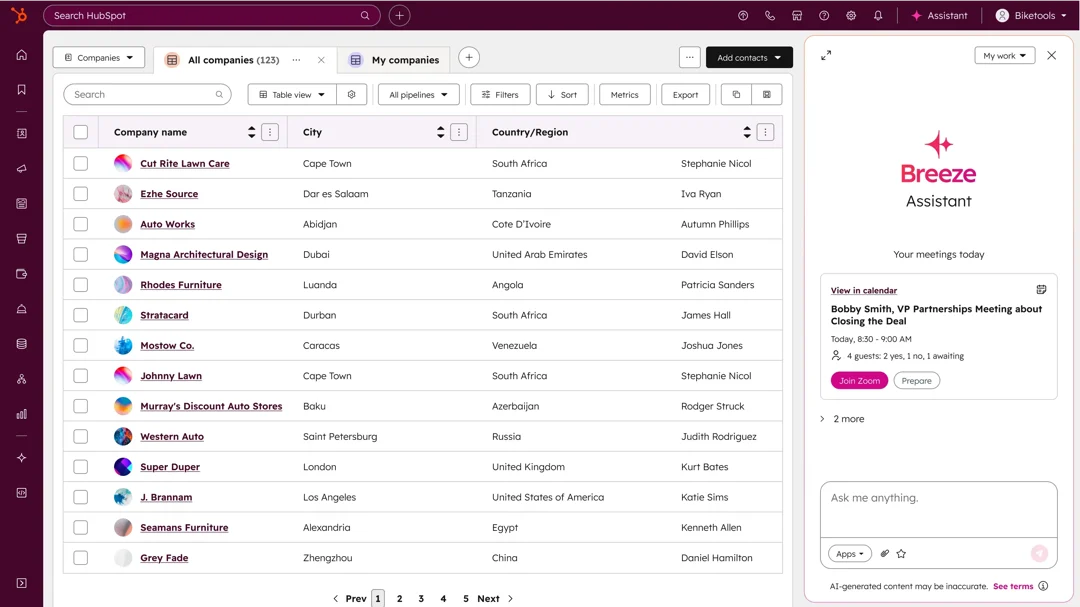
Clean CRM data also feeds back into all the other AI tools you're using. Better outreach personalization. Better answer recommendations. Better account scoring. Garbage in still equals garbage out, so this stuff matters more than people give it credit for.
Common Mistakes Sales Teams Make With AI
A few patterns we see over and over with teams that get frustrated by their AI tools.
Buying too many tools at once
A typical sales team now has 12 or more tools in the stack. Adding three new AI tools at the same time guarantees that none of them get used properly. Pick one bucket, roll it out, train your team, then add the next.
Skipping the knowledge base step
Most sales AI tools are only as smart as the content you feed them. If your docs are scattered, outdated, or contradictory, the AI will spit out scattered, outdated, or contradictory answers. Cleaning up your source content is boring work. It's also the difference between a tool you love and a tool you regret buying.
Treating AI like magic
AI helps. AI doesn't replace strategy, judgment, or relationships. Teams that expect AI to fix a broken sales motion usually end up disappointed. Teams that use AI to amplify a working sales motion see real wins.
Forgetting about the humans
Reps need training, time, and a reason to care. If you drop a new AI tool on a team without explaining what it does and how it makes their lives easier, adoption will be terrible. The best rollouts include a clear "here's what you don't have to do anymore" story.
So Which Type Should You Start With?
Most growing sales teams end up using all three. But you don't have to roll them out at once. Start with the area where the pain is loudest.
If reps are buried in RFPs and questionnaires, fix that first. Bulk operations AI shows results in the first few weeks and pays for itself fast. It's also a great way to build trust with skeptics, because the wins are concrete and easy to measure.
If reps are spending hours hunting for internal answers, start with answer automation. The time savings compound, and onboarding gets way easier. A 90-day ramp can drop to 45 days or less when new hires can ask questions like a senior rep on day one.
If buyers are complaining about slow responses from your team, look at customer-facing AI. The Answer Hub model in particular is one of the highest-leverage moves a sales team can make right now, because it shrinks deal cycles without adding headcount.
The point is to be intentional. AI alone won't fix anything. Match the right tool to a real problem, and you'll see the impact in your pipeline pretty fast. Match the wrong tool to the wrong problem, and you'll just have another expensive tab open in your browser.
FAQs
Start with the area where the pain is loudest. If reps are drowning in RFPs and security questionnaires, go with bulk operations AI first since the ROI is fastest to measure. If reps lose hours hunting for internal answers, start with answer automation. If buyers are complaining about slow response times from your team, look at customer-facing AI like an Answer Hub. There is no universal right answer here, just the one that fixes your biggest bottleneck first.
Pick tools that work from a closed, approved knowledge base instead of pulling answers from the open web. The best customer-facing AI tools refuse to answer when they don't know something and loop in a human instead of guessing. Before you sign a contract, ask the vendor directly how their tool handles the "I don't know" case. If they can't give you a clear answer, that's a red flag.
Not anytime soon. AI is good at the repeatable 80 percent of sales work like research, drafting answers, logging calls, and filling out RFPs. The nuanced 20 percent that actually wins deals (building trust, navigating tough objections, reading the room on a live call) still needs a human. The reps who win in this era are the ones who learn to use AI as an amplifier of their work, not a replacement for it.

.png)
AI Made Writing Code Free and Moved the Bottleneck to Code Review

The Payoff of Connecting Questionnaire work to your Sales Pipeline
Shadow AI: What Your Reps Are Pasting Into ChatGPT Right Now

How to Write an RFP Response That Survives AI Scoring

SIG vs CAIQ vs VSA: A Simple Guide to the Big Three