%20(1).jpg)
The Problem With Running RFPs Through ChatGPT
Your org has already shelled out the money to pay for ChatGPT. Half the proposal team has it open in another tab right now. So when a 200-question RFP lands, the thought makes sense: just paste it in and let it rip. And the first few answers do look great. Clean, fast, sure of themselves. Drafting an answer is the part ChatGPT is good at. The catch is that writing the answer is maybe 20% of an RFP. The other 80% is the messy stuff, and that is where a general chatbot starts to slip.
What ChatGPT actually does well for RFPs
Give it credit. Paste a question into ChatGPT, hand it a doc or two, and it writes a clear, professional answer in seconds. Ask it to shorten that answer, or make it sound less stiff, and it does that too. For a single question with the source material sitting right in front of it, the output is often pretty good.
It has also gotten better at reaching your files. You can connect it to SharePoint or Google Drive now, or drop files into a Project. So the old line that ChatGPT only knows what you paste is out of date.
But there is still a gap between answering one question and running a whole RFP. A real one is 200 to 400 questions, half a dozen contributors, a few hard deadlines, and a pile of answers that live in someone's head instead of any file. ChatGPT was built to help one person in one chat window. It was not built for the rest.
The 10% it gets wrong is the real problem
The issue is that ChatGPT will answer every question with the same confident tone, whether it knows the answer or not. When it does not know, it makes something up that reads perfectly. It might insert a SOC 2 detail that is two years stale. Maybe an integration you do not actually offer gets included. A blog post might survive a mistake like that, but a security questionnaire can't.
As a result, every single response has to be edited because of hallucinations. So the "fast" draft turns into a slow line-by-line review, and someone is doing that review at 11pm the night before the deadline. Stopping those made-up answers before they ship is most of the real work, and ChatGPT leaves all of it on your plate.
ChatGPT cannot coordinate your experts
Most RFP questions cannot be answered by one person. Security questions need someone in IT. Legal language needs counsel. The deep technical stuff needs the engineer who actually built the feature. Getting answers out of those people and back into the document is the slowest part of the whole job, and it usually runs on a mess of email threads and pinging people on Slack.
ChatGPT does nothing here. It can draft for the person typing, but it cannot hand ten questions to your security lead, set a due date, or show who has finished what. OpenAI says it straight in their own docs: the ChatGPT file Library does not introduce external sharing or multiplayer collaboration. It is a tool for one person. An RFP is a team sport.
1up turns the RFP into a team effort
1up runs the RFP as a shared project from the first upload. You assign questions to the right people, set due dates, and watch progress in one view that shows exactly who is working on what. When an expert fixes an answer, that correction saves itself back into the system, so the next person inherits the better version. The week you used to spend chasing people turns into an afternoon.
ChatGPT will not manage an answer library
Every proposal team knows this pain. You spend an hour writing the perfect answer to a brutal compliance question. You send it. Three weeks later the same question shows up in a new RFP, and with ChatGPT you start over from a blank box. It can search files you connected, sure. What it will not do is keep a curated set of your best, approved answers that gets sharper every time you use it.
You can try to build that yourself. Plenty of teams do. The problem is that the library becomes a full-time job. One 1up customer described maintaining theirs in exactly those words. Someone has to keep every answer current as your pricing, product, and compliance change, and the moment that person gets busy, the whole thing rots. Then two reps grab two different answers to the same question, and a reliable answer library stops being reliable.
1up keeps your approved answers in one place
1up builds a knowledge base from your website, product docs, past questionnaires, and connected sources like Google Drive, SharePoint, and Confluence. Approved answers get saved, reused, and improved, and every edit your team makes flows right back in. Each answer carries its source with it, so when legal asks where a claim came from, you can actually show them. The library learns. Answer fifty is better than answer one because the system kept score.
Here’s how 1up works with Google Drive:
ChatGPT struggles to autofill documents accurately
ChatGPT can read a spreadsheet and write answers. Dropping those answers back into the right cells of a real questionnaire is a different job. An RFP is full of structure: numbered requirements, dropdowns, checkboxes, and answer fields that have to line up exactly. ChatGPT was not built to read that layout and place each answer where it belongs.
Scale makes it worse, and not just because of file size limits. There is a well-documented flaw in how these models read long documents. Researchers from Stanford, UC Berkeley, and Samaya AI tested it directly and found that when the answer to a question sits in the middle of a long context instead of near the start, model accuracy falls by more than 30%. They named it the "lost in the middle" problem, and it shows up across every major model, ChatGPT included.
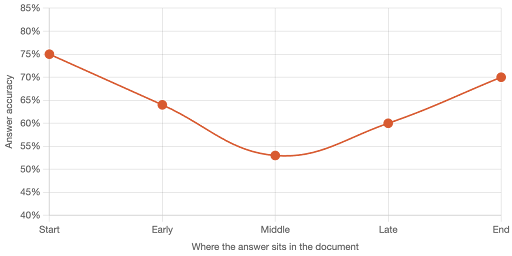
Now picture a 2,000-row due-diligence questionnaire pasted into a chat. The questions buried in the middle are exactly the ones most likely to come back wrong, and they are the hardest ones to catch. So you end up splitting the file, feeding it in chunks, and stitching the answers back together by hand. Which is the work you were trying to skip.
1up drops answers into the right fields for you
1up was built to fill messy documents at full size. It handles Word, Excel, Google Sheets, and PDF questionnaires, spots dropdowns and checkboxes, and drops each answer in the right spot. Because it pulls each answer from your approved library one at a time instead of swallowing the whole file into a single context window, there is no middle for answers to get lost in. When you export, the file comes back in the same format you sent in, formatting intact, with a source behind every answer. No token ceiling, no chunking, no retyping a thousand fields.
Here’s how 1up works with Word docs:
ChatGPT cannot fill out web-based questionnaires
More and more, the questionnaire never arrives as a file. It lives inside a web portal like SAP Ariba or Coupa, or a security review tool like Whistic, where the buyer expects you to log in and type your answers straight into their system. ChatGPT has no clean way to do this. It can browse a bit in agent mode, but it has no approved answer library to pull from, so it would be guessing in every field. Guessing is the one thing you cannot do on a security questionnaire. So you are back to the worst version of the job. Copy from a doc, paste into the box, repeat a few hundred times.
1up works right inside the web portal
1up has a browser extension that brings your full knowledge base right onto the page. It reads the questions sitting in the portal and generates hundreds of answers in minutes, wherever the questionnaire lives. The part of online questionnaires everyone dreads becomes the easy part.
Here’s how:
You SHOULD NOT throw ChatGPT out
Here is the part most "switch to our tool" posts skip. Your team likes ChatGPT, and that is fine. 1up runs as an MCP server, which means you can point ChatGPT, Claude, or whatever agent you use straight at it. Keep the chat window your team already lives in. The difference is that it now pulls from a human-approved source of truth instead of inventing answers, and every reply comes with a citation you can hand to security. You are not ripping anything out. You are giving the model you already use a real foundation underneath it.
How to tell if ChatGPT is enough
Three things decide it:
- How many questions? A handful is a ChatGPT job. A few hundred is not.
- How many people? One writer is fine. Six experts who need wrangling is a different game.
- How much risk? A marketing FAQ can take a small mistake. A SOC 2 questionnaire cannot.
A short list, one writer, low stakes, and answers already sitting in a clean doc? ChatGPT can carry it. A long list, several experts, repeat questions across deals, and a security review where a wrong answer loses the deal? You have outgrown a general chatbot. The time ChatGPT saves on the first draft gets eaten by the time you lose to fact-checking, chasing people, and filling fields by hand.
ChatGPT can help, but it was not built to run complex RFPs
ChatGPT is a strong writer and a useful research tool, and on a one-off question it earns its keep. An RFP is a different animal. It comes with deadlines, experts, repeat questions, structured files, web portals, and a real cost when an answer is wrong. ChatGPT handles the easy 20%. 1up was built for the 80% that actually decides whether the proposal goes out clean and on time. If your team faces more than the occasional questionnaire, that gap shows up fast, usually right before a deadline.
FAQs
Yes, for small ones. ChatGPT can draft a clear answer from a document you give it, so it works fine for a handful of questions. But it cannot coordinate your experts, keep a library of approved answers, or fill out web-based questionnaires, so it falls short on full RFPs that involve a team, repeat questions, and multiple formats.
ChatGPT has no approved source of truth, so when it does not know an answer, it fills the gap with a confident guess. It also reads long documents unevenly, and research shows accuracy drops by more than 30% when the answer sits in the middle of a long context. On a security questionnaire, one wrong answer can cost you the deal, so every response needs a human check.
ChatGPT is a general assistant built to help one person in a chat window. A dedicated RFP tool runs the whole process. 1up coordinates your subject matter experts, keeps a living library of approved answers with sources attached, autofills Word, Excel, and PDF documents accurately, and works inside web portals that ChatGPT cannot reach.

.png)
AI Made Writing Code Free and Moved the Bottleneck to Code Review
The Payoff of Connecting Questionnaire work to your Sales Pipeline

Shadow AI: What Your Reps Are Pasting Into ChatGPT Right Now

How to Write an RFP Response That Survives AI Scoring
SIG vs CAIQ vs VSA: A Simple Guide to the Big Three