The Payoff of Connecting Questionnaire work to your Sales Pipeline


Most sales AI demos go well until someone asks the practical question. How does this thing actually talk to our CRM? It usually comes up before pricing does, and for good reason. A tool that cannot see your deal records is working blind, and reps already lose hours piecing together account history before a call. Buyers want specifics. Which records does it read, who has to approve that access, what happens to the data afterward, and how fast does a rep see anything useful. Those answers decide whether a tool gets adopted or abandoned.
What it actually means when sales AI connects to your CRM
The word "integration" hides a lot. Three different things get called by the same name, and they carry very different risk.
Reading records
The AI pulls contextual details such as account names, contacts, open opportunities, stages, close dates, activity history, and call notes. In Salesforce, these map to standard objects like Account, Contact, Opportunity, and Task, along with custom fields. In HubSpot, they correspond to contacts, companies, deals, and engagements.
Writing back
The AI updates the CRM directly, such as logging call summaries, updating record fields, or attaching notes to deals.
Record linking
The AI establishes a connection between internal and CRM records without transferring significant data. For example, associating a questionnaire directly with a specific deal to maintain context.
Record linking is frequently overlooked, yet it often represents the most practical starting point. It provides valuable attribution and context with minimal permissions, eliminating security concerns regarding vendor access to full pipeline data.
The three ways sales AI tools connect to a CRM
Sales AI tools generally rely on one of these three primary integration methods to interface with your existing CRM infrastructure.
- Native marketplace apps
Vendors list these applications directly on major platforms like the Salesforce AppExchange or HubSpot App Marketplace. Installation is straightforward: an administrator installs the app and approves the required permissions. This represents the fastest deployment path, with the added security assurance of vendor vetting by the CRM provider. However, customization is limited to the features pre-built by the vendor.
- Direct API connections over OAuth
The tool authenticates directly with the CRM to make API calls - using connected apps in Salesforce or private and public apps in HubSpot. Common among answer engines and knowledge platforms, this approach gives vendors precise data retrieval controls while allowing administrators to carefully manage and approve scope access.
- Middleware integrations
Platforms such as Zapier, Workato, and Tray pass data between systems, which helps when your CRM has no native support from the vendor. The trade-offs are a third party handling your customer data, another subscription, and one more place to check when something breaks. Fragmentation is already common here.
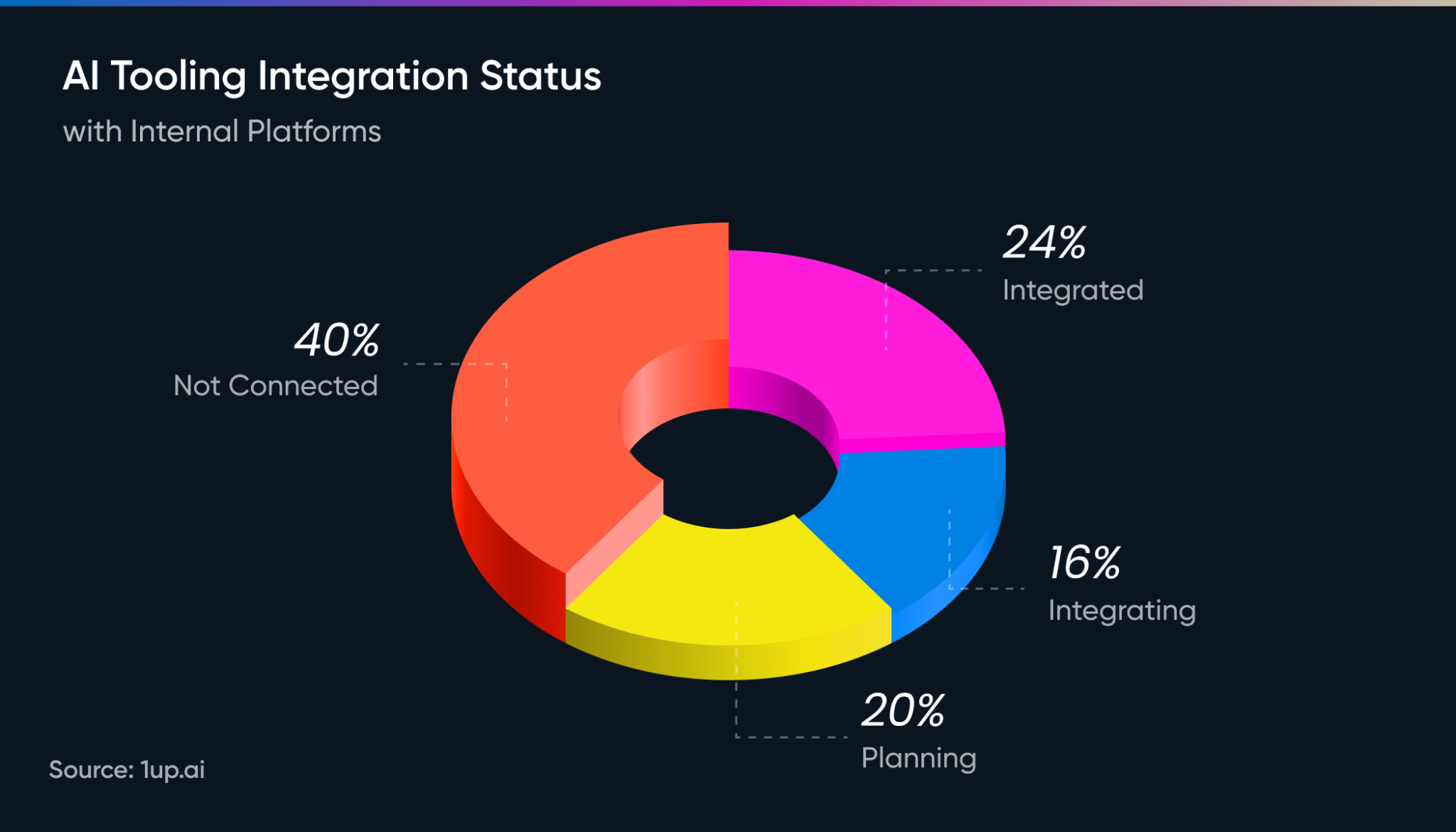
In 1up's research on AI usage across sales and presales, only 24% of respondents had their AI tools fully connected to internal systems, 40% had no connection at all.
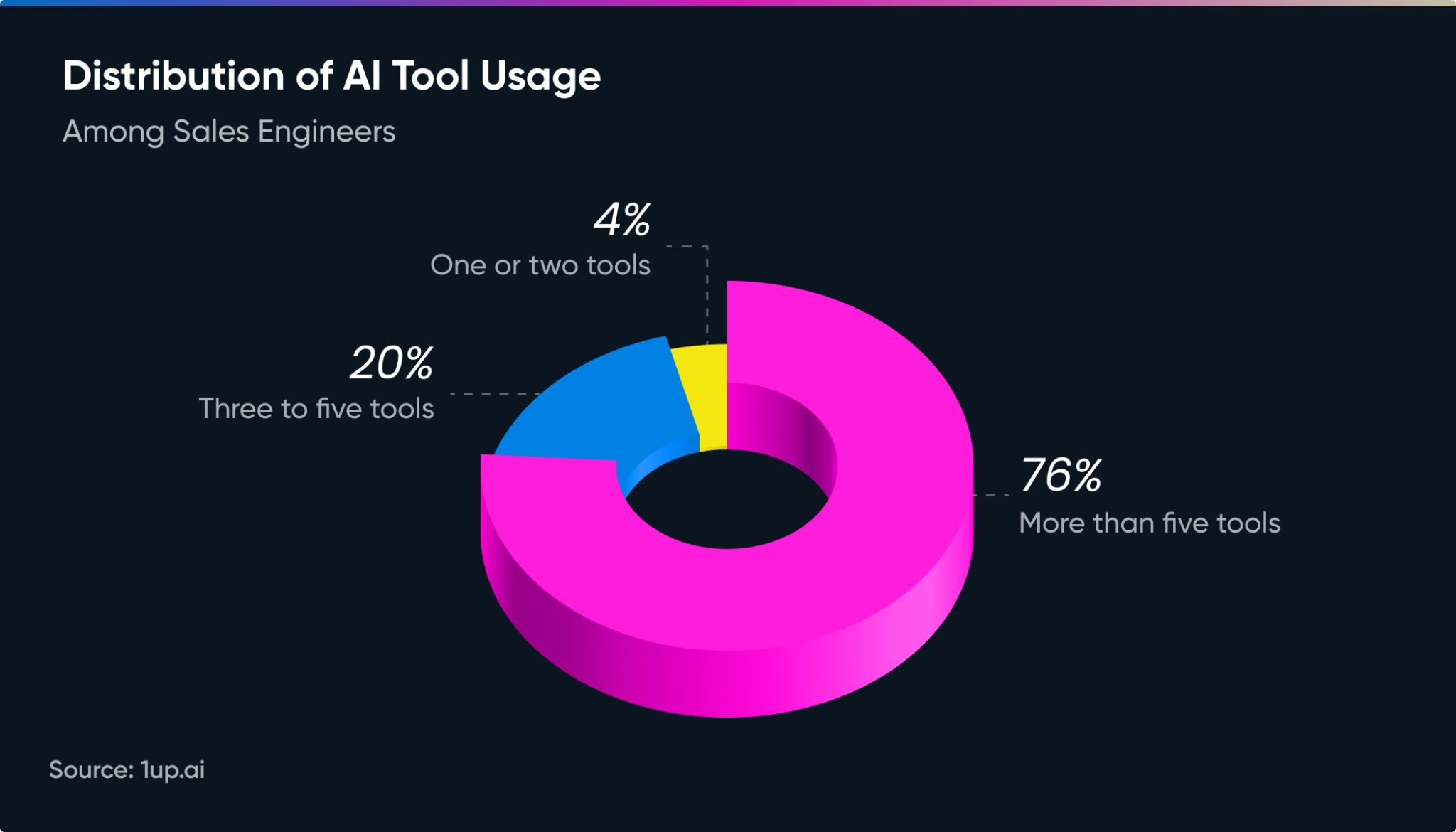
Additionally, 76% were juggling more than five tools day to day. Middleware can bridge a real gap, so count the layers before you add one.
Ultimately, organizations should select an integration path based on their specific security, maintenance, and technical requirements.
How permissions work, and why scope size matters
OAuth is the standard for major CRMs. Instead of sharing passwords, admins approve specific scopes that define exact access limits. Salesforce gives admins control over which profiles can use an app, IP restrictions, and refresh token behavior. Reviewing Salesforce guidance on managing OAuth access policies during setup helps ensure policies are configured correctly from the start.
A key architectural decision is whether the AI connects via a single shared service account or requires each user to authenticate individually.
Per-user authentication ensures the AI only accesses records the user is authorized to see in the CRM. Conversely, a shared service account bypasses CRM record visibility rules once data leaves the system, introducing security risks. Organizations with territory splits, regional data restrictions, or sensitive pipeline fields should require per-user authentication.
Scope size also directly impacts security approval timelines. Requesting full read access to all CRM objects prolongs review processes, whereas requesting only the essential permissions required for specific functions enables much faster approval.
What connecting 1up to Salesforce gives a sales team
1up links questionnaires directly to Salesforce opportunities, and the value shows up in a few places at once.
Deal context stops living in someone's head. When a security questionnaire is attached to the opportunity it belongs to, anyone picking up that deal later can see what was asked, what was answered, and when. No Slack archaeology, no forwarding a spreadsheet to the new AE.
RevOps gets numbers that did not exist before. Which deals required a security review. How much time questionnaire work added to the cycle. Whether compliance-heavy deals close at a different rate than the rest of the pipeline. Those questions were guesswork until the work and the record were tied together.
Reps stop rebuilding the same answers. A question answered on one deal is available on the next, which matters most for teams fielding the same 40 security questions from every enterprise buyer.
Security review gets easier, too. The connection uses a standard Salesforce connected app with OAuth, so your admin approves it through the same process used for every other tool. There is no mirror of your pipeline sitting on a vendor server, which removes the objection that stalls a lot of these conversations. Here’s how:
The bigger payoff is compounding. Every linked questionnaire adds to a record you can search, report on, and hand off, and that record gets more useful the longer the team uses it.
Why your CRM is the wrong place to look for answer knowledge
Expecting strong product or security answers directly out of your CRM is a common mistake that leads to poor AI results.
Your CRM excels at deal context like tracking customer identities, opportunity stages, call participants, and meeting notes. That information is invaluable for pipeline management and prep, but it stops there.
Your CRM does not store technical details like encryption protocols, data retention policies, SLA commitments, subprocessor lists, or approved SSO responses. That critical information lives scattered across Confluence, SharePoint, Google Drive, and local documentation.
To deliver accurate, actionable outputs, AI tools need both halves of the picture. Connecting internal knowledge repositories alongside your CRM ensures your team gets precise technical answers wrapped in relevant deal context. Learn more about how these internal knowledge sources fit together.
Furthermore, CRM data quality decays quickly. Outdated close dates or inconsistent custom field definitions (like Deal_Health__c) degrade AI performance. Cleaning key fields and integrating dedicated knowledge repositories before rollout prevents poor outputs and ensures long-term adoption.
What setup actually looks like, and where the time really goes
The technical setup is straightforward and follows a simple sequence:
- Authorize the connection: Build a private app in HubSpot (see HubSpot's private apps documentation) or install the vendor's connected app in Salesforce.
- Define scope: Confirm the specific records and fields the tool can access.
- Pilot test: Test performance on a limited sample set (e.g., ten accounts).
- Initial rollout: Deploy to a small group of reps working live deals for two weeks.
- Expand permissions: Enable write access later, if required.
While technical installation takes hours, the surrounding administrative process takes weeks. Creating a HubSpot private app can happen in an afternoon, but getting a Salesforce connected app approved through enterprise change control involves ticket queues, calendar bottlenecks, and vendor security questionnaires.
To prevent delays, plan for the security review early. Request the vendor's SOC 2 report, subprocessor list, and data handling documentation on day one rather than day thirty.
Questions worth asking before you approve any connection
Asking these questions early helps establish clear boundaries and prevents security bottlenecks later.
- Data access: Which objects and fields does the tool read, and can that scope be restricted?
- Write permissions: Does it modify records, and can write access be toggled off entirely?
- Authentication model: Does each user authenticate individually, or does everyone share a single service account?
- Data retention: Is CRM data stored on the vendor’s servers, and for how long?
- Offboarding: What happens to your cached data when the contract terminates?
- Environment testing: Can the integration be validated in a sandbox prior to production?
- Internal ownership: Who owns and maintains this connection when the implementing admin leaves?
Internal ownership is routinely ignored until an unmaintained connection breaks the moment its creator departs.
A vendor’s speed and clarity in answering these questions is a direct litmus test of their maturity. Mature vendors answer immediately on the call because permission boundaries are fundamental to their design. Less mature providers defer, route questions to engineering queues, or offer vague assurances. How a vendor handles security and permission architecture inevitably reflects how thoughtfully their product will perform on live deals.
Start narrow, prove value, then scale
Technical setup is straightforward. What determines long-term adoption is how you handle access and rollouts early on.
Start read-only or with record-linking to minimize security friction. Use per-user OAuth so CRM permission rules stay intact. Pilot with a small cohort on real deals before going wide, and connect internal knowledge bases alongside the CRM so reps get complete answers. Crucially, designate a single internal owner to maintain the integration over time.
FAQs
Only if you grant write access. Many integrations, including 1up's Salesforce connection, are built around linking and reading rather than modifying records. Write access is a separate permission an admin approves, and it can be limited or turned off.
Often yes. A user can start the authorization, but Salesforce orgs commonly require an admin to install and approve the connected app before anyone can use it. Loop your admin in at the start instead of hitting the wall mid-setup.
Salesforce and HubSpot have the widest support, since both have mature APIs and app marketplaces. Pipedrive, Microsoft Dynamics, and Zoho come next. If your CRM is not natively supported, middleware can often bridge the gap.
That depends on the authentication model. With per-user OAuth, the tool inherits each person's existing CRM permissions. With a shared service account, it can reach whatever that account can reach, so ask which model the vendor uses before you approve anything.
.png)
AI Made Writing Code Free and Moved the Bottleneck to Code Review

Shadow AI: What Your Reps Are Pasting Into ChatGPT Right Now

How to Write an RFP Response That Survives AI Scoring

SIG vs CAIQ vs VSA: A Simple Guide to the Big Three

Why Most Internal AI Assistants Get Built and Then Abandoned