The rollout goes fine. A dozen people try it the first week, two of them say it's impressive, and the launch announcement collects a pile of emoji. Six weeks later three people are using it, and one of them is the person who set it up. Nothing broke. The internal company AI still runs, still returns answers, still cites its sources. It just stopped being part of how anyone gets work done.
This is how most of these projects end, and it almost never gets diagnosed, because it does not look like a failure. There is no outage. No angry ticket. No vendor to fire. Usage drifts toward zero while the subscription renews.
Abandonment does not announce itself
The usage curve is predictable enough to sketch from memory. Week one is a spike, driven by curiosity. Week two is about half of that. By week six, daily active users have collapsed to the small group who were going to use it no matter what, usually the person who championed it and a couple of new hires who do not yet have anyone to ask.
Leadership rarely sees this. The dashboard they get shows seats provisioned, or total questions answered since launch, and both of those numbers only go up. A tool can be completely dead and still post a rising cumulative total.
The industry numbers point the same direction. Gartner predicted that at least 30 percent of generative AI projects would be abandoned after proof of concept, pointing at data quality, unclear business value, and cost.
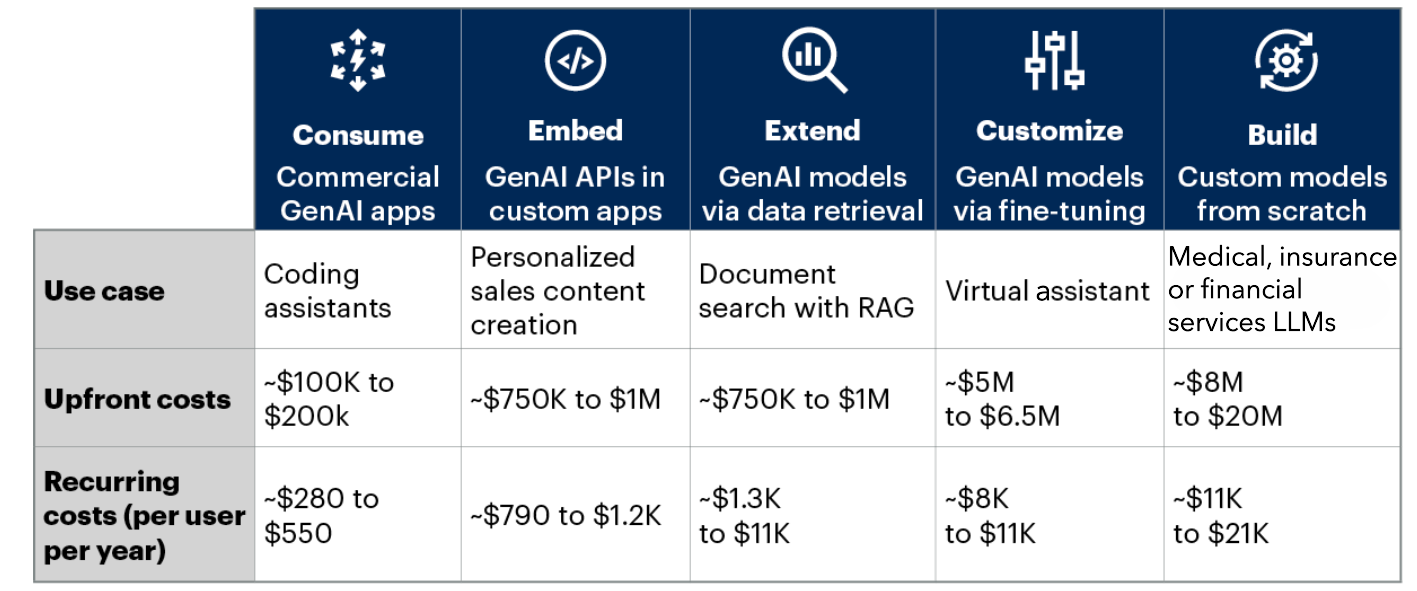
Those are the reasons a project gets cancelled in a budget meeting. They are not the reason a rep stops opening the tool. That reason is smaller and more human, and it happens weeks earlier.
The real competitor is the coworker who answers in four minutes
Most teams build the assistant to replace searching. That framing is wrong from the start, because almost nobody was searching. They were asking a person.
A rep who needs to know whether the platform supports SCIM provisioning has two options. Type it into the assistant, or drop it in the sales engineering channel. The second option feels free. It takes eight seconds, the answer usually arrives inside ten minutes, and it comes from someone whose name the rep recognizes. That last part matters more than speed. A named human is accountable in a way a tool is not.
The cost of that habit is real, it just lands on someone else. The solutions engineer loses forty minutes of deep work. The same question gets asked again by a different rep next month, and answered slightly differently. None of that shows up in the asker's day, so none of it changes the asker's behavior.
So the assistant is not being graded against a broken search bar. It is being graded against a colleague who is reliable, fast, and free to the person asking. Beating that takes more than a working retrieval pipeline. It takes an answer that arrives faster than the human would have replied, in a form the rep can paste into a customer email without rewriting it, from a source they recognize as the real one.
Miss any of the three and the old habit wins, because the old habit was never that painful to begin with.

Mistake one: rolling out before coverage is there
Most assistants launch at partial coverage. The knowledge base has the product docs and the security policies loaded, and the team figures the rest will fill in once people start using it and flag gaps.
That plan has a flaw. The gaps get discovered by users, and users only give you a few tries.
Think about what a first week looks like at 40 percent coverage. A rep asks four questions. Two come back solid. One comes back thin. One comes back wrong or empty. From the rep's side, that is a coin flip, and a coin flip is worse than useless for something they need to be sure about.
They are not going to run a second experiment next week. They already ran it.
This is where the priority order most teams assume turns out to be backwards. In our State of AI in Knowledge Management report, respondents ranked accuracy first among the qualities that matter in an AI knowledge assistant, then transparency, then ease of use. Speed came in last. People will wait for an answer they can trust. They will not come back for a fast answer they have to verify.
.jpg)
Which means the sequencing on most rollouts is upside down. Coverage is not something you build after launch with real usage data. Coverage is the thing that buys you a launch at all.
A more useful approach is to work backwards from actual demand. Pull the last hundred questions your team asked each other in Slack. Not hypothetical questions, the real ones, in the words people used. Load the assistant, run all hundred, and read the outputs yourself. If it cannot handle the top fifty cleanly, you do not have a launch. You have a beta with an audience of one.
Mistake two: putting it somewhere people have to go
The second failure is location. The assistant gets a web app, a login, and a link in the onboarding doc. Now getting an answer requires leaving the tab you are in, remembering the tool exists, remembering the URL, and signing in.
Every one of those steps is a place to fall out. And the alternative, typing in the Slack window already open on the second monitor, has none of them.
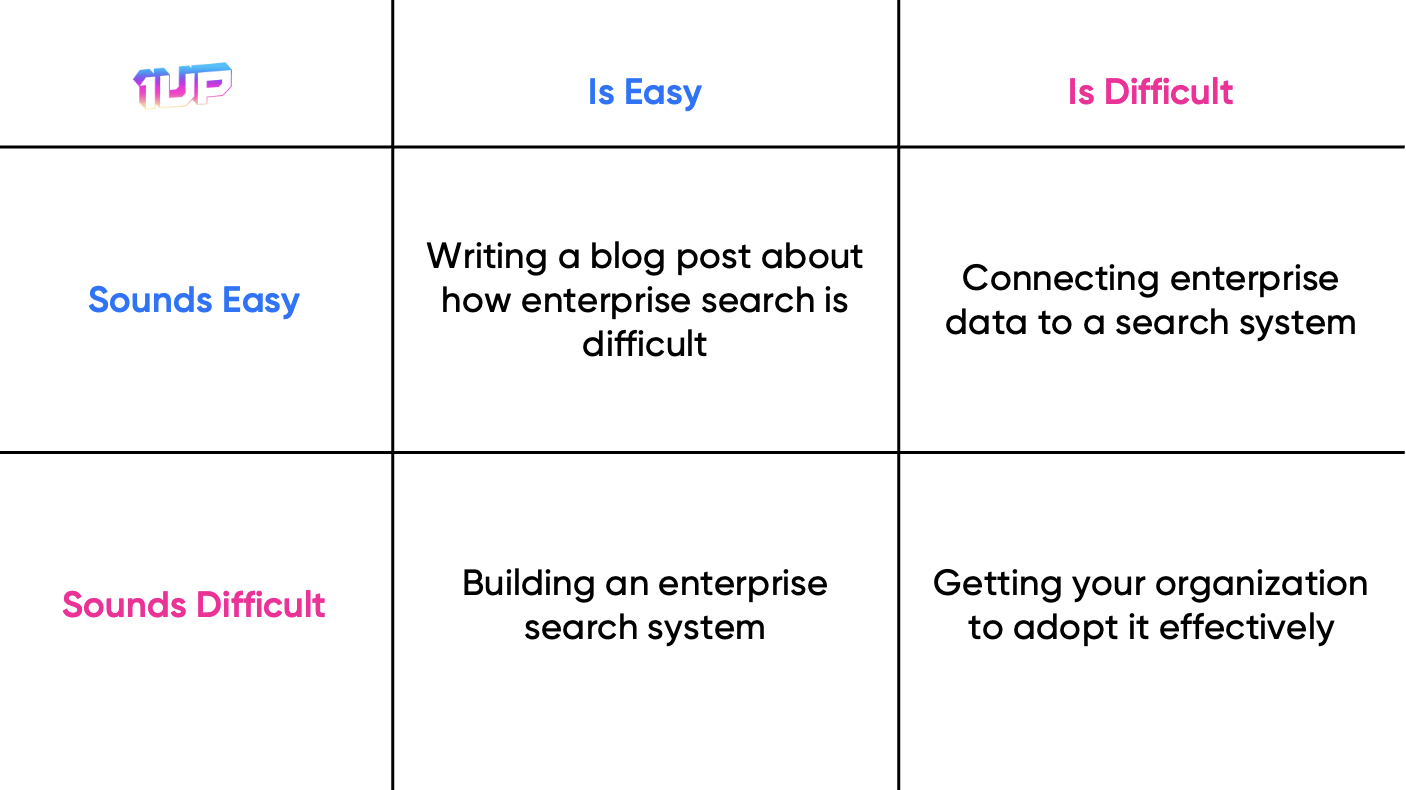
There is a reason enterprise search remains difficult even at companies that invest heavily in it. Information lives in one place and work happens in another, and the gap between them never closes on its own. A separate destination for answers just adds one more place to check.
The fix is unglamorous. The assistant belongs in Slack, Teams, or Google Chat, where the question was going to be asked anyway. It belongs in the browser, so a rep filling out a portal questionnaire can pull an approved answer without switching tabs.
The goal is that using the assistant takes fewer keystrokes than tagging a colleague, because that is the actual comparison being made, dozens of times a week, mostly without conscious thought.
Teams that skip this step often blame adoption on culture. The tool was fine, people just did not change their habits. But nobody was asked to change a habit. They were asked to add a step.
Mistake three: nobody owns it, so wrong answers stay wrong
This is the moment that kills more assistants than any other. A rep spots a wrong answer, mentions it in a channel, and then nothing happens.
Two weeks later the same wrong answer is still there. Now the rep has learned something durable about the tool, and it has nothing to do with accuracy. They have learned that nobody is home.
The 1up survey found this gap is close to universal. Most organizations have no formal owner for their AI knowledge system. Responsibility gets shared across teams or handled informally, which in practice means it is handled by whoever has spare time, which means nobody. And 97 percent of respondents said human curation and governance remain very or critically important, which is a striking pair of findings to sit next to each other. Almost everyone agrees a person needs to be accountable. Almost nobody has named that person.
.jpg)
This is why the AI answer engineer role has started showing up on org charts. Not as a title for its own sake, but because someone has to hold the pager for accuracy. That person decides which source wins when two documents disagree, retires the old version instead of leaving both connected, routes questions to the subject matter expert who can settle them, and closes the loop back to whoever reported the problem.
The ownership does not have to be a full time job. It has to be a named person with a fixed slot on their calendar. Thirty minutes a week is enough at most companies, provided the thirty minutes actually happens.
Mistake four: corrections that nobody sees land
Even where corrections do get made, users often have no way of knowing.
A rep flags a bad answer. The knowledge owner fixes the underlying document that same afternoon. The rep never finds out. From where they sit, reporting the problem went into a void, so they do not report the next one. They just stop asking the assistant that category of question and route around it. The assistant's real coverage shrinks while its measured coverage looks stable, because the questions it fails are no longer being asked.
Trust is built on visible cause and effect. A review of human-AI interaction design standards published on arXiv pulls together the guidance the major platform teams have converged on, and two rules keep showing up. Tell users how their input changes what the system does next. Show the result of a correction right away rather than later. A correction that lands silently is indistinguishable from a correction that was ignored.
So close the loop out loud. Reply to the person who flagged it. Post the fixes in the channel where the assistant lives, weekly, in plain language. Five lines is plenty. People who see their feedback change the tool will keep giving feedback, and feedback is the only mechanism that grows coverage after launch.
Some of this can be handled by the tool rather than by memory. In 1up, any answer can be assigned to a teammate for review, with a due date and a note explaining what needs checking.
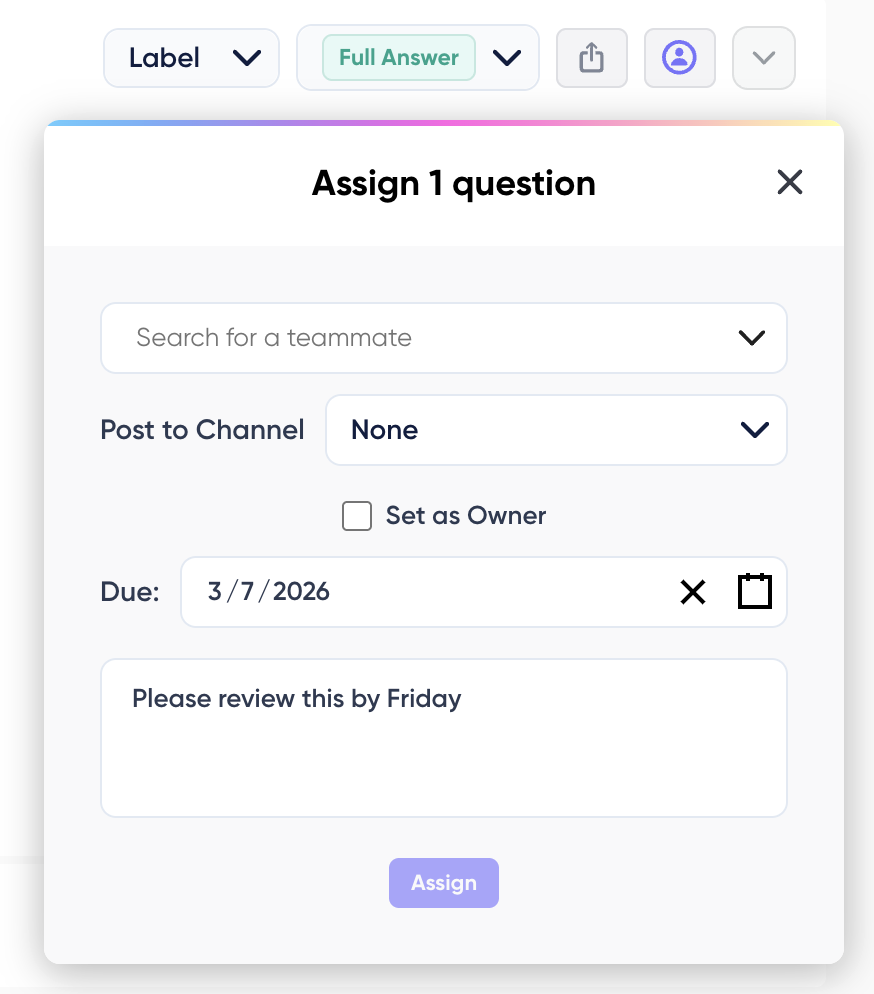
The assignee gets a notification by email or through Slack, Teams, or Google Chat, and the question switches to Under Review on its own. That single step turns a flagged answer into something with a name and a date attached to it. The person who raised the problem can see it moved, and the comment stream gives both people somewhere to talk it through without leaving the answer.
Pair that with a weekly note in the channel and the loop is fully visible from both ends. People who see their feedback change the tool will keep giving feedback, and feedback is the only mechanism that grows coverage after launch.
The numbers that actually predict survival
Most adoption dashboards measure the launch. Seats. Cumulative questions. Total documents connected. All three go up forever and none of them tell you whether the thing is alive.
Four numbers are worth more than all of those combined.
- Weekly repeat askers
How many people asked at least one question in each of the last two weeks. This is the real adoption number, because it counts habit rather than curiosity. Watch it weekly from launch and you will see abandonment start around week three, while you can still do something about it.
- Answer rate
What share of questions returned something usable, as judged by a person reading a sample, not by whether the system produced text. Systems almost always produce text. That is the problem.
- Correction rate over time
How often answers need fixing. The absolute number matters less than the direction. A rate that falls month over month is the only honest proof the knowledge base is improving.
- Slack question volume for the same topics
The one everybody forgets. If reps are still asking humans the same questions the assistant is supposed to cover, the assistant is not being used regardless of what its own logs say.
Where to find these numbers
The four metrics above only work if your tool actually reports them. Plenty of dashboards stop at volume. 1up's reporting and analytics splits the picture across two views, and together they cover all four.
The usage summary is the volume and habit view.
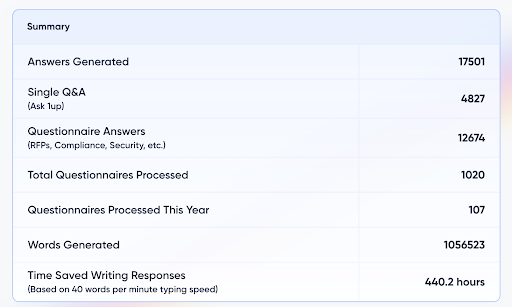
The valuable detail is the split between the two answer types. Single Q&A counts someone typing a one-off question, which is the exact behavior that would otherwise have been a Slack message to a colleague. Questionnaire answers count bulk document work. Those describe two different habits, and watching them separately tells you whether people reach for the assistant when a question pops into their head or only when a document lands on their desk. A single Q&A number that climbs steadily past week six is the strongest sign the habit took hold.
The usage by user breakdown underneath gives you the per-person view, showing answers received and questionnaires handled for each teammate. Comparing that list across two consecutive weeks gets you the repeat asker count directly.
The second view covers answer quality.
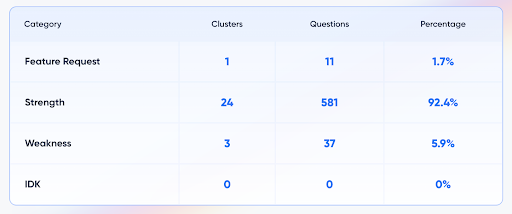
KB Insights samples recent answers, groups them into topic clusters, and sorts each cluster into four buckets. Strengths are questions answered well from existing sources with little or no editing. Weaknesses are questions where an answer came back but needed real work, usually because the documentation behind it was thin. IDKs are questions where the assistant said it did not know, which points at information missing from the knowledge base. Feature requests are topics people keep asking about that the sources do not yet cover well.
Those four buckets map onto the metrics above almost exactly. The strength percentage is your answer rate. The weakness percentage tracked month over month is your correction rate, and a falling number in that column is clear evidence the knowledge base is getting better. IDKs are your coverage gaps, and each one is a documented case of someone asking for something nobody had written down yet, which makes that list the best content backlog in the company.
The snapshot above shows what a healthy knowledge base looks like. Strengths above 90 percent means the large majority of answers land without heavy editing, and no IDKs in the sample means the assistant had the sources it needed for every question it received.
KB Insights also ranks most used and least used sources, which turns cleanup into a short list instead of a guessing game. The least used view surfaces the outdated and duplicate files that are worth retiring, and that is the same maintenance work the ownership section calls for.
One more view worth watching after launch is messaging platform usage, which breaks adoption out by web app, Slack, Teams, Google Chat, and browser extension. That is the direct test of the placement point from earlier. Watching Slack and browser numbers grow is how you confirm the assistant reached people where they already work.
Restarting an AI assistant that has already been abandoned
Plenty of teams reading this already have a dead assistant sitting in their stack. The instinct is to relaunch it with a new announcement. That rarely works, because the people you are announcing to already formed an opinion, and second impressions are much harder to move than first ones.
A better sequence is to fix it out of sight, then prove it in public.
Start by pulling every question the assistant failed while it was live. Those logs are the most valuable content inventory in the company, because each entry is a documented gap someone cared enough to hit. Fix the top thirty. Name an owner. Move the assistant into Slack or the browser if it was living in its own app.
Then skip the relaunch. Pick the three people who complained loudest, hand them the fixed version, and ask them to try to break it. Skeptics who change their mind are worth more than any announcement, because the rest of the team already watched them be right the first time.
Adoption is the work, not the finish line
Building AI has now become a commodity, but driving adoption is the real challenge. Convincing busy people to change their habits requires persistent, unglamorous work: curating data, resolving conflicts, and proving your value. If you treat launch day as the finish line, your tool will be forgotten. If you treat it as Day One of operations, you’ll build an asset that grows smarter every quarter.
FAQs
Most stop because of what happened in the first two weeks, not because the tool broke. A few early answers came back thin, wrong, or empty, and that was enough to teach them the assistant was not worth trying. Once someone decides a tool is unreliable, they rarely test that opinion again. They go back to asking a coworker, which was never that painful in the first place.
The more useful measure is weekly repeat askers, meaning people who asked at least one question in each of the last two weeks. Total questions and seats provisioned both climb forever, even after everyone has stopped using the tool. A healthy assistant holds a steady or growing repeat number past week six. A dying one peaks in week one and flattens by week three.
Coverage is better judged by real questions than by percentage of documents connected. Pull the last hundred questions your team asked each other in Slack, run them through the assistant, and read the answers yourself. If the top fifty do not come back clean, the rollout is early. Launching at partial coverage spends your one shot at a first impression on a coin flip.

.png)
AI Made Writing Code Free and Moved the Bottleneck to Code Review
The Payoff of Connecting Questionnaire work to your Sales Pipeline
Shadow AI: What Your Reps Are Pasting Into ChatGPT Right Now

How to Write an RFP Response That Survives AI Scoring
SIG vs CAIQ vs VSA: A Simple Guide to the Big Three