A deal is close to the finish line. Then the buyer's security team sends over a data room request and a stack of due diligence questionnaires. Suddenly a bunch of people are on the hook. Your sales rep wants to keep the momentum going. Your compliance lead is already buried in other reviews. And your VP just wants the thing to close before the quarter ends. You already have a data room, packed full from the last audit, so you open it to point everyone in the right direction, and you freeze. Hundreds of files. You cannot find the one answer any faster than the buyer can.
So they give up on the room and email you instead. Now the deal is stuck waiting on manual answers, which is the exact thing the data room was supposed to prevent.
The problem is not that your data room is missing files. It is that a pile of files cannot answer a question. This guide walks through how to build a data room with AI, so the room does the answering for you. Everybody involved in diligence wants the same thing from a different angle. Sales wants speed so the deal does not stall. IT and compliance want control and accuracy so nothing wrong goes out the door. Leadership wants the deal closed without adding risk. A plain data room gives none of them that. A data room built with AI can.
The good news is you do not need to start over. You can build one on top of the documents you already have.
What a good data room actually does
A regular data room is storage. You drop in files, share a login, and hope the other person finds what they need. Most of the time they do not.
Building a data room with AI adds a layer on top of those same files. It reads your approved content and answers questions in plain language, so a buyer can type "what is your data retention policy" and get a real answer in seconds, with a link to the source. No folder digging. No waiting on a human.
This is a real step up from the trust centers most companies already run. A lot of those are static libraries with a search bar that barely works. Buyers land on them, strike out, and file a request anyway, which lands right back on your compliance team's plate.
A good AI data room does a few things a folder never could. It answers from sources you have approved, it loops in a real human the moment one is needed, and it runs around the clock so deals keep moving without pulling anyone off their real work. That mix is what sales and leadership care about most, and it is what IT and compliance can actually trust.
Finding the right answer is the problem
The problem is almost never that people ignore your data room. They open it. They just cannot get what they came for once they are inside. A few reasons show up over and over, and each one hits a different part of your team.
The content is stale. You loaded it up for one moment, maybe a SOC 2 audit, and then everyone moved on. Six months later half of it is out of date, which is a nightmare for compliance because now there is a real risk of sending a buyer something inaccurate.
The structure only makes sense to the person who built it. Your folders match how you think. The reviewer thinks differently, wanders around, and gives up. So your sales rep has to step in and play tour guide, which kills their momentum on the deal.
And the big one. You cannot ask it anything. A filing cabinet does not answer questions. So the reviewer emails your team, and your IT and security experts lose another afternoon to questions they have answered fifty times before. Meanwhile leadership watches a deal that should have closed sit in limbo over a security review.
Building the room with AI fixes all three at once.
How to build your data room with AI, step by step
You can set the whole thing up using 1up's Answer Hub. It is where you connect your approved documents, brand the room to match your site, choose what is public versus gated, and publish it all as one link to send to buyers. The AI does the answering, you keep control of what goes in, and most teams have it live in an afternoon. Here are the steps.
Step 1: Choose your knowledge sources
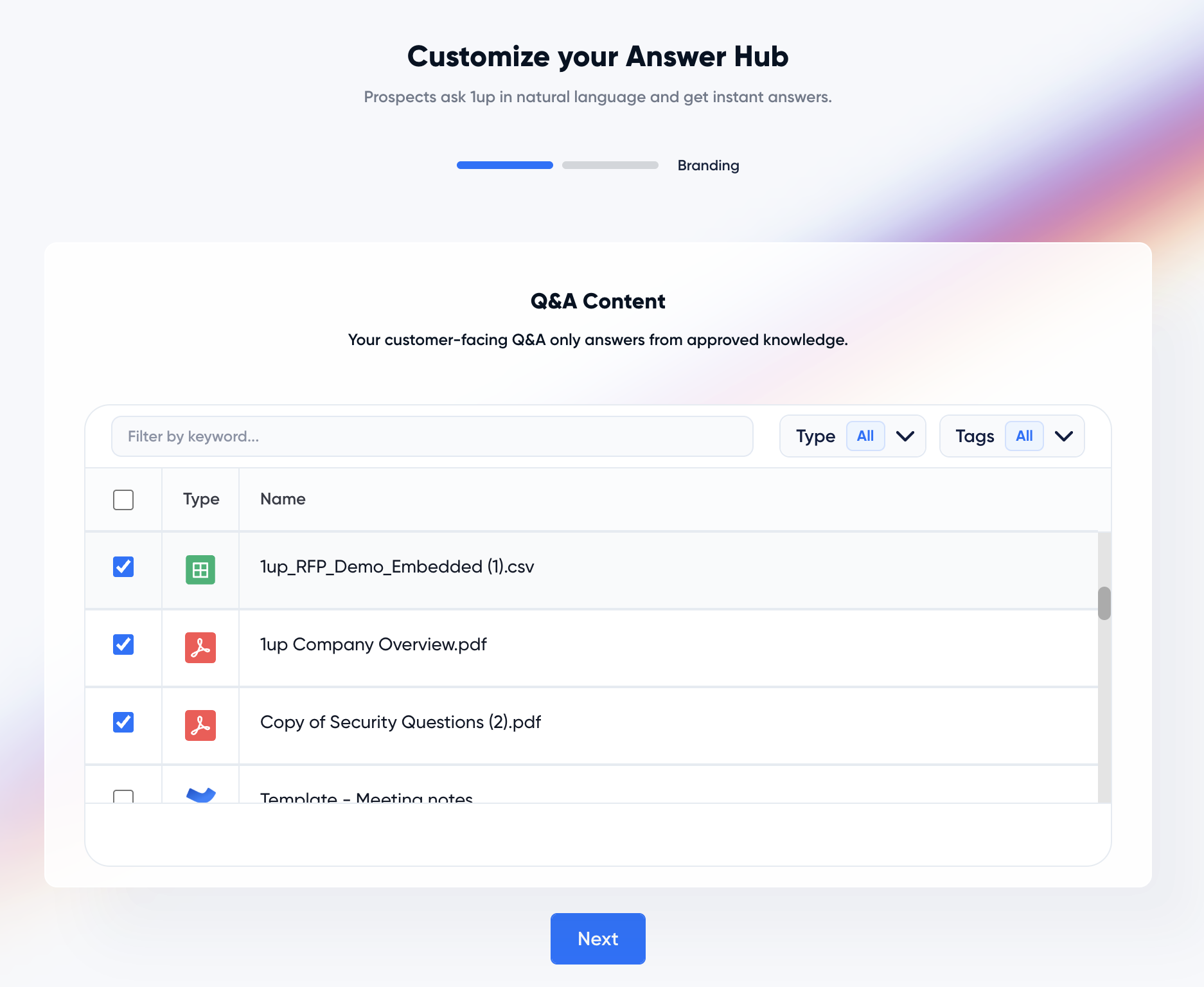
Open Answer Hub from the left-hand menu and follow the onboarding steps. Pick at least one file or URL from your Knowledge Base to power the Hub. You can also point it at your Approved Answer Library, which is the set of answers your team has already vetted inside 1up.
This step matters most, so it is worth doing right. The more good content you connect, like product docs, security policies, past DDQs, and completed RFPs, the better your answers will be. The AI only uses the sources you give it. It does not make things up or pull from the open internet. That last part is what wins over IT and compliance, since the AI physically cannot go off-script and invent an answer.
Step 2: Add your logo and branding
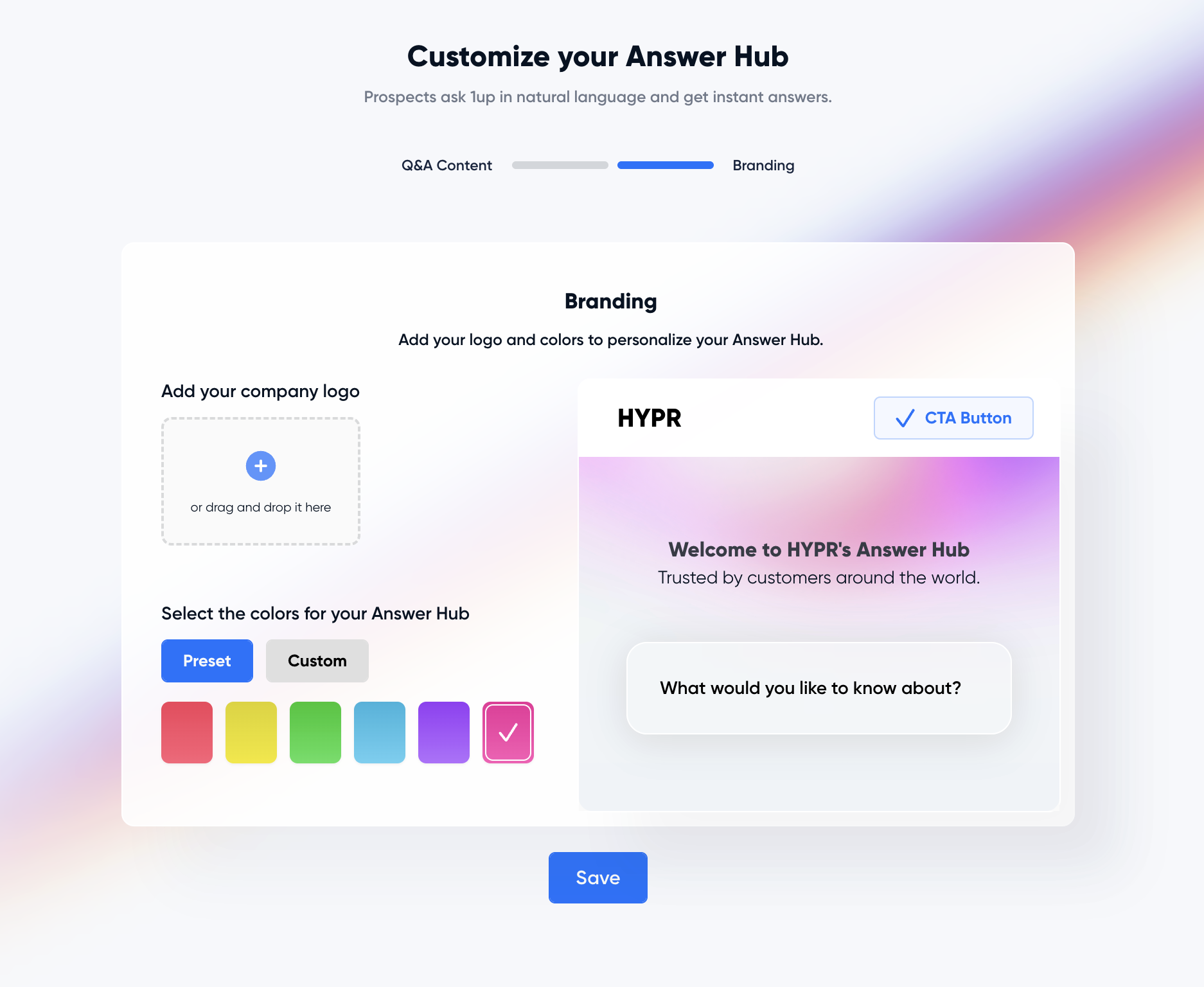
Upload your company logo and apply your brand settings. Once you do, a live preview of your data room shows up in the 1up dashboard. From that preview screen you can manage your content and admin settings in one place.
Step 3: Define your admins and approvers
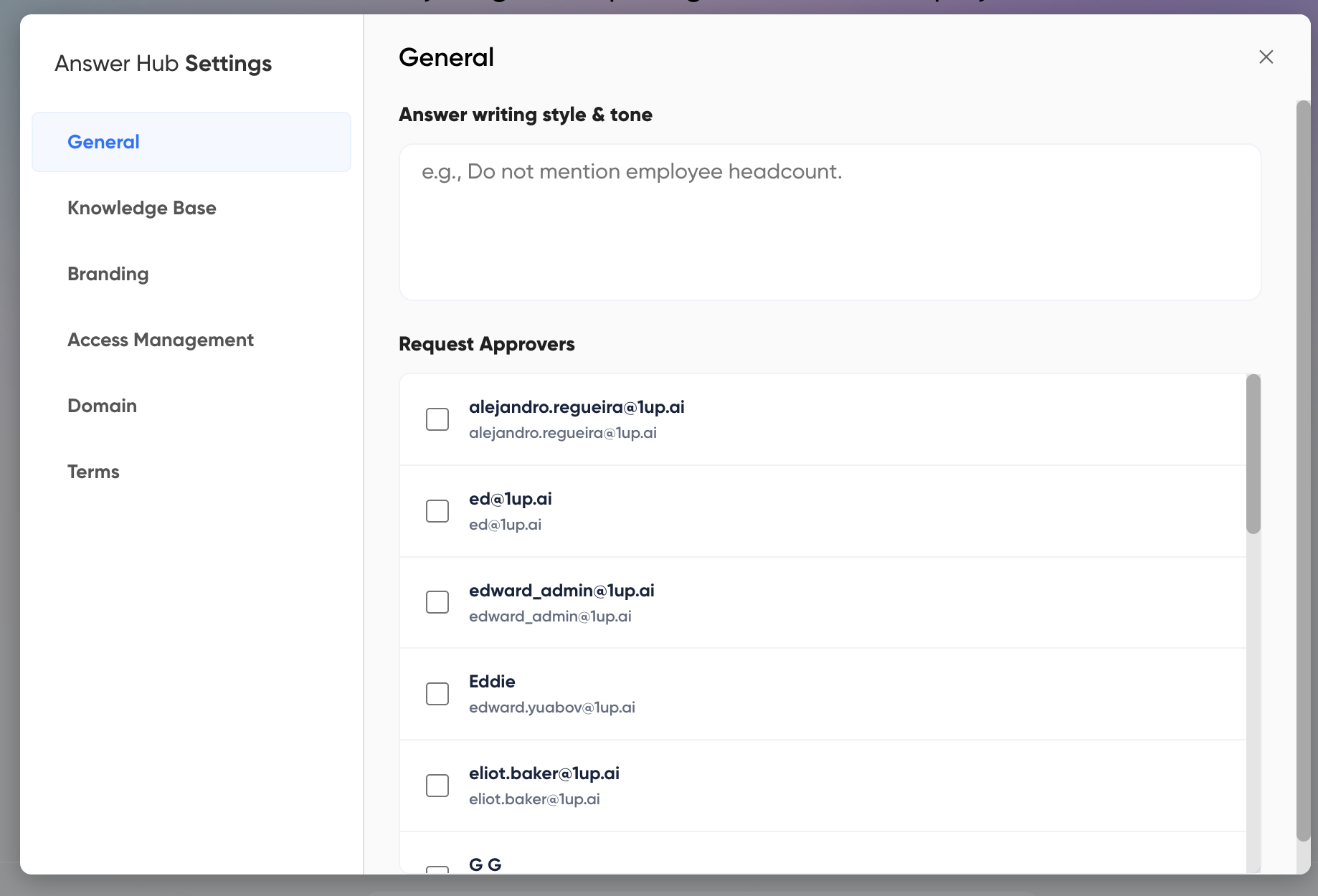
Open the Settings modal to configure the Hub. Here you can add section titles and intro text, which control the layout and the tone buyers see when they land. You also pick your Request Approver. That is the person, or people, who review requests to see your gated content. This same screen is where you add or remove the external users who get into your Hub. For compliance, this is the control they have been asking for. Nothing sensitive moves without a named person signing off.
Step 4: Set up a custom domain
You can host your data room on your own domain, something like trust.yourcompany.com, so it feels like a natural part of your site. To do it, generate the DNS records inside 1up and hand them to your IT team to finish setup. Once that is done, your Hub lives at your own URL, which makes it something sales is proud to send instead of a clunky third-party portal.
.png)
Step 5: Add your Terms of Service
Upload your own Terms of Service. This is what buyers see and agree to before they get into your data room, so your legal team will want a say here.
.png)
Step 6: Build your downloads section
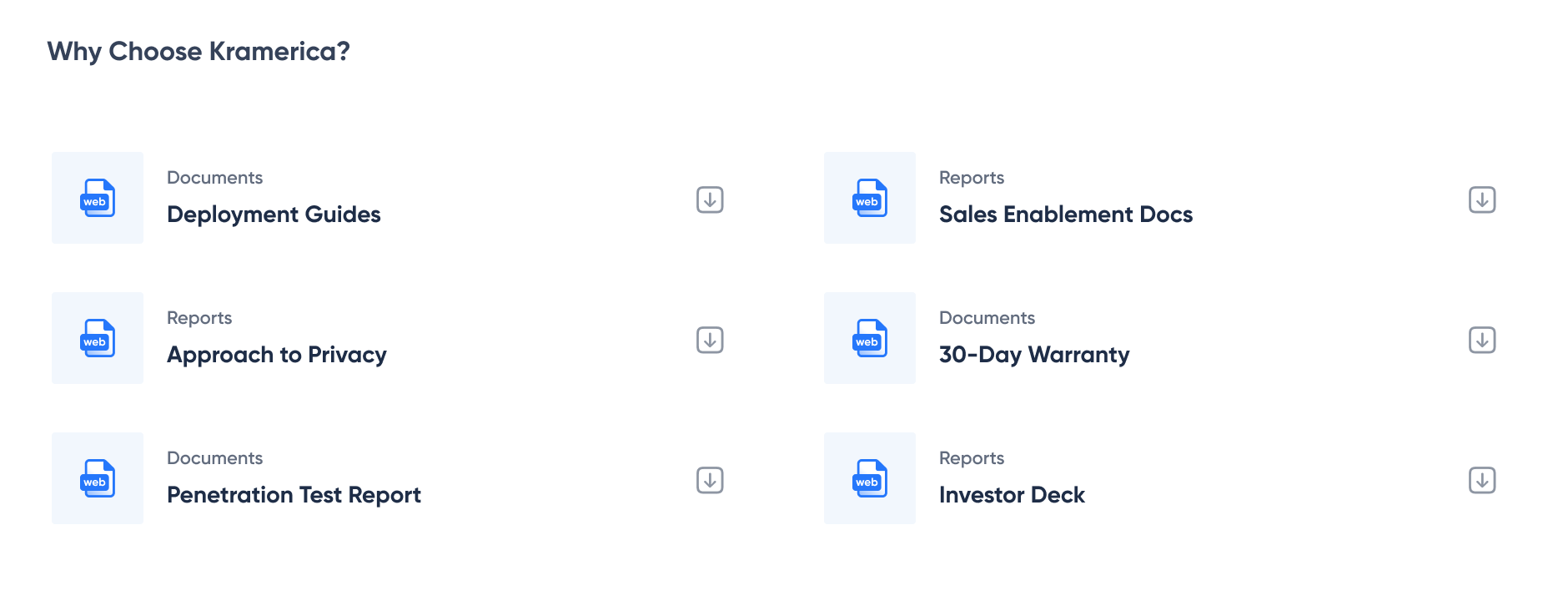
This is where the data room part really comes together. You can add two kinds of files.
Public Resources are open to anyone. Think sales decks, one-pagers, and other collateral that helps move a deal forward. This is a gift to sales, since buyers can grab what they need without a single email.
Gated Resources are the sensitive stuff, like legal docs, security reports, and compliance materials. Buyers request access, and your admin approves it. So your SOC 2 report is available, but only to the people you actually clear. Sales gets to share it fast, and compliance keeps the gate.
Step 7: Add certifications and customer logos
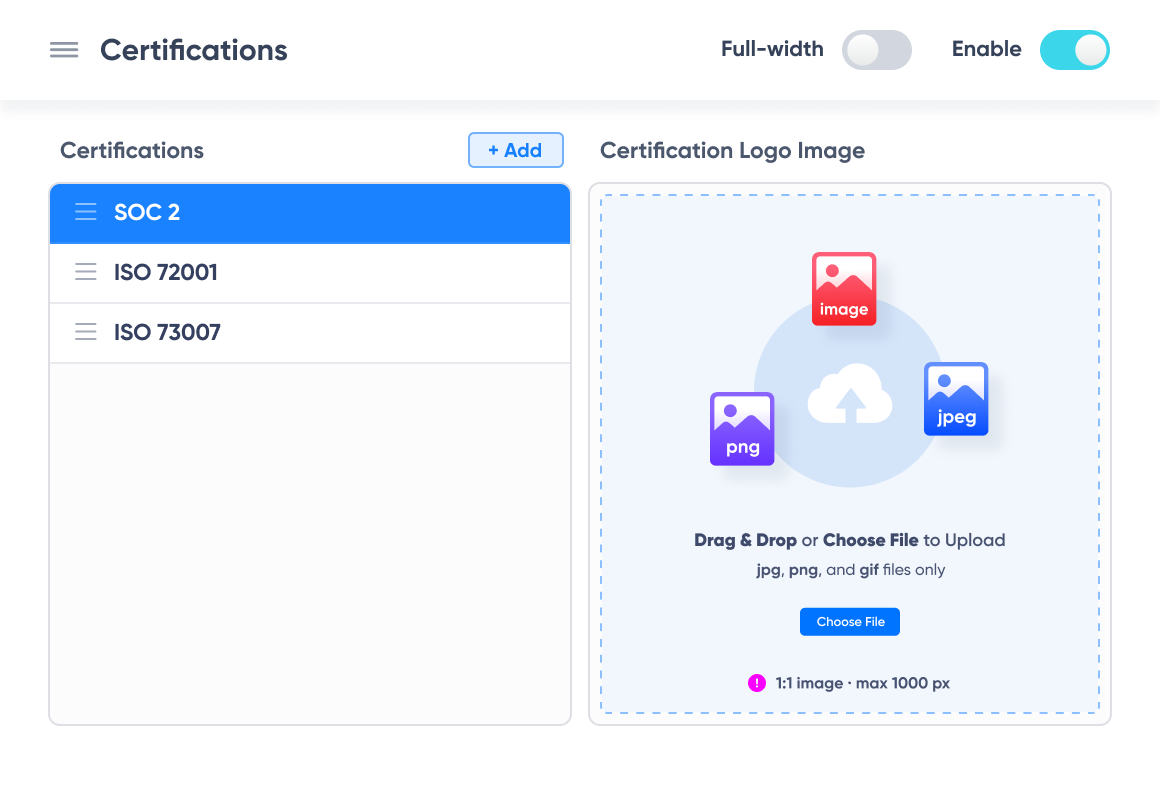
Under Badges, show off the certifications you have earned, like SOC 2, ISO 27001, or FedRAMP. A buyer's security team looks for these first, so putting them front and center speeds up the whole review. Add customer logos here too, which is quiet social proof that leadership loves, since it signals other serious companies already trust you.
Step 8: Publish and share
When the Hub looks right, hit Publish to generate a customer-facing link. Simply share to copy that link and send it to a prospect. That’s it. You now have a live data room powered by AI, and your reps can drop the link into an email, an RFP reply, or even their signature.
What makes an AI data room more than a folder
A few things separate this from an average data room, and each one maps to what your team actually wants.
Every answer comes from your approved library, so buyers see content you have vetted rather than random AI guesses. That is the accuracy IT and compliance need. If the Hub cannot answer something, the buyer taps once to bring in the right expert, so the AI handles the routine 90 percent while your team keeps control of the critical 10 percent that needs a person.
It also watches what people ask. The Hub logs every question, which gives your reps a clear read on what a buying committee cares about. If a question keeps coming up and your content cannot answer it, that is a signal to add a doc. Sales gets deal intelligence, and the room gets sharper the more you use it.
The security angle matters to everyone in the deal. These reviews line up with real frameworks, and the AICPA keeps the SOC standards that spell out what those controls should cover. An AI data room hands buyers that proof without a single manual reply, which is how a deal clears diligence in days instead of weeks.
Is your data safe in Answer Hub?
Short answer, yes, and this is the part IT will push hardest on. 1up is SOC 2 Type II compliant and was built by cybersecurity engineers. Your data is encrypted at rest and in transit, and it is never used to train any AI models or shared outside your workspace. You choose what goes in, and you can change or delete it whenever you want.
That control is the whole point. Your most sensitive security and compliance answers sit behind gated access, while the routine stuff stays out front doing the work for you.
See Answer Hub in action
The easiest way to get it is to see a real one. 1up runs a live data room at trust.1up.ai, so you can ask it questions the same way your buyers would and watch how it sources each answer.
This is the whole point in one moment. A question goes in, an accurate answer comes back in seconds from approved docs, and nobody has to dig through a folder or wait on a rep.
Get your diligence team out of your inbox
Your data room does not need more files. It needs a way to get people to the answer without going through your team. Build your data room with AI and everyone in the deal gets what they came for. Sales keeps the momentum, IT and compliance keep control and accuracy, and leadership gets the deal closed without taking on new risk. It takes an afternoon to set up, and once it is live, your buyers self-serve while your experts get their time back.
FAQs
It means adding an AI layer on top of your secure document space. Buyers ask questions in plain language and get accurate answers pulled from your approved files, with sources attached, instead of digging through folders. Answer Hub is 1up's version.
It lets buyers self-serve answers day and night, so deals do not stall waiting on a rep or an SME. Public sales assets are one click away, and the room even shows reps what the buying committee is asking about.
Every answer comes from your approved library, sensitive files sit behind gated access that a named approver signs off on, and 1up never uses your data to train AI models. The platform is SOC 2 Type II compliant with encryption at rest and in transit.
Most teams can build and publish a data room with AI in an afternoon, as long as the content you want to connect is ready. The stronger your knowledge base, the better the answers.

.png)
AI Made Writing Code Free and Moved the Bottleneck to Code Review
The Payoff of Connecting Questionnaire work to your Sales Pipeline

Shadow AI: What Your Reps Are Pasting Into ChatGPT Right Now

How to Write an RFP Response That Survives AI Scoring

SIG vs CAIQ vs VSA: A Simple Guide to the Big Three