Your Buyer Is in the Room and You're Not: 5 AI-Native Sales Rooms

Your buyer barely talks to you. Nothing personal. It’s simply how B2B buying works these days, with most of the journey spent in docs, group chats, and late-night comparison sessions you never see. So the digital sales room you hand them ends up doing a big share of the selling on its own. If your team runs on AI, that room should too, a shift we dug into in our guide to AI sales enablement. This piece is about the five rooms doing it best.
Most of the deal happens when you are not there
Gartner has found that B2B buyers spend only about 17% of their time meeting with suppliers at all. Split that across the two or three vendors they are weighing, and any single rep gets maybe 5% or 6% of their attention. A more recent Gartner survey found that most buyers now prefer a rep-free experience for big stretches of the process.
Sit with that for a second, because it changes what a sales room is for. The room is where your buyer goes at 9pm to re-read your pricing, forward a deck to their boss, and try to remember why you beat the other two options. You are not there in that moment. Your content is. Your answers are. Or they are not, and the deal cools without anyone saying so out loud.
So for an AI-native team, the real test of a sales room is pretty simple. Does the AI help the deal move when nobody is driving it? A room that only hands you a tidy engagement chart after the fact is fine. A room whose AI answers the buyer, drafts the next step, or warns you before a deal goes quiet is earning its keep.
What "AI-native" actually means
Almost every digital sales room says it has AI now. The word got cheap. A better way to cut through it is to ask what the AI changes.
Some AI just describes things. It summarizes a doc, recaps who clicked what, cleans up your meeting notes. Useful on a Tuesday, but it does not push the deal anywhere. Other AI does things. It writes the follow-up. It answers a buyer's question inside the room while you are asleep. It maps the buying committee and points at the account that has gone silent. That second kind is what you are really paying for.
Here is a quick gut check when a tool waves the AI flag around:
- Does it create? Drafts follow-ups, business cases, and recaps from real deal context, not a blank text box.
- Does it answer? Gives buyers a real reply from your content when no rep is around.
- Does it read the deal? Tracks engagement, maps stakeholders, and flags risk early.
And there is one more thing most buyers of these tools forget to ask. Where do the AI's answers come from? This is the most important factor. Gartner also found that 69% of B2B buyers have hit answers from a sales team that did not match what the company's own website said. Now picture an AI in your sales room confidently giving a buyer a wrong number about your security or your pricing. You just taught a stakeholder to doubt you, at the exact moment they were deciding whether to trust you. So with any buyer-facing AI, do not only ask whether it can answer. Ask what it is answering from.
The 5 digital sales rooms, and what each AI is really for
Gartner now tracks digital sales rooms as their own software category, which tells you how fast this went from a nice extra to a normal line item. At the core they all do the same thing, give the buyer one shared space, but they split into two camps. Most are sales-collaboration rooms built around content, mutual action plans, and engagement tracking. A newer flavor works more like a data room, a secure space where buyers pull the answers and documents they need to say yes, without waiting on a rep. Here are five AI-native rooms worth knowing. Four are sales-collaboration rooms, and one, 1up's Answer Hub, takes the data-room approach.
1. Aligned
Aligned leans harder into buyer enablement than most tools in this space. Sellers and buyers work from one shared link, and the buyer never logs in. The AI splits into two jobs. Buyer-Assist sits inside the room and answers buyer questions using only the content you have shared, which is a big deal for the trust problem above. It is answering from your stuff, not the open internet. On the seller side, AI-Insights reads signals across calls, email, and CRM to flag risk and surface stakeholders you did not know were involved.
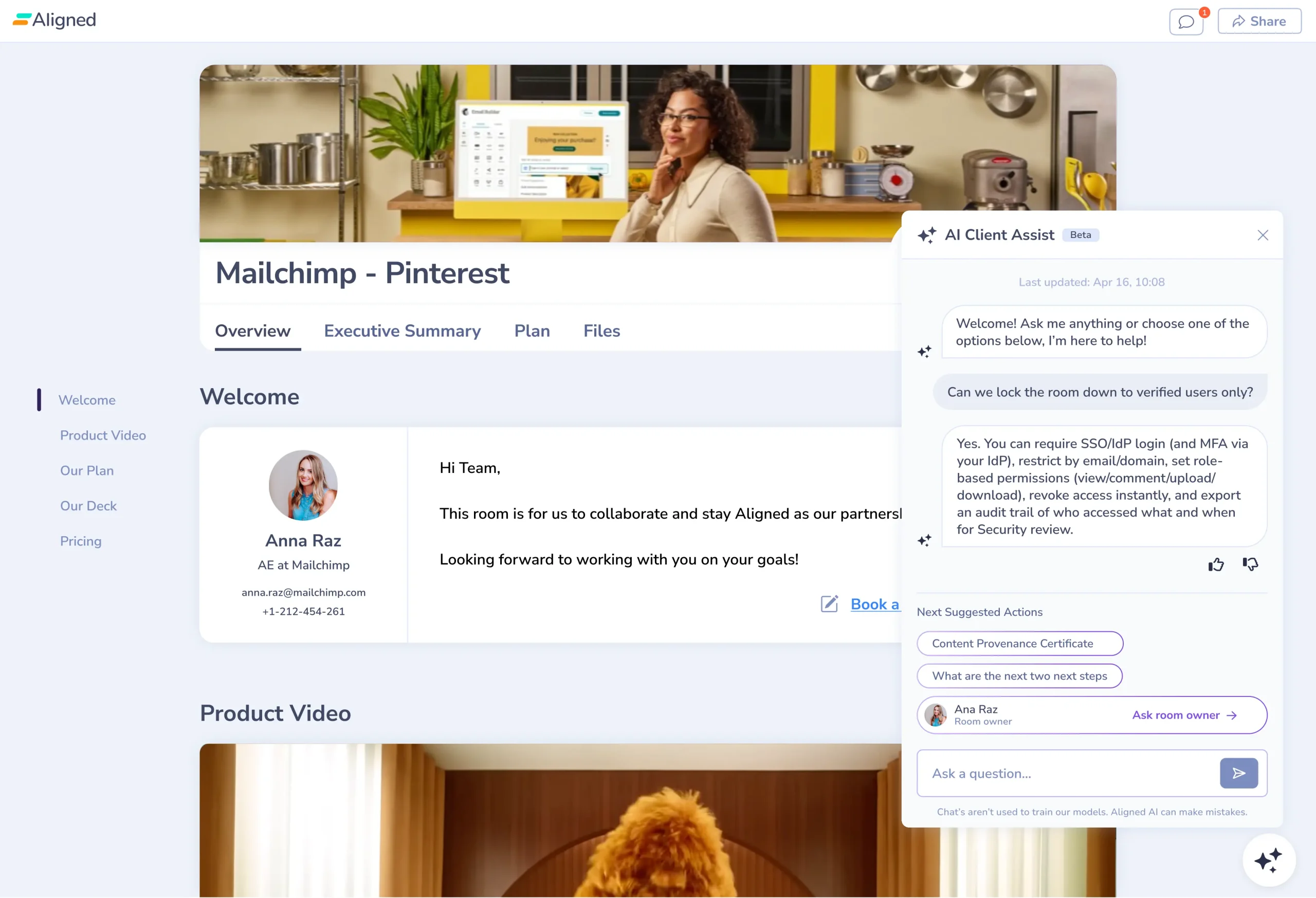
Trade-off: Aligned is built to bring clarity to messy, multi-person deals more than it is built to automate your whole workflow end to end. If your deals involve a big committee and a lot of quiet self-service, that is exactly the point.
2. Dock
Dock is a revenue enablement platform first and a room second, and it covers the full lifecycle from first pitch through renewal. AI Documents drafts customer-facing content like business cases and mutual action plans from live CRM data, so a rep working twenty deals can get a first draft in seconds instead of losing a whole afternoon. The AI Enablement Agent answers rep questions from your content, CRM, and call transcripts. AI Documents come on every plan, even the free one, while the Enablement Agent starts on Premium.

Trade-off: Dock is broad. If all you want is one slick buyer-facing page, it can feel like more platform than you need. For teams where sales and customer success share the same workspace, that breadth is the whole appeal.
3. Flowla
Flowla built its pitch around execution. The room is the front door, and AutoPilot is the engine underneath, a set of AI agents that handle the admin reps put off. Deal goes quiet after a demo, Flowla can draft the follow-up. New decision maker shows up in the room, a tailored intro lands in your Gmail drafts. Deal closes, the same room rolls into onboarding instead of starting from zero. It syncs to the CRM in real time, and recent updates added MCP support and a v2 API for teams that want it wired deep into their stack.
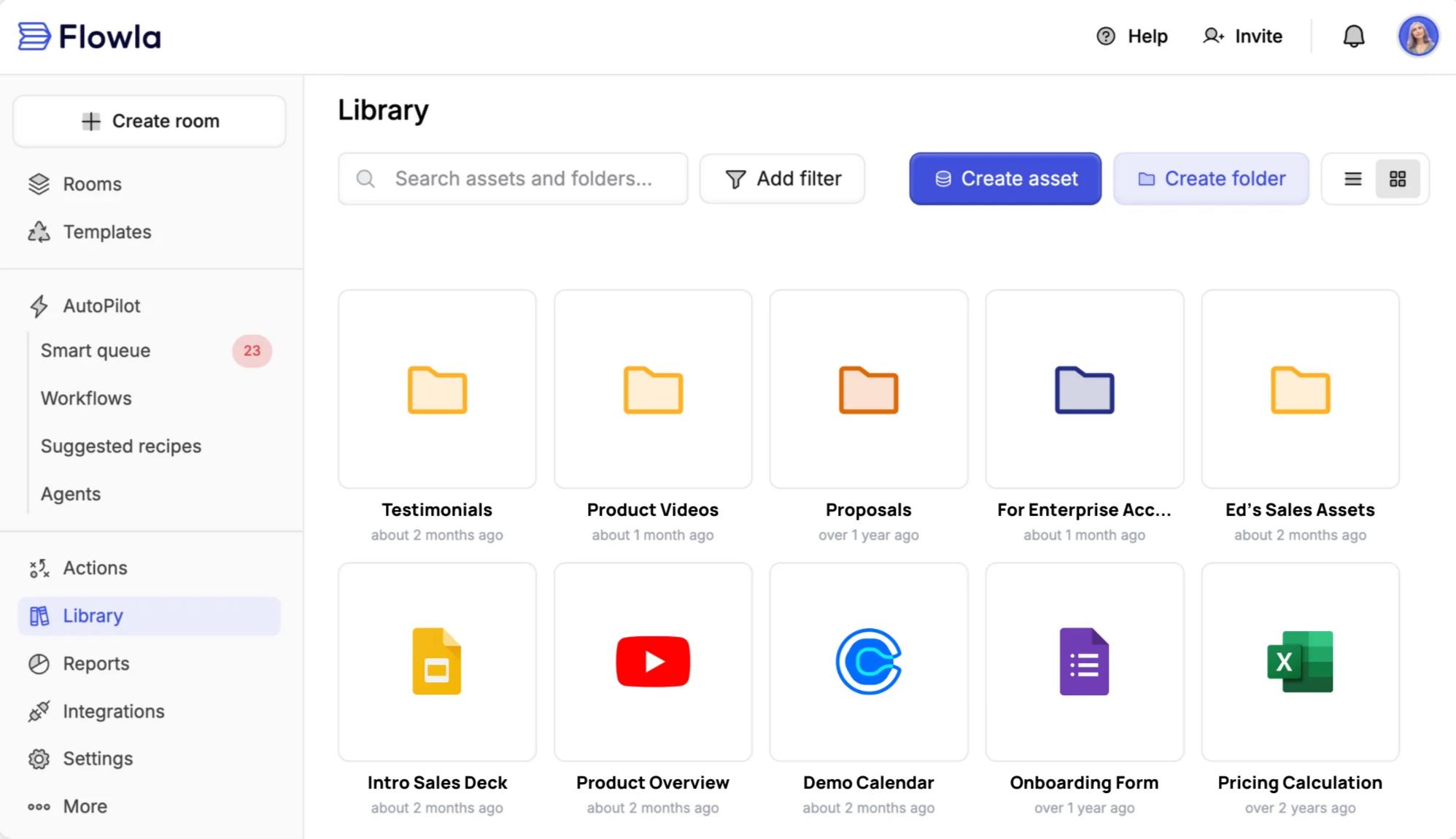
Trade-off: It’s all about the set up. You get the most out of Flowla when you actually build the workflows, so it rewards teams willing to invest a little upfront.
4. 1up Answer Hub
A classic data room is a locked folder of documents you share with a buyer. The problem is that even with good docs, the buyer still has to dig, and when they cannot find something, they email your team and wait. 1up's Answer Hub flips that. It is a secure, buyer-facing room built on your connected knowledge, but instead of handing the buyer a pile of files, it answers their questions. Product docs, security reports, DDQs, past questionnaires, all of it becomes a hub your buyer can just ask.
The data-room part is the control. You tag what is buyer-safe versus internal-only, set public or gated access, and keep sensitive reports behind a login, so each buyer sees exactly what you want them to. The AI part is the trust. Answer Hub only answers from your approved sources, and when it does not have something, it says so and loops in a rep with one click. It handles the routine 90% while your team owns the tricky edge cases. Every question gets logged too, so you can see what buyers keep asking, where they hesitate, and what is missing from your knowledge base.
Teams describe it as the silent closer on a deal, since prospects finally self-serve the security and compliance answers reps used to chase down by hand. It supports dozens of languages, and it is built on a SOC2 Type II compliant platform. Best for deals that bog down in security and compliance review, or any team that wants buyers to get answers at 9pm instead of waiting until someone is back at their desk.
Trade-off: Answer Hub is focused on the answer side, so it does not try to run the whole deal the way a full collaboration room does, with mutual action plans and timelines. It is at its sharpest once your product and security docs are connected and in decent shape for it to pull from. For teams that have that knowledge and want buyers to self-serve it, that focus is the whole point. Best for deals that get bogged down in security and compliance review, or any team that wants buyers to get answers at 9pm instead of waiting until someone is back at their desk.
5. Trumpet
Trumpet is known for its "Pods," branded microsites a rep can build in minutes with a drag-and-drop editor and more than 70 widgets. It sits at the top of G2's digital sales room grid, and its AI has grown up fast. Spark AI builds personalized pods from your content, call recordings, and deal context. Org Chart AI maps stakeholders so you can multi-thread. Buyers can ask questions right in the pod and get answers from the pod content.
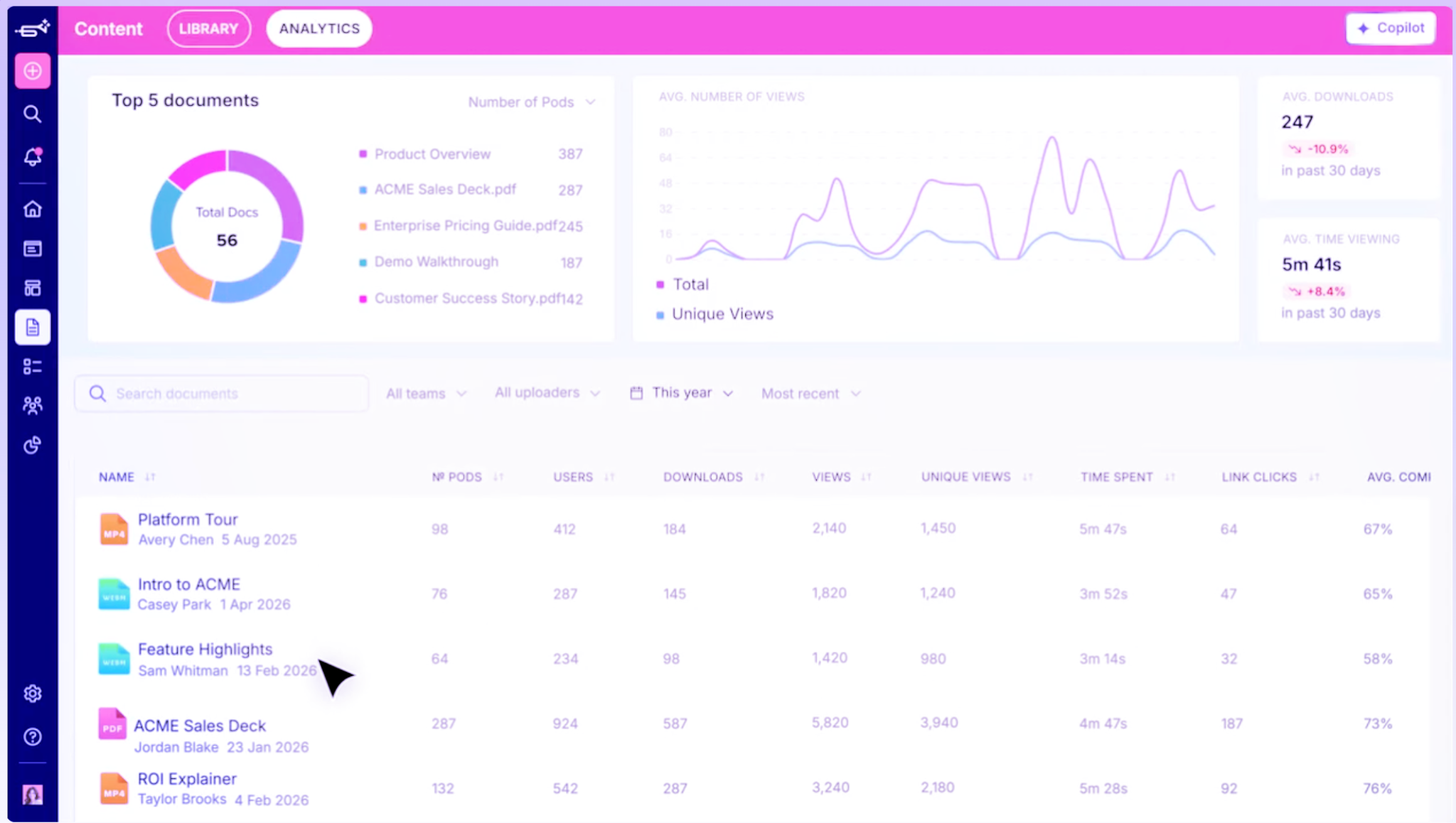
Trade-off: The flip side of all that flexibility. Someone still has to make design choices, though the AI now handles a solid first pass. For SaaS teams that care about a buyer experience that looks and feels personal, few tools match it.
How to choose the right one
There is no single best AI-native sales room. There is the one that plugs your biggest leak. A rough way to narrow it down: if you want buyers to self-serve and reps to see deal risk, start with Aligned. If you need one space shared across sales and customer success, look at Dock. If deals keep dying from slow follow-up and messy handoffs, Flowla was built for that. If the buyer experience itself is where you compete, Trumpet. And if security and compliance questions are what slow you down, 1up's Answer Hub.
One more filter that people skip. If your deals keep stalling in security and compliance review, the fix might not be a flashier sales room at all. A data-room approach like Answer Hub lets buyers self-serve those answers, and it pairs with automated RFPs and questionnaires behind the scenes so your team stops rewriting the same responses every week. A gorgeous Pod with stale answers inside is still a slow, risky deal. Sort out the answers first, then pick the room that presents them well.
Pick for your biggest gap, then trust the answers inside
AI-native selling comes down to which room does real work for you while you are off doing something else. Some draft the content. Some answer the buyer. Some chase the follow-up so nobody has to remember. Pick the one that closes your biggest gap, then back it with a real sales enablement layer so the answers living inside the room stay fast and correct. That last part is what your buyer actually walks away remembering.
FAQs
An AI-native sales room uses AI to do real work, not just to tidy things up after the fact. The useful version drafts follow-ups, answers buyer questions right inside the room, maps the buying committee, and flags deals that have stalled. The big thing to check is where the AI pulls its answers from, since a buyer-facing bot that guesses can cost you trust at the worst possible moment.
An AI-native sales room uses AI to do real work, not just to tidy things up after the fact. The useful version drafts follow-ups, answers buyer questions right inside the room, maps the buying committee, and flags deals that have stalled. The big thing to check is where the AI pulls its answers from, since a buyer-facing bot that guesses can cost you trust at the worst possible moment.
A digital sales room is a shared, buyer-facing space built for the sales process, with content, mutual action plans, and engagement tracking. A data room is more about secure, controlled access to documents and answers, often for security, compliance, or due diligence. The line between them is blurring fast. AI answer rooms like 1up's Answer Hub sit right in the middle, giving buyers self-serve answers to product and security questions while keeping sensitive docs behind gated access.
The Payoff of Connecting Questionnaire work to your Sales Pipeline

Why Most Internal AI Assistants Get Built and Then Abandoned
.jpg)
Building AI Governance for Enterprise Knowledge

Why Your Internal AI Assistant Gives Wrong Answers: A Document Audit Guide
How to NOT Use AI for Sales: 7 Mistakes That Lose Deals