RFP management has changed a lot in the last few years. Back in 2022, most teams were copying old answers, pasting them into new spreadsheets, and hoping nothing got missed. Now, in 2026, things look pretty different. AI handles a big chunk of the work, and humans still run the show. Response teams are smaller, faster, and a lot less stressed than they used to be, partly because AI proposal and bid management tools have gotten genuinely good at the boring stuff.
If you've spent any time on proposals or presales, you already know the pain. Tight deadlines, weird question formats, and that one stakeholder who ghosts you until the day before submission. The tools have gotten better. The basics haven't changed though. You still need accurate answers, solid content, and a team that can pull it all together without losing their minds.
This guide walks through what RFP management actually looks like in 2026. What teams are doing well, where AI still trips people up, what to measure, and what's worth changing in your own workflow. There's a lot to cover, so grab a coffee.
How to Standardize RFP Answers
Standardizing your answers is step one. Without it, every response feels like starting from scratch, and you waste hours rewriting things you've already written ten times over.
Most teams in 2026 build a central library of approved answers. This used to be a Google Doc with 400 pages and no search function. Now it's usually a real content database, sometimes called an answer library or a response database, that connects with whatever tool you use to write proposals.
What a Good Answer Library Looks Like
A solid answer library has a few key traits. First, every answer has an owner. Not "the proposal team" or "marketing." A specific human who knows that content and signs off on changes. If no one owns it, no one updates it, and you end up with answers from 2022 still showing up in proposals next quarter.
Second, every answer has metadata. That means tags for product line, region, customer segment, compliance framework, and anything else that helps you find the right version fast. A SOC 2 answer for a US enterprise buyer is different from a SOC 2 answer for a small EU buyer. Tags help your AI pull the right one.
Third, answers are written for reuse, not for one specific deal. That means general enough to apply to most situations, but specific enough to actually answer the question. The trick is in the middle. Too general and it sounds like marketing fluff. Too specific and it only works for one customer.
How to Build the Library
Most teams build their RFP response database in waves. The first wave is the easy stuff. Company overview, mission, leadership bios, basic product descriptions, security certifications. This content rarely changes and gets asked in almost every RFP. Knock it out first.
The second wave is product and technical content. This is where you need real experts. Get your product managers, engineers, and security folks to write or review their sections. Do not have a writer guess at this stuff. Wrong technical answers in proposals are how you lose deals or end up with a customer expecting features you don't have.
The third wave is the harder content. Pricing frameworks, legal language, custom answers for verticals or regions. This stuff needs more care and probably more review cycles. Plan for it.
Maintenance Habits That Actually Work
Here's the thing though. A library only works if someone actually keeps it clean. Old answers about products you don't sell anymore? Dead weight. Numbers from your 2023 SOC 2 report? Probably out of date. The best teams out there treat their answer library like a living thing. Someone owns it. Someone reviews it. Someone deletes the junk.
A few habits that help:
- Tag every answer by product, region, and use case
- Add expiration dates on time-sensitive content like compliance reports and customer counts
- Have one person sign off on edits to security and legal answers
- Run a monthly cleanup of duplicates and outdated entries
- Track which answers get used most so you know what to prioritize for review
- Archive instead of delete so you can roll back if needed
The hardest part is getting people to actually use the library instead of digging through old emails. That's a culture problem more than a tools problem. The fix is usually a mix of training, easy access from wherever they're writing, and a clear policy that says "use the library or get your answers reviewed before they go out." Teams that skip this step end up with five versions of every answer floating around in Slack.
How to Automate RFP Responses
This is the question that comes up most. The short answer is to pick the parts that drain your time and start there.
Most RFPs have a chunk of questions you've answered a hundred times. Security stuff, company background, basic product questions. AI can draft answers to these in seconds if you've got a clean source of truth. The trick is making sure the AI pulls from your approved content, not random pages on the internet or some old draft floating in a SharePoint folder no one remembers.
Where to Start with Automation
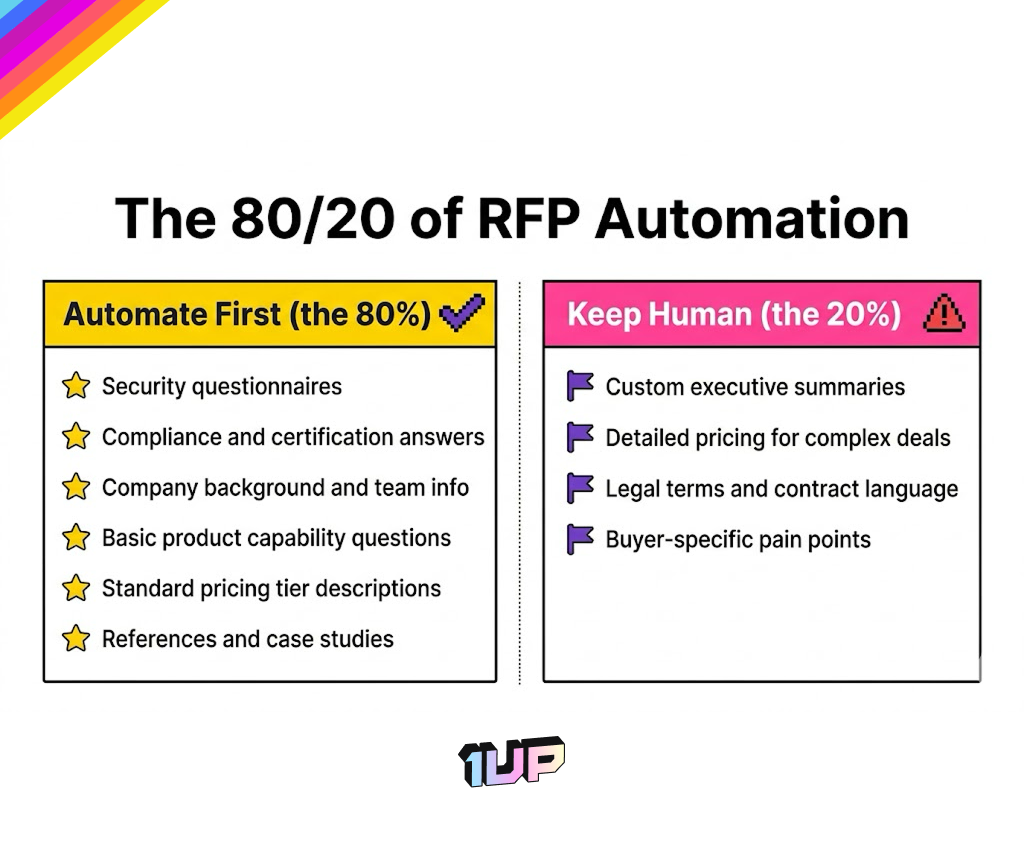
The 80/20 rule applies hard here. About 80% of the questions in most RFPs are similar enough that automation handles them well. Start with these. The other 20% are weird, specific, or strategic, and they need a human touch. Don't try to automate everything at once. Start with the easy wins and build trust in the system.
Good starting points for automation:
- Security questionnaires and SIG Lite responses
- Compliance and certification questions
- Company background, history, and team info
- Basic product capability questions
- Standard pricing tier descriptions
- References and case study selection
What you should not start with:
- Custom executive summaries
- Detailed pricing for complex deals
- Legal terms and contract language
- Anything tied to a specific buyer's pain points
Handling the Format Problem
Automation also helps with format. RFPs come in all kinds of weird formats. Word docs, Excel sheets, PDFs, those custom portals where you can only paste 500 characters at a time. The newer AI tools handle most of these without you reformatting everything by hand.
This used to be a huge time sink. Teams would spend hours just copying answers from one format to another, fixing line breaks, dealing with character limits, and so on. Now the better tools detect the format, parse the questions, and generate answers in the right shape. That alone saves most teams several hours per response.
Setting Up the Source Content
Most teams hit the same gotchas when they first try to automate their RFP process in the generative AI era, and the fix usually comes down to setting up better source content before flipping on the AI.
What does "better source content" actually mean? A few things. Clear answers without filler. Consistent voice across the library. Up to date data. Proper tagging. And ideally, multiple versions of common answers for different contexts. The AI is only as good as what you feed it. Garbage in, polished garbage out.
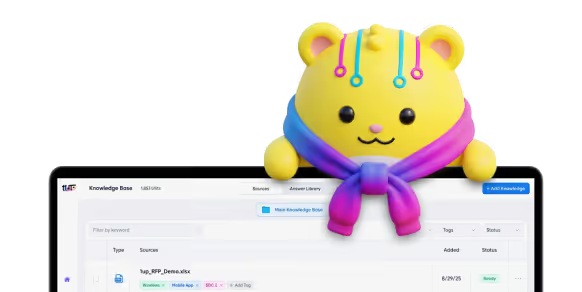
Here’s how 1up handles RFP automation:
The Cost Angle
The bigger picture goes beyond speed. Automation also frees your team to focus on the work that actually matters. Reading the buyer's question carefully. Crafting the executive summary. Catching the weird custom requirement buried on page 47. AI handles the boring repetitive parts. Humans handle the parts that win deals, the ones where judgment, context, and a real read on the customer matter most.
There's also a cost angle. Hiring more proposal writers gets expensive fast. Automating the parts that don't need a human is a way to scale without growing headcount. That matters even more in 2026, when most companies are still watching their spend carefully.
A 2026 Gartner survey found that AI saves sellers nearly 5 hours a week on average, mostly by handling the repetitive parts of the job. That tracks with what most teams see in practice too. The catch is that the same survey showed most companies don't reinvest the saved time in higher-value work. That's a leadership problem more than a tooling problem.
Where to Avoid Using AI
This is the part most blog posts skip. AI is great at drafting, summarizing, and pulling answers from a knowledge base. But there are spots where it can hurt you more than help, and you should know where those are before you go all in.
Executive Summaries
Don't use AI to write executive summaries without serious human edits. Exec summaries are the parts buyers actually read. If yours sounds like every other vendor's, you've already lost. The voice has to be yours. The story has to be yours. AI can give you a starting structure, but a real person needs to finish it.
A good exec summary speaks directly to the buyer's specific situation. What problem are they trying to solve? Why now? Why your company? AI can give you a template, but the specifics need to come from a human who has been on the calls and understands what's actually going on.
Pricing
Don't let AI handle pricing questions on its own. Pricing is too sensitive, too situational, and too easy to mess up. A wrong number in a proposal can cost you the deal, or worse, lock you into bad terms you can't walk back from.
Knowing how to answer pricing questions well takes context the AI doesn't have, like the buyer's budget, the competitive situation, or what the rep has already promised on calls. The right approach here is to have AI pull standard pricing language and tier descriptions, but flag any custom pricing or discount requests for a human. Most modern tools support this kind of conditional routing. Use it.
Legal Language
Don't trust AI on legal language without review. Indemnification clauses, data handling commitments, SLA terms. These need a real human, ideally someone from your legal team, to look them over before they ship.
AI is okay at summarizing legal terms or pulling standard language from your approved playbook. AI is not okay at writing new legal commitments on the fly. The difference matters.
Personal Communication
And don't use AI for the bits where personality matters. Cover letters. Notes to the buyer. Anything that should feel personal. People can tell when content is generic, and in 2026 they're way more sensitive to it than they used to be. AI slop is real, and buyers are starting to call it out in real time.
This includes the little touches that build relationships. A note thanking the buyer for sharing context on a call. A personalized intro that mentions something specific they said. These should be written by humans every time.
High-Stakes Claims and Commitments
The bigger risk is that AI will hallucinate facts when it can't find a real answer, which is a fast way to lose trust with a buyer. Compliance questions, security commitments, regulatory claims. If the AI gets these wrong and you ship it, you might be on the hook for promises you can't keep. Always have a human review high-stakes content. Always.
RFP AI Response Best Practices
Here's what the teams winning more deals are doing right now.
Start From Approved Content
First, they start from approved content. The AI doesn't get to guess. It pulls from a curated knowledge base, and if it can't find an answer, it flags the question instead of making something up. This is huge for cutting down hallucinations, which is still a real problem with general-purpose AI tools.
The setup matters too. Some teams point their AI at their entire intranet and call it a day. That's a recipe for trouble. Better to point the AI at specific, curated sources where every piece of content has been vetted. Less is more when it comes to source content quality.
Always Review Before Shipping
Second, they review everything before it ships. AI drafts the first pass, but a human reads every word. This part is not optional. Even the best models make mistakes, and in proposals, one wrong fact can sink the deal.
The review process should not be one person doing everything. Split it by domain. Security people review security answers. Product folks review product answers. Legal reviews legal. This is faster than it sounds if the workflow is set up right, because each reviewer only sees the questions in their area.
Use Confidence Scoring
Third, they use AI confidence scores to flag uncertain answers. Some tools rate how sure they are about each response, and anything below a set threshold gets routed to a subject matter expert. This saves hours and catches errors before they go out.
.png)
Confidence scores work best when paired with clear thresholds. Above 90% confidence? Auto-approve for human review. Between 70% and 90%? Route to a domain expert. Below 70%? Treat as unanswered and write from scratch. Tune the thresholds based on what you actually see in your responses.
Track Everything
Fourth, they track everything. Which answers won deals? Which lost? Which got edited the most? That feedback loop makes the AI better and the team smarter over time.
A few metrics worth tracking:
- Time from RFP received to first complete draft
- Time from first draft to submission
- Number of questions per RFP and how many were auto-answered
- Edit rate on AI-generated answers
- Win rate by content type or domain
- Which answers from the library get used most
Keep Content Close to the Source
Fifth, they keep their content close to the source. The AI gets fed approved material from real subject matter experts, not stale documents nobody owns. Garbage in, garbage out applies double in proposals.
This is where having clear ownership of content pays off. When the security team owns the security answers and the product team owns the product answers, the content stays accurate. When nobody owns it, the content rots.
How to Measure RFP Performance
Most teams don't measure their RFP work well. They track win rate and call it done. That's not enough.
Here's a better set of metrics, broken into three categories.
Speed Metrics
How fast can you turn around a response? This matters because faster responses often signal a more responsive vendor, and because some RFPs reward early submitters.
- Average time from receipt to submission
- Time spent per question
- Hours of human work per response
- Percent of questions answered on first pass without revision
Quality Metrics
How good is the content going out the door?
- Edit rate (how often AI drafts get changed)
- Error rate caught in review
- Customer feedback on response quality
- Internal stakeholder satisfaction
Outcome Metrics
What's actually happening to the deals?
- Win rate overall and by segment
- Win rate by RFP source (inbound vs outbound vs partner referrals)
- Average deal size from RFP-won deals
- Time from RFP submission to close
- Reasons for losses (track this honestly)
The teams that win consistently treat RFPs like a sales channel with its own funnel metrics. They know their conversion rates at each stage and they invest in the parts that drive the most lift.

RFP Content Governance in the Age of AI
Governance sounds boring, but it's the difference between a system that works and a mess no one wants to clean up.
Content governance in 2026 means knowing who owns what answers. It means tracking when content was last reviewed, limiting who can publish to the main library, and keeping audit logs of AI-generated content. None of this is glamorous. All of it matters.
What Bad Governance Looks Like
Teams who skip governance end up with bloated libraries full of contradictions. Three different answers to the same question, all marked "approved," all slightly wrong in different ways. Then someone uses one of them in a real proposal, and you find out about it three months later when a customer points out the inconsistency.
Other signs of bad governance:
- No clear owner for any category of content
- Anyone can edit anything
- No record of who changed what or when
- AI pulls from random sources including outdated docs
- Compliance answers haven't been reviewed in over a year
- Security claims that nobody can actually verify
Rules That Work
A few rules that work well:
- One owner per content category like security, product, legal, and finance
- Quarterly reviews of high-traffic answers
- Required approvals for any change to compliance or security content
- Clear tagging so AI knows which version is the current one
- Audit logs showing every change with who made it and why
- Version history so you can roll back if needed
The other piece is making sure your AI tools don't pull from random sources. If your AI can scrape internal Slack messages or grab content from old Google Drive folders, you've got a governance problem. Lock down the sources. Pick what the AI can see, on purpose, every time.
The Compliance Angle
For regulated industries, governance is doubly important. Healthcare, finance, government contractors, anyone subject to data privacy laws. The AI is going to make claims about your security posture, your data handling, your certifications. If those claims are wrong, the consequences go beyond losing a deal.
This is where having a real review workflow matters. High-stakes content does not go out the door without a sign-off from the right person. No exceptions. Make this a clear rule and enforce it.
According to a Harvard Business Review article on AI governance nightmares, the standard approach to managing AI risk is broken at most companies. Companies that manage AI inputs carefully see better outputs and fewer compliance issues. Companies that let AI run wild end up cleaning up messes for months.
How Are Teams Collaborating on RFPs?
This is maybe the biggest change in 2026. RFP work used to be siloed. Sales handed off to proposal writers, who chased down product managers, who tagged in security, who emailed legal. By the time the response went out, half the team hated each other.
Now collaboration tools are baked into the workflow. Comments, version history, real-time editing. Even better, AI can route questions to the right person automatically. Security questions go to security. Product questions go to product. Pricing goes to finance. No more digging through Slack to find the right person.
Who Is on a Modern RFP Team?
The roles have evolved. Here's what a typical 2026 RFP team looks like:
- Proposal manager owns the response from start to finish, coordinates everyone else, and is responsible for the final deliverable
- Sales rep or AE owns the relationship with the buyer and the deal context
- Sales engineer or solutions consultant handles technical depth and product fit questions
- Subject matter experts from security, legal, product, and finance review their areas
- Content owner maintains the answer library between RFPs
Smaller teams combine roles. Larger teams may have multiple proposal managers, a dedicated content team, and a writer or editor for the executive summary. The size doesn't matter as much as having clear roles.
What Good Collaboration Looks Like
A shared workspace where everyone sees the same draft. Clear ownership of each question or section. Automatic deadline tracking so nothing slips through the cracks. Notifications that mean something instead of adding to the noise.
The best teams also have a kickoff process. When an RFP comes in, the proposal manager pulls together a short call with everyone involved. Twenty minutes max. They go through the deal context, the deadline, the key questions, who owns what, and what could go wrong. This single habit prevents most of the chaos that hits teams in the last 48 hours.
Communication Norms
Good RFP teams have clear communication norms. A few that work:
- All RFP discussion happens in one channel or thread, not scattered across DMs
- Updates go in writing so the proposal manager can see status at a glance
- Blockers are flagged early, not at the deadline
- After every submission, the team does a short retro on what worked and what didn't
This last one matters more than people think. Retros catch problems before they become patterns. Every team thinks they don't have time for them. Every team also thinks they don't have time to fix the same problem on the next ten RFPs in a row.

Common Mistakes Teams Make
Even with good tools and good processes, teams trip themselves up. Here are the most common mistakes seen in 2026.
Over-Automating
Some teams get excited about AI and try to automate everything. They turn off human review on common questions, lower their confidence thresholds, and ship more responses faster. Their win rate drops within a quarter.
The fix is to remember that AI is a draft tool, not a finished tool. The volume is up, but the quality has to stay up too. If you're losing deals because of sloppy responses, the automation is hurting you.
Treating It as the Proposal Team's Problem
Smaller companies often dump RFPs on one person and call it good. That person becomes the bottleneck for every deal. They burn out. The quality suffers. Win rate drops.
RFPs are a cross-functional effort, even at small companies. Product, security, and sales all have to play a role. The proposal manager coordinates, but they don't write everything alone.
Skipping Content Maintenance
Teams build a great answer library, then never touch it again. Six months later, half the content is outdated and they're not sure which half. Now every RFP is a slog because nobody trusts the library.
Build maintenance into the workflow from day one. Quarterly reviews. Owners for every category. Clear expiration dates on time-sensitive content.
Not Tracking Wins and Losses
This one comes up over and over. Teams submit RFPs, find out they won or lost, and never dig into why. So they keep making the same mistakes.
A simple loss review process changes this. There are usually a handful of reasons why you lose RFPs, and they tend to repeat across deals if you don't catch them early. After every lost RFP, the proposal manager spends 30 minutes documenting why the deal was lost. Pricing? Feature gap? Timing? Relationship? Over time, the patterns show up, and you can fix the systemic issues.
Forgetting About Buyer Experience
It's easy to forget there's a person on the other side reading your proposal. They've read ten others this week. Yours has to stand out. Clarity, structure, and a real understanding of their needs go further than any fancy formatting.
Read your own proposals out loud before submitting. If they're boring or generic, your buyer is going to feel that too.
Where to Start if You're Behind
RFP management in 2026 has gotten a lot better, but it still takes real work. The teams who get this right are closing more deals, faster, with less burnout. The teams who don't are still copying answers from old PDFs and wondering why their win rate keeps dropping.
You don't have to fix everything overnight. Here's a 90-day plan if you're starting fresh or playing catch-up.
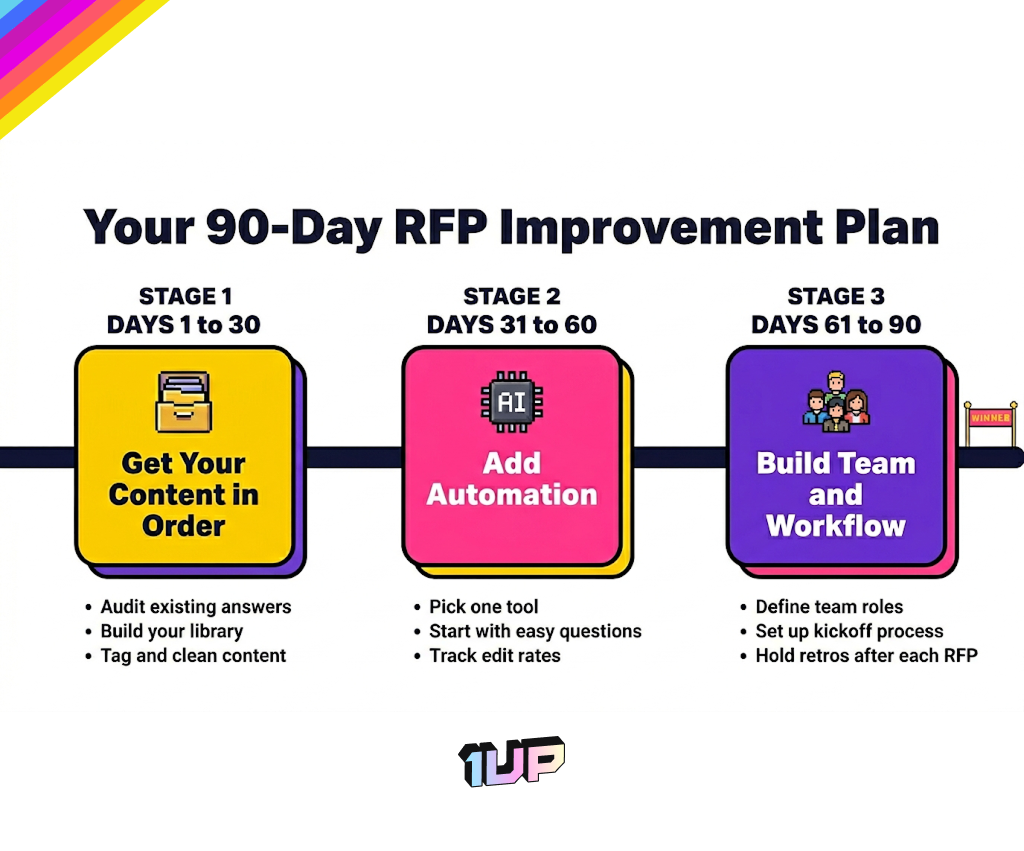
Days 1 to 30: Get Your Content in Order
Audit what you have. Where are your answers living right now? Are they in one place or scattered? Pull everything into a single library, even if it's messy at first. Tag each answer by category, product, and last review date. Delete the obvious junk.
Identify the top 20 questions you see in every RFP. Make sure you have current, approved answers for each of those. This alone will save you hours on the next response.
Days 31 to 60: Add Automation
Pick one tool. Don't overthink this. Set it up to pull from your cleaned-up library. Start with the easy questions. Run it on one or two real RFPs and see what happens. Keep humans in the loop on everything.
Track edit rates and confidence scores so you know what's working and what isn't. Adjust your sources and prompts as you learn.
Days 61 to 90: Build the Team and the Workflow
Define roles. Who is the proposal manager? Who owns what content? Who reviews what? Get these on paper, even informally.
Set up your kickoff and review process. Hold a retro after each RFP. Build the habits that will scale.
After 90 days, you should have a working library, basic automation, clear ownership, and a team that knows what to do when an RFP lands. That's enough to start winning more deals than you were before.
The teams who win the most aren't using the fanciest tools. They're the ones who got the basics right and kept improving. Start there.
FAQs
RFP management is the process of receiving, organizing, responding to, and tracking requests for proposals from potential buyers. In 2026, it includes managing a centralized answer library, using AI to draft responses, coordinating subject matter experts, and measuring win rates to improve over time.
No, and that's not the goal. AI handles the repetitive parts well, like answering common security and compliance questions or pulling standard product info from your knowledge base. Humans are still essential for executive summaries, pricing decisions, legal language, and any content that's specific to the buyer's situation.
Start with your content. Audit what answers you already have, pull them into one place, and clean out anything outdated. From there, layer in automation for the easy questions and define clear roles for your team. Most companies see real improvement within 90 days if they follow this order.

.png)
AI Made Writing Code Free and Moved the Bottleneck to Code Review

The Payoff of Connecting Questionnaire work to your Sales Pipeline

Shadow AI: What Your Reps Are Pasting Into ChatGPT Right Now

How to Write an RFP Response That Survives AI Scoring
SIG vs CAIQ vs VSA: A Simple Guide to the Big Three