.png)
Claude is one of the best AI models you can put in front of an RFP. Hand it a question and a doc, and it writes a clear, sharp answer in seconds. So a lot of teams try the obvious thing: paste the whole questionnaire into Claude and let it go. The first few answers look great. The trouble shows up later, because drafting an answer is only about 20% of the work, and the rest is the messy stuff that a chat window was never built to handle. The good news is there is a clean way to fix that without leaving Claude, and it starts with rethinking how you run RFPs in the AI era.
Claude is a strong writer, and that part is real
Claude deserves its dues. It reads a document and writes a clean, professional answer fast. It handles long inputs, follows your tone, and explains its reasoning when you ask. For a single question with the right source sitting in front of it, the output is often very good.
It has also gotten better at reaching your files. You can connect Claude to your own data sources and drop documents into a Project, so it is no longer stuck with only what you paste in.
But there is a wide gap between answering one question and running a 300-question RFP with six contributors and a hard deadline. The model is the reasoning engine. An RFP needs a lot more than reasoning. It needs a source of truth, a workflow, and a way to put answers into the exact fields a buyer is asking for. That is the part Claude on its own does not cover.
MCP, explained without the jargon
MCP stands for Model Context Protocol. It is an open standard for connecting AI models to outside tools and data, created by Anthropic and now used across the industry. People call it the USB-C of AI, because it gives any model one standard way to plug into any tool, instead of a custom hookup for every pairing.
This matters for RFPs because a tool can run what is called an MCP server, and a model like Claude can connect to it as a client. Once that link is made, Claude can pull from that tool's data and use its abilities, live, inside the same chat. So the model you already like stays the same. What changes is what it can reach. That is the whole idea behind using MCP to automate RFPs. You keep Claude for the thinking and give it a real RFP system underneath.
Confident and wrong is a dangerous mix
The scary thing about Claude on its own is not that it gets things wrong. Every tool does. The scary thing is how good it sounds while doing it. Ask it a question it does not actually know the answer to, and it will not pause or hedge. It writes a clean, confident response and moves on. Maybe it cites a SOC 2 control you dropped last year. Maybe it claims a feature you have never shipped. The answer reads perfectly, which is exactly what makes it slip past a busy reviewer.
On a marketing FAQ, a slip like that is a typo. On a security questionnaire, it can blow up a deal or land you in a compliance mess. As a result, catching those made-up answers becomes the real job, and it falls entirely on whoever is checking the work.
You might think a smarter or more specialized tool fixes this. It helps, but not as much as you would hope. Researchers at Stanford ran a careful study on the AI tools built for legal work, the kind that cost thousands of dollars a month and connect straight to real legal databases. These are the most accuracy-obsessed AI products on the market. Even so, the study found those tools hallucinate 17% to 33% of the time. A general chatbot with no database behind it did worse.
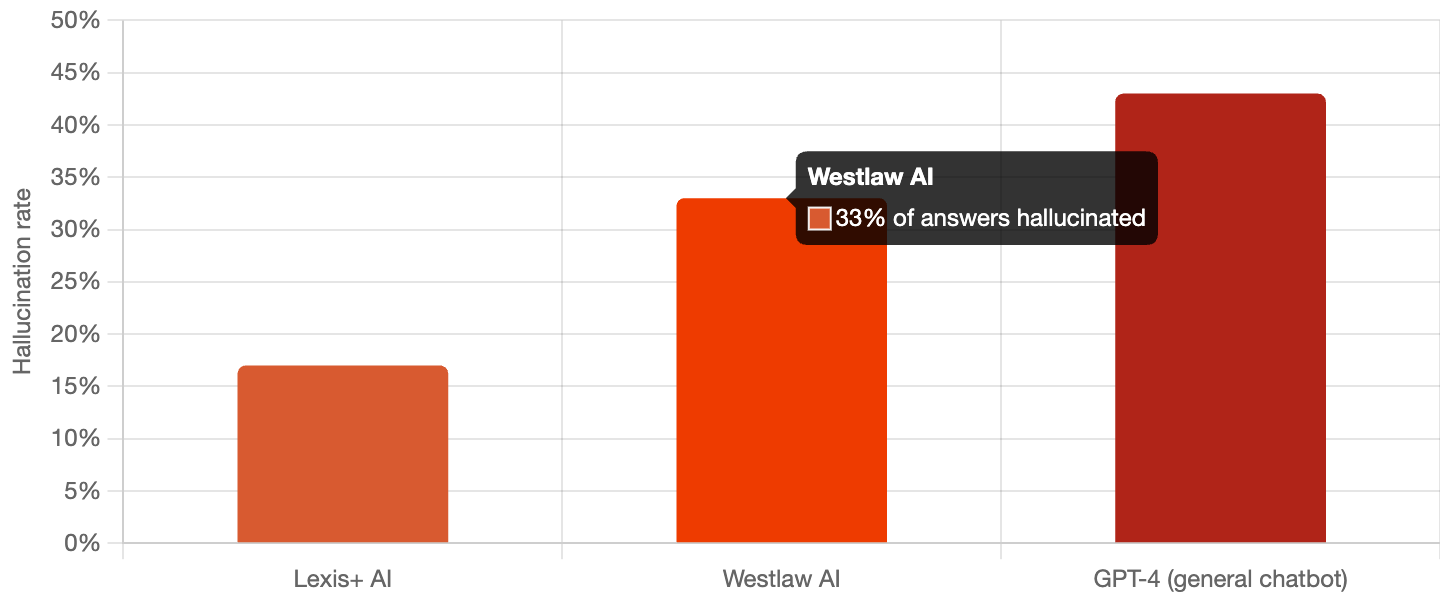
RFP and security answers carry that same weight. They have to be right, every time, and a confident wrong answer costs you. The fix is not a cleverer prompt or a bigger model. It is grounding the answers in your own approved content and keeping a person in the loop to sign off, which is the whole reason to connect Claude to a real RFP system through MCP.
Wrangling your experts is still on you
Most RFP questions cannot be answered by one person. Security questions need IT. Legal language needs counsel. The deep technical answers need the engineer who built the feature. Getting those answers out of busy people and back into the document is the slowest part of the job, and it usually runs on email threads and Slack pings nobody can track.
Claude does nothing here on its own. It can draft for the one person typing, but it cannot hand ten questions to your security lead, set a due date, or show who has finished what. It is a tool for one person in one chat. An RFP is a team sport.
1up puts the whole team in one place
1up treats the RFP as a shared project from the first upload. You assign questions to the right people, set due dates, and watch progress in one view that shows who is working on what. When a teammate corrects an answer, that fix saves itself back, so the next person inherits the better version. The week you used to spend chasing people turns into an afternoon.
Every RFP starts from a blank box
Every proposal team knows this pain. You spend an hour writing the perfect answer to a brutal compliance question. You send it. Three weeks later the same question shows up in a new RFP, and with Claude you start over from a blank box. The model can search files you connected, but it does not keep a curated set of your best, approved answers that gets sharper every time you use it.
You can try to build that library yourself. Plenty of teams do. The catch is that it becomes a full-time job, and you own it forever. Someone has to keep every answer current as your pricing, product, and compliance change, and the day that person gets busy, the whole thing rots. Then two reps give two different answers to the same question, and a trustworthy questionnaire knowledge base stops being trustworthy.
1up remembers so Claude does not have to
1up builds a knowledge base from your website, product docs, past questionnaires, and connected sources like Google Drive, SharePoint, and Confluence. Approved answers get saved, reused, and improved, and every edit flows right back in. Each answer carries its source with it, so when legal asks where a claim came from, you can show them. Connect that library to Claude through MCP, and the model stops guessing. It answers from the approved truth instead.
Here’s how 1up works with Confluence:
Reading a file is easy, filling one is not
Claude can read a spreadsheet and write answers. Dropping those answers back into the right cells of a real questionnaire is a different job. An RFP is full of structure: numbered requirements, dropdowns, checkboxes, and answer fields that have to line up exactly. The model was not built to read that layout and place each answer where it belongs.
Scale makes it worse. A big due-diligence questionnaire can run a couple thousand rows. Paste that into one chat and the model has to juggle all of it at once, which is where wrong answers slip in unnoticed. So you end up splitting the file, feeding it in chunks, and stitching it back together by hand. Which is the work you were trying to skip.
1up handles the formatting headaches
1up was built to fill messy documents at full size. It handles Word, Excel, Google Sheets, and PDF questionnaires, spots dropdowns and checkboxes, and drops each answer where it belongs. Because it pulls each answer from your approved library one at a time, the model is never juggling the whole file at once. When you export, the file comes back in the same format you sent, formatting intact, with a source behind every answer.
Here’s how 1up automates RFPs that are PDFs:
Web portals are a brick wall
More and more, the questionnaire never arrives as a file. It lives inside a web portal like SAP Ariba or Coupa, or a security review tool like Whistic, where the buyer wants you to log in and type answers straight into their system. Claude has no clean way to do this on its own. It can reason about the questions, but it cannot reach into someone else's portal and fill it from your approved answers. So you are back to the worst version of the job on a security questionnaire. Copy from a doc, paste into the box, repeat a few hundred times.
1up works right on the webpage
1up has a browser extension that brings your full knowledge base right onto the page. It reads the questions in the portal and generates hundreds of answers in minutes, wherever the questionnaire lives. The part of online questionnaires everyone dreads becomes the easy part.
Keep Claude, add the missing layer
Here is where it all comes together. You do not have to throw Claude out to get any of this. 1up connects to Claude through an MCP connector, so your team keeps the chat window they already use. The difference is what Claude can now reach. It pulls answers from your approved 1up library instead of inventing them, every response comes with a citation you can hand to security, and the heavy lifting of filling documents and portals runs through 1up. You get Claude for the thinking and 1up for the source of truth, the workflow, and the audit trail. The model becomes the easy front door, and the trustworthy part lives underneath.
[Embed: 1up via MCP connector demo]
A quick gut check before you commit
Three things decide whether you can just keep using Claude, or you should go with a purpose-build solution:
- How many questions? A handful is a job for Claude alone. A few hundred is not.
- How many people? One writer is fine. Six experts who need wrangling is a different game.
- How much risk? A marketing FAQ can contain a small mistake. A SOC 2 questionnaire cannot.
A short list, one writer, low stakes, and answers already in a clean doc? Claude can carry it. A long list, several experts, repeat questions across deals, and a security review where a wrong answer loses the deal? You need a real source of truth and a workflow behind the model. The time Claude saves on the first draft gets eaten by fact-checking, chasing people, and filling fields by hand, unless you give it something to stand on.
Claude brings the brains, 1up brings the rest
Claude is a fantastic model, and on a one-off question it earns its keep. An RFP is a different animal, with deadlines, experts, repeat questions, structured files, web portals, and a real cost when an answer is wrong. The model handles the easy 20%. MCP is how you connect it to the 80% that actually decides whether the proposal goes out clean and on time. Keep Claude. Plug in 1up. Let each one do the part it is good at.
FAQs
Yes, for small ones. Claude writes a clear answer from a document you give it, so it works fine for a handful of questions. But on its own it cannot coordinate your experts, keep a library of approved answers, autofill structured documents, or fill web portals, so it falls short on full RFPs that involve a team and high-stakes answers.
MCP, or Model Context Protocol, is an open standard from Anthropic that lets AI models connect to outside tools and data. For RFPs, it means you can point Claude at a tool like 1up through an MCP connector. Claude still does the writing, but it now pulls from your approved answer library, shows a source for each answer, and runs the document and portal work through 1up.
It can, like any model. When Claude does not know an answer, it may write a confident response that is wrong. A Stanford study found that even AI tools built for legal research hallucinate 17% to 33% of the time. The way to lower that risk is to ground answers in your own approved content and keep a person in the loop to review, which is what connecting Claude to 1up through MCP is for.

.png)
AI Made Writing Code Free and Moved the Bottleneck to Code Review

The Payoff of Connecting Questionnaire work to your Sales Pipeline

Shadow AI: What Your Reps Are Pasting Into ChatGPT Right Now

How to Write an RFP Response That Survives AI Scoring

SIG vs CAIQ vs VSA: A Simple Guide to the Big Three