
How to Autofill Web Forms with AI
.jpg)
The Problem
Web portal questionnaires are painful in a way file-based ones are not. You cannot export them, you cannot prepare answers offline, and most tools cannot touch them. So your team ends up doing it manually. Searching old responses, rewriting answers, and pulling in subject matter experts every time a new one lands.
The Solution
1up's Browser Plugin scans any web-based questionnaire, pulls answers from your approved knowledge base, and fills them in automatically. Works on any portal including Panorays, OneTrust, Whistic, Venminder, and more. What used to take days can be done in minutes.
Best Practices for Automating Web Portal Questionnaires with 1up
A lot of security and vendor questionnaires live inside web portals now. They sit there in a browser tab, waiting for someone to fill them in by hand. 1up changes that by bringing automated answer generation to any webpage, so your team stops doing this manually and starts closing deals faster.
The Browser Plugin is a one-click install from the Chrome Web Store or Microsoft Edge Add-ons. Once it is installed, open any web portal questionnaire, click Scan, and 1up gets to work. It reads every question on the page, matches each one to the best content in your knowledge base, and fills in responses. You review, make any edits you want, and submit.
If you correct or improve an answer, 1up saves it. The next time a similar question comes up, it already has your preferred response ready. Over time this builds into a security questionnaire knowledge base that makes every future portal faster than the last.
Build a Knowledge Base Your Team Can Actually Trust
The biggest reason web portal questionnaires take so long is that every time a new one comes in, your team is starting from scratch. They search through shared folders, dig up old assessments, and chase down people in the security or legal teams to get the right answer. Then that work disappears into the portal and the next questionnaire starts the same way.
1up fixes that loop. Upload your past questionnaire responses, security policies, compliance documents, and product materials into your 1up knowledge base. Tag them by category so the Browser Plugin knows exactly which content to draw from for each type of question. When a new portal questionnaire comes in, 1up pulls from that content and generates answers directly in the browser. The work compounds over time instead of starting over.

Keep Your Documentation Current
Web portal questionnaires cover a wide range of topics. Risk management, data privacy, access controls, incident response, third-party integrations. The accuracy of your automated answers depends on the quality of your source material. Assign ownership across your security, product, and compliance teams and make sure documentation gets updated when things change. 1up is only as good as what you give it, but teams that maintain a clean knowledge base see a dramatic drop in the time it takes to complete these.
.png)
Use 1up to Collaborate Across Teams
Vendor and security questionnaires often require input from multiple departments. With 1up, your security, legal, compliance, and product teams can all review and refine AI-generated answers in one place before they go out. No more email threads, no more chasing people down. Everyone works from the same knowledge base and responses stay consistent across every submission.
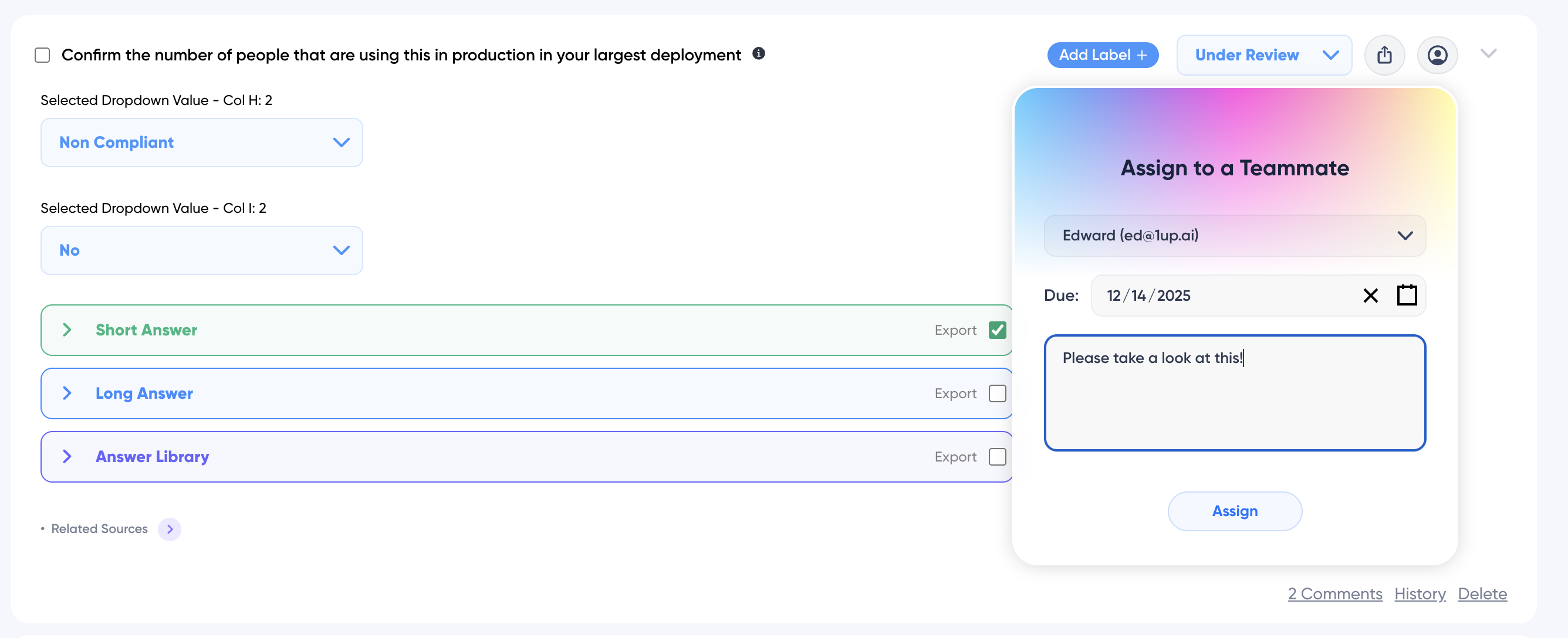
What changes once you have 1up and the Browser Plugin set up:
- Works across all major vendor and security portals including Panorays, OneTrust, Whistic, Venminder, and more
- The Browser Plugin scans any web portal and identifies questions, dropdowns, checkboxes, and answer fields automatically
- Answers come from your actual knowledge base, not generic AI responses
- Edit any answer on the fly and teach 1up better responses as you go
- Pairs naturally with file-based questionnaire automation so your whole response workflow is covered

FAQs
It works on any web-based questionnaire portal. That includes Panorays, OneTrust, Whistic, Venminder, CyberGRX, and any other portal-based assessment tool your customers use.
The 1up Browser Plugin is available on Chrome and Microsoft Edge. Firefox support is coming soon.
From your 1up knowledge base. Everything you connect, your internal docs, past questionnaires, compliance materials, and third-party sources, is available to the Browser Plugin when generating answers.
Yes. All data is encrypted at rest and in transit. Your documents are never used to train AI models. 1up does not download, share, or sell your data. The platform is SOC2 Type II compliant and ISO 27001 certified.
.png)




