How to Automate Venminder Assessments with AI

The Problem
Venminder questionnaires want you to fill them out directly inside the portal. You cannot export them, you cannot work offline, and every new vendor risk assessment pulls in the same people - security, compliance, legal, product - to answer questions your team has already answered a dozen times before.
The Solution
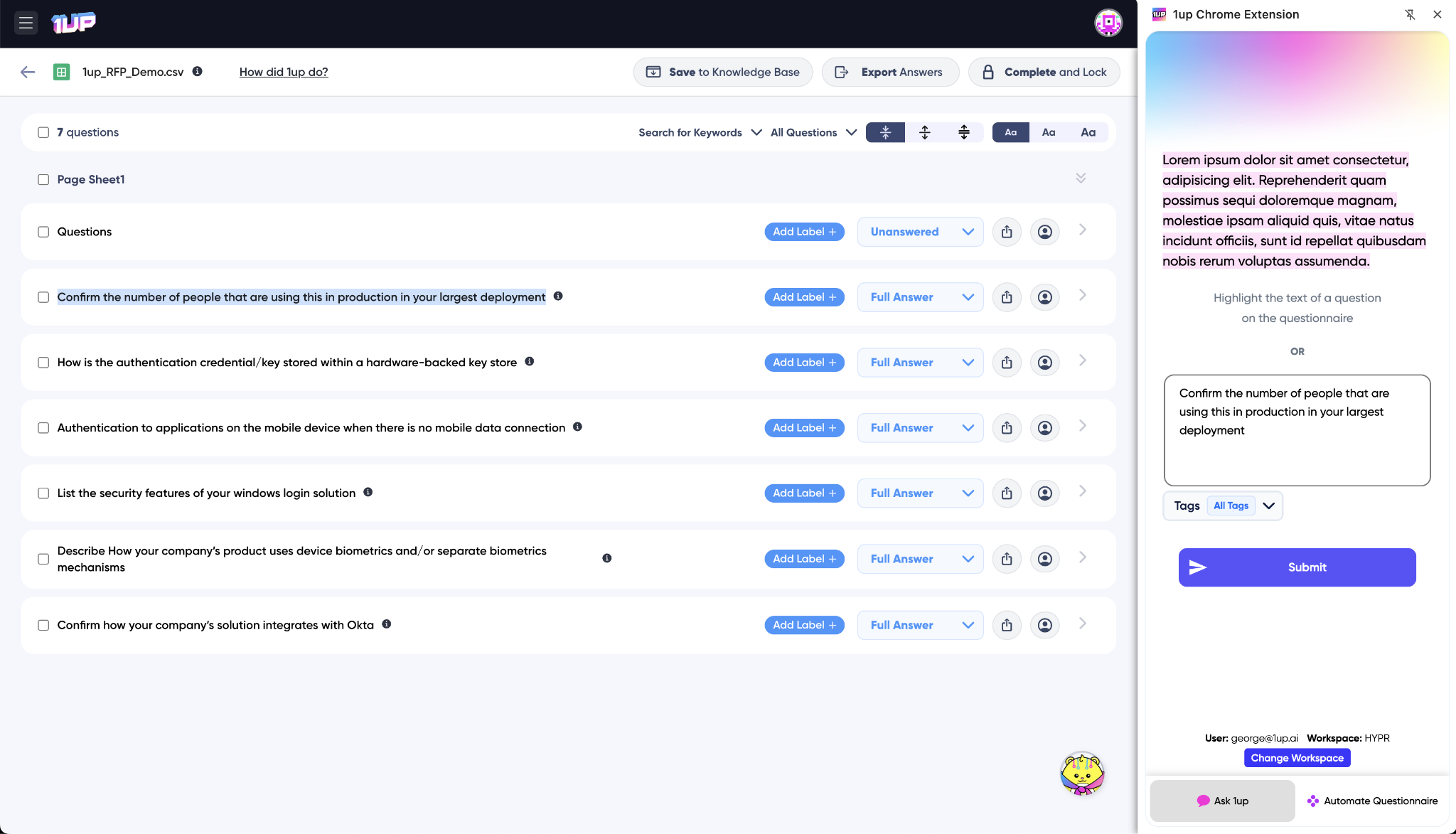
1up brings the Browser Plugin to Venminder. Highlight a question on the page and 1up generates an answer from your approved documentation right there in the browser without switching tabs. No exporting, no copy-pasting, no manual research.
Stop Filling Out Venminder Questionnaires Manually
Vendor risk assessments like Venminder are painful precisely because the platform controls the process. You are filling things out question by question inside a portal you cannot easily get out of. 1up fixes that by meeting you where the questionnaire actually lives - right in the browser - and generating answers from your knowledge base on the spot.
Most teams still handle Venminder the hard way. Someone digs up an old assessment, cross-references a policy document, loops in three other people, and types everything in by hand. If the questionnaire can be exported, that is great - export it as an Excel or Word file, upload it to 1up, and get hundreds of answers back in minutes.
But a lot of the time Venminder does not let you do that. It wants you to fill everything out right there on the page. That is where the 1up Browser Plugin comes in. Highlight any question on the Venminder page and 1up generates an answer right there in the sidebar from your connected knowledge base. No tab switching, no researching, no digging through shared folders. You can answer multiple questions in sequence, edit any response on the fly, and move through the entire assessment in a fraction of the time. The Browser Plugin is included in every 1up plan.
For similar web-based vendor risk portals, the same workflow applies - Whistic and others work exactly the same way.
The teams that move fastest through Venminder are usually the ones that loaded their knowledge base before the assessment arrived. Past Venminder submissions, security policies, privacy materials, risk management docs, access control documentation - all tagged and ready so 1up knows exactly what to draw from when each question comes up.
From there it compounds. Every correction saved back to the knowledge base means the next similar question gets a better answer automatically. A Venminder assessment that used to take two days starts taking a couple of hours. Your security and compliance team stops getting pulled into every vendor request and starts focusing on the work that actually requires their expertise.
What Changes Once You Automate Venminder with 1up
- No more filling out Venminder by hand: The Browser Plugin brings 1up directly into the Venminder portal. Highlight a question, get an answer sourced from your approved documentation, and move on. What used to take days gets done in a fraction of the time.
- Answers come from your actual content: 1up draws from your past Venminder submissions, security policies, risk management documentation, compliance materials, and anything else you connect. Nothing gets made up. Every answer traces back to a source your team has already approved.
- Consistent responses across every assessment: Venminder questions repeat across customers and vendors. When your answers come from a centralized knowledge base rather than whoever happens to be assigned that week, you get consistent, accurate responses every time - not four different answers to the same question from four different team members.
- Built for collaboration across teams: Vendor risk assessments rarely get done by one person. Assign specific questions to security, legal, or compliance teammates, set due dates, and they get notified to review. Everyone works in one place and every improvement gets saved back to the knowledge base for next time.
See how other teams like Fleetio use 1up to handle vendor risk assessments faster and with less manual effort. Read Customer Stories
FAQs
Yes. 1up supports Venminder questionnaires of any size through the Browser Plugin or by uploading an exported file. It finds matching content in your knowledge base and generates complete responses for your team to review and finalize.
Security, compliance, and product teams each managing their own section works best. Tag documents by category and keep materials updated so 1up delivers accurate answers for every new assessment.
1up only uses the documents you upload. It runs inside your environment and follows your internal security and privacy rules. Your data does not get reused or shared elsewhere.
Yes. The Browser Plugin is included in every 1up plan at no extra cost.
.png)