Proposal management tends to spiral faster than anyone expects.
You start with what looks like a normal request such as an RFP, RFI or RFQ, then suddenly you are buried under documents, tabs, random notes and messages from teammates who are trying to help but are also juggling ten other things. Anyone who has ever tried to answer one of these knows the moment when you think you have it under control, then realize you are missing half the info you need and the clock is already ticking.
Even teams that only get a handful of RFPs each month end up in this same cycle. You mean to get ahead of it, then the deadline sneaks up and you are scrambling again. Someone might be out of office. Someone might forget to send a link. Someone else might be working from an old version of a doc. It becomes a group effort that nobody really has time for.
The steps are always the same and they always feel harder than they should. After a while you start wondering why the RFP process still works this way.
The work is repetitive. The pressure builds fast.
Proposal automation shows up as the thing that finally gives everyone a little breathing room so the team can focus on the parts that actually matter.
The Traditional Proposal Workflow
Before proposal automation entered the picture, most teams followed the same familiar pattern. On paper the steps look pretty harmless, but once you actually start doing them the whole thing feels a lot messier. One stage blurs into the next and you feel the pressure creeping up before you even realize it.
Things take longer than you planned, you lose track of a detail here and there and suddenly you are knee deep in a process that was supposed to be simple.
Here is the workflow most teams still rely on:

You're probably familiar with this process.
If so, you're also familiar with what we call The Proposal Manager's Sliding Scale of Sadness.
1. Receive the RFP 😁
Some days you get a short doc that looks easy enough. Other days you open a giant spreadsheet with hundreds of rows that someone cloned from an old template nobody remembers making. The format never stays the same, which makes it tough to build any real workflow. Most teams try to keep things organized, but files still end up scattered across folders and shared drives. Even experienced groups find themselves piecing everything together at the last minute. You can make this part easier by building a reliable home for your documents, which is why many teams start by creating a structured company knowledge base.
2. Pre qualify the proposal 🙂
This is the moment when the team has to decide if the opportunity is worth the effort. You review the requirements and talk through the deal, but the final call often comes down to bandwidth. A lot of companies end up turning away solid opportunities simply because they do not have the time or people to take on another RFP.
3. Identify key stakeholders 😐
No one handles an RFP on their own.
- Sales reaches out to Product for the pieces they need to finish their part of the response.
- Product loops in Engineering to double check the technical details and make sure everything is accurate.
- Security checks with Compliance to confirm the latest policies and controls are reflected the right way.
- Legal steps in and reminds everyone to slow down just enough to make sure nothing important slips through.
The list grows fast. Finding the right people and getting their attention at the right time becomes its own coordination challenge and usually sets the tone for the rest of the process.
4. Gather information 😕
This is the point where things start to get messy. Teams dig through old folders, outdated decks and random notes in search of the right answers. Someone remembers a previous questionnaire with a similar question. Someone else thinks they saw an old PDF that might help. This gathering of information turns into its own reminder of why enterprise search is so difficult.
5. Write answers manually 😟
Writing responses is slow work. Sometimes it takes hours. Sometimes days. The content starts feeling repetitive and the constant back and forth with teammates adds even more time. When several people contribute, version control becomes a new problem that no one asked for.
6. Chase down reviewers 😢
Once the writing is done, the chase begins. Subject matter experts need to approve everything, but they already have crowded calendars. You send a message. You wait. You send another. The back and forth often takes longer than the actual drafting. Some teams ease this pain by exploring how proposal and bid management tools streamline collaboration.
7. Proofread 😭
After everyone adds their part, the proposal still needs a full review. Teams tighten language, fix grammar and check that every detail is correct. This is important work, though it usually happens when the deadline is already close.
8. Submit 🫠
When everything is finally pulled together, the proposal goes out the door and you hope the customer reviews it quickly. After so many hours of manual effort, the team is usually relieved but completely drained. Once a proposal is out the door, teams benefit from knowing what might cause them to lose an RFP and what might put them in a stronger position to win.
The problem is clear. The process is slow and repetitive and it pulls energy from teams that are already stretched thin. This is exactly why more companies are looking toward proposal automation to simplify the work and bring some predictability back into their RFP workflow.
How LLMs Unlocked Fast Proposal Automation
If you look closely at the proposal process, it starts to feel like the perfect setup for automation. The inputs are predictable. The outputs follow a pattern. The writing volume is huge. None of this surprises anyone who has ever worked on an RFP. What does surprise people is how much time gets lost between the steps, especially when teams juggle scattered documents and slow review cycles.
A lot of teams have already played around with AI tools to speed things up. Some get quick wins. Others realize pretty fast that generating text is only a small piece of the work. True proposal automation depends on accuracy, strong collaboration habits and a way to protect sensitive company information without slowing everything down.
Large Language Models make this possible because they bring structure to a process that has always been chaotic. When you pair LLMs with a platform built for proposal automation, the workflow starts feeling predictable again. Instead of jumping between folders and rewriting the same answers, teams get a system that handles the heavy lifting so they can focus on the judgment calls that actually matter.
To get real value from proposal automation, teams need to make sure they can:
- Use trustworthy data sources that come from a well organized response database
- Let humans refine and review responses so accuracy stays high. Have a dedicated AI knowledge engineer to manage the knowledge base.
- Support collaboration across departments without endless back and forth
- Ensure company data security
- Assign ownership so everyone knows who is responsible for what
Once you have these pieces in place, the workflow switches from reactive and manual to something smoother and much easier to maintain. That said, it’s important for teams to keep human oversight of the process because LLMs can suck at confidence scoring.
The New Automated Workflow
Automation streamlines the RFP process as follows:
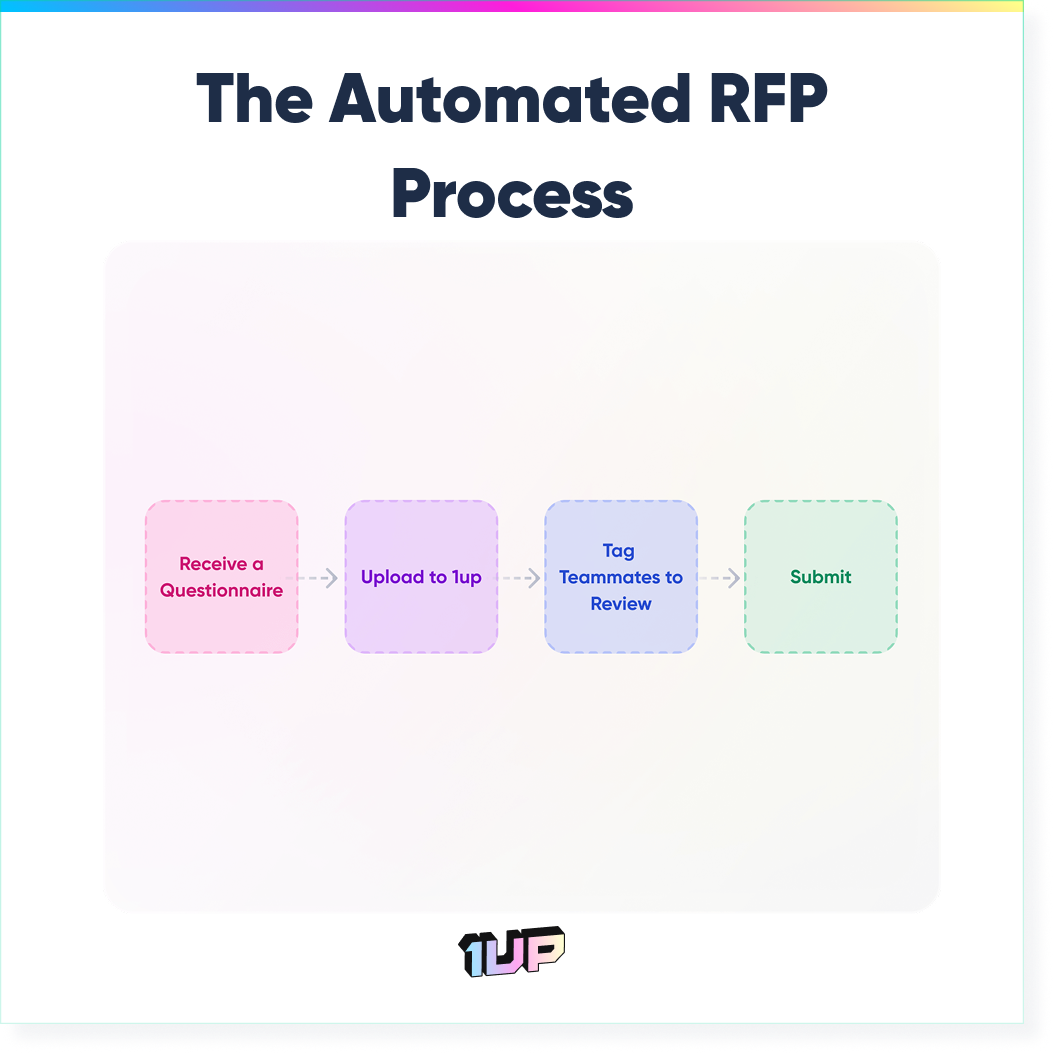
1. Receive a questionnaire
When a new questionnaire comes in, the whole process feels lighter. The team does not have to get stuck in a long debate about whether they have the bandwidth to respond. Proposal automation using a tool like 1up gives you room to say yes to more opportunities because the bulk of the work no longer lands on a few people who are already stretched thin.
2. Upload to 1up
This is where the shift becomes real. Upload relevant documents to 1up and let it do the heavy lifting. It pulls from your connected knowledge base, finds the right source material and starts generating accurate answers in the background. Instead of spending hours digging through old files or piecing together information, you get a notification letting you know the draft is ready for review. What used to take days can happen in minutes.
3. Tag teammates for review
If a question needs a second opinion or a specific detail from someone else, you assign it to them with a single click. They get a notification, look it over and send it back. You do not have to chase down responses or remind people repeatedly. The back and forth that used to slow everything down becomes a quick handoff.
4. Submit your proposal
By the time you reach the final stage, the proposal already looks clean. Grammar is handled. Formatting is consistent. The structure makes sense. You make a few final tweaks and send off a polished response without the usual rush or last minute scramble.
The impact is noticeable right away. Teams pick up more opportunities because they finally have the capacity. Win rates rise because responses are stronger and more consistent. Even though you cannot measure the drop in stress, you feel it across the team.

What are the 5 Best Tools to Automate Proposals?
If you are looking to automate proposals, the next question is which tools are actually worth evaluating?
The market has grown fast in the last few years, and many platforms promise to make answering RFPs, questions, and security reviews much easier.
The best tools for proposal automation help your team put all their answers in one place, create new answers fast, and work together on reviews without a lot of back-and-forth between departments.
Here are five proposal automation platforms that teams often check out:
Loopio
Loopio is one of the most well-known platforms for answering RFPs. It mainly helps you manage your responses and keep a library of organized content. It enables teams to use correct answers for many different proposals.
Loopio works well for teams that get a lot of RFPs and need a system to keep all their content in order. Its features help proposal managers give out questions, check on progress, and make sure everyone is working with the latest versions of documents.
1up
1up focuses on automating questionnaires and RFP responses using LLMs. You can upload a questionnaire, connect your company knowledge base, and let the platform generate answers from your approved materials automatically.
Teams can easily work together to review and fix these answers instead of writing them from scratch. This helps companies respond faster and take the opportunity to answer more RFPs while minimizing workload for proposal managers as well as SMEs.
PandaDoc
PandaDoc is a platform that helps you create, send, and keep track of proposals better. The tool has templates, features that automate documents, and built-in electronic signature tools. Sales teams often use PandaDoc to quickly create proposals and move deals along faster. Even though it's not only for RFP questions, it helps automate many parts of the proposal-making and approval process.
Responsive (previously RFPIO)
Responsive is a platform used for managing RFPs, RFIs (Request for Information), and security questionnaires. It has automated features that let teams pull answers from a central content library and work with company experts.
Qvidian (Upland)
Qvidian has been around for many years and is known for document automation. Companies use it to create long and complicated proposals, not just standard RFP questions. The platform focuses on document assembly, reusable content and structured templates to help teams consistently create polished responses.
Transitioning to Automated Proposal Management
If you're reading this, you're already aware of proposal software and RFP tools. You also know that inaccuracy and inconsistency are some of the biggest problems with RFP software.
Shifting from a manual process to proposal automation feels like a big change, but 1up is built to make the transition smooth. Most teams start seeing improvements in their workflow almost immediately. The steps below show how organizations usually get set up and how quickly the benefits kick in.
1. Connect your knowledge base
Everything starts here. Your knowledge base becomes the source of truth that 1up uses to generate responses, so the quality of your results depends on the materials you connect. Most teams pull together the documents they already rely on during RFP season. This usually includes things like:
- Security and compliance documents
- Previously completed questionnaires
- Product and service documentation
- Sales and marketing materials
- Website content and key URLs
You do not need to upload everything at once. Most teams begin with five to ten solid documents that cover the questions they see most often. Here’s how to build an automated knowledge base for RFPs and questionnaires with 1up:
Once these are in place, 1up has enough context to produce accurate answers that reflect how your company actually works.
2. Assign an administrator and collaborators
After the knowledge base is connected, you bring in the people who will help keep responses accurate. This often includes teammates from sales, operations, IT, security and compliance. 1up supports permission levels so you can let collaborators review and edit answers without giving them access to the full knowledge base.
This creates a clean workflow where the right people can weigh in without risking changes to your core documents. Here’s what RFP collaboration looks like when automated:
3. Automate your proposals
Once everything is set up, you upload your questionnaire and let 1up take it from there. The platform reads each question, finds the relevant information and starts generating responses in real time. Short questions usually come back right away. Longer or more complex ones might take a little more time. You receive an email once the draft is ready for review, and you can watch answers populate as they are generated.
For many teams, this is the moment when the value becomes impossible to ignore. The hours they used to spend searching for answers or rewriting content disappear. What used to feel like a full day of work now fits into a simple review cycle that takes a fraction of the time.
“Throughput has definitely increased. When we were responding to RFPs manually, we would say no to opportunities because we did not have the capacity. Now we are saying yes to every questionnaire. The volume of inbound RFPs is no longer a blocker.”
Matt Hathcock, FusionAuth Sales Engineering Manager
Proposal automation does more than speed up the process. It changes the entire feel of the work. Teams stop burning hours on repetitive tasks and get more time back for strategy, customer conversations and the parts of the job that actually move deals forward. The workflow becomes steadier, easier to manage and far less stressful.
Once automation handles the heavy lifting, small improvements start showing up everywhere. There are fewer last minute scrambles, fewer long nights of writing or reviewing and more confidence that the answers going out the door are accurate and consistent.
If your goal is to respond faster, improve quality and build a more scalable way to handle RFPs, proposal automation is the most reliable path forward. It gives teams room to grow without adding strain and creates a foundation that supports stronger outcomes across the entire sales cycle.
FAQs
Proposal automation handles repetitive tasks like finding information, drafting answers and coordinating reviews. This lets teams spend more time on strategy and customer conversations instead of manual work.
LLMs help teams generate accurate responses from trusted sources and support smoother collaboration across departments. They reduce the need for constant rewriting and searching through documents.
No. Most teams begin with a small set of five to ten core documents. As long as the knowledge base covers the most common questions, automation can produce strong and reliable answers.


The Payoff of Connecting Questionnaire work to your Sales Pipeline

How to Write an RFP Response That Survives AI Scoring

SIG vs CAIQ vs VSA: A Simple Guide to the Big Three

How to Win Government RFPs With AI (Without Getting Disqualified)

Why Most Internal AI Assistants Get Built and Then Abandoned