Writing an Executive Summary can trip people up.
You sit down to write the first part of the proposal and suddenly nothing comes out. You know the product. You know what the buyer asked for. You might even have notes from calls and still the page looks empty and you start second guessing everything.
Plenty of RFP Managers and Sales Leaders deal with this, and it's one of the common reasons people lose RFPs. The executive summary feels scary because you want it to sound good and you want the buyer to like you right away.
That pressure makes it easy to overthink every word. Some folks add way too much detail. Others write something really generic just to get it done. Reviewers can feel that and usually skim past it.
This guide will help you get through that first part without melting down. You'll see what needs to go in the summary and what you can leave out. You'll learn a simple way to talk about the buyer’s goals and your solution without twisting your brain in knots. Follow these steps, and the whole thing becomes a lot easier.
What is an Executive Summary?
Exec summaries, within the context of an RFP, sit at the very top of your response and set the stage for everything that follows. They give the evaluation team a quick look at what your proposal covers and why your company should be taken seriously. This is where you show that you understand what the buyer wants and that you can deliver something that actually solves their problems.
When done well, the summary should feel like a snapshot of the buyer’s goals and your solution working together.

You only get one shot to make that first impression land.
Reviewers usually read this section before they dive into any technical details, so a clear Executive Summary can help your proposal build momentum right away. It gives them a reason to keep reading instead of skimming. A clearer picture of how buyers move through a selection process helps this section land, and understanding the differences between RFPs, RFQ, and RFIs, gives you the context to shape a stronger summary.
A strong Executive Summary does not have to sound fancy. It just needs to help the reader understand your angle faster and feel confident that your proposal is worth their time.
Why Proposal Teams Struggle With Executive Summaries
A lot of teams run into trouble when they start writing the Executive Summary because the pressure to get it right can make the whole thing feel heavier than it needs to be. People try to pack every detail into the first few lines and lose the core message in the process. Once that happens, it gets hard to recover the flow.
Another issue is the habit of listing features instead of speaking to the buyer’s goals. This usually shows up when teams rely on product heavy internal notes that never got updated or were never meant for this type of writing. It pulls the focus away from the customer and makes the summary feel disconnected.
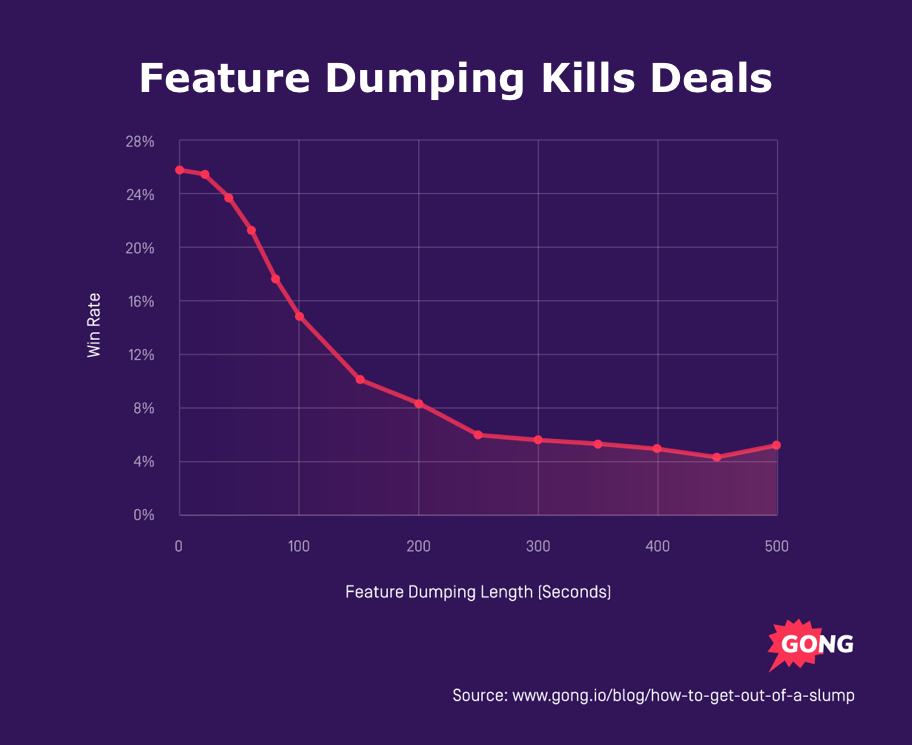
As our friends at Gong say, feature dumping kills deals.
The tone gets messy too. Folks want to sound smart and end up sounding stiff. Reviewers are human and they tune that out quickly. A lot of this comes down to how leaders communicate and how direct the writing should be.
Then there is timing. Many teams leave this section for last and rush through it right before submission. When that happens, the summary becomes a patchwork of edits rather than a clear opening to the proposal.
A strong executive overview does NOT need to be perfect. It just needs to be clear. When you keep it simple, specific, and focused on the buyer, the entire proposal becomes easier to read and easier to trust.
Elements of a Strong Executive Brief
These five elements make up a simple structure that works across industries and deal sizes. Evaluators scan dozens of proposals, so a clear framework helps your summary stand out and makes it easier for them to understand your angle right from the start.
Clear understanding of the buyer’s goals
Everything starts with the buyer. Show that you understand what they want to fix, improve, or build. This is where you reflect their language, not yours. When teams skip this step, the summary feels disconnected. A clearer picture of buyer needs usually comes from stronger internal knowledge sharing and discovery habits.
A crisp description of your proposed solution
Once you outline the buyer’s goals, give a tight explanation of how your solution meets them. Keep it short. Keep it focused. Reviewers do not need a full product tour here. They only need to understand why your approach fits. Teams that struggle with this part often deal with scattered enablement content, which is why clean sales enablement content strategy can lay the foundation for how these summaries are written.
Your unique value
This is where you explain what sets your company apart. You can highlight innovation, experience, customer support, or real results you have delivered for similar clients. Strong positioning also comes from knowing how competitors frame their solutions. The same ideas behind B2B competitive marketing strategies apply here, since they help teams communicate advantages clearly in crowded markets.
Direct benefits to the buyer
Do not stop at features. Spell out the outcomes the buyer can expect. Faster processes. Better visibility. Lower risk. Stronger outcomes. Reviewers care most about the part where the solution makes their world easier. When teams learn to reframe features into benefits, they can tie a proposal directly to a buyer outcome.
A simple call to action
End the summary with a clear direction. Invite the reader to move into the details of the proposal or a follow up conversation if that fits your process. You do not need anything complicated here. Just a clear next step.
5 Steps to Write a Winning Exec Summary
There is no need to turn this into a huge writing project. A steady process helps you build an RFP submission summary that feels clear and grounded in the buyer’s needs. These steps guide you through each part without getting lost.
Step 1. Start with the buyer’s world
Begin by gathering everything you know about the buyer. Use the RFP, discovery calls, and any internal notes to list their top goals in plain language. When teams share deal insights more consistently, the early framing becomes easier, which is why strong knowledge sharing practices in the workplace can make a real difference here. Focus only on the goals that matter most because they set the direction for the rest of your summary.
Step 2. Outline your solution at a HIGH level
Write a few simple sentences that show how your solution addresses each goal. Keep it light. This is not the section for technical detail or product tours. The goal is to connect the dots between what the buyer wants and how your solution moves them forward.
Tip: Avoid using AI for this part. Or if you do, keep it brief. You want to avoid being too wordy. No one will remember that.
.png)
Step 3. Proof, Proof, and more Proof.
Buyers want confidence. Give them a reason to trust you. Share results you delivered for similar clients, short success metrics, or anything that proves your team knows how to execute. Don’t be shy about this. Share your customer stories with confidence. Your tone matters here because RFP evaluators respond to clarity more than hype. Build up those communication skills that focus on direct and simple language.
Step 4. Connect benefits to outcomes
Translate features into the real world impact the buyer will feel. Instead of saying what the product does, describe how their team will work differently once it is in place. Faster responses. Better insight. Fewer manual steps. These are the outcomes that matter and they help the evaluator picture success.

Step 5. End with a clear direction
Close with a clear and confident sentence. Answer this simple question: WHAT HAPPENS NOW? Point the reader toward the rest of the proposal or invite them into a follow up conversation if that is part of your process. A strong finish keeps the momentum going and makes it easier for the reviewer to move deeper into your response.
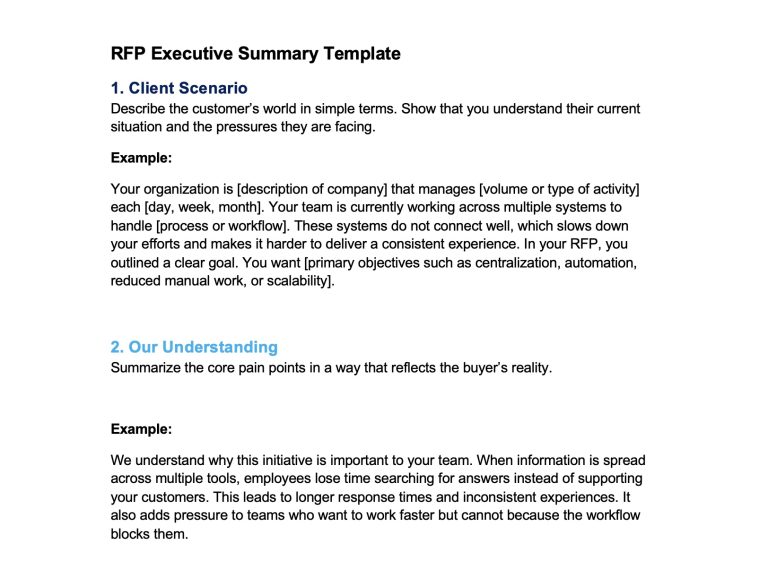
Free Template for a Strong RFP Executive Summary
Here is a downloadable template you can use the next time you or your team has to write a bid summary.
Best Practices to Keep Your RFP Executive Summary Clear and Effective
A strong exec brief does not come from fancy writing. It comes from simple choices that help the reviewer understand your message without working for it. These best practices keep your summary clean and buyer focused.
Write with clarity and avoid long sentences
Short sentences help reviewers take in the information fast. They read dozens of proposals, so clean writing gives your summary an advantage.
Focus on what the buyer wants rather than what you sell
Buyers care about their goals more than your product features. When you write from their point of view, the whole message becomes more relatable.
Keep your tone friendly and confident rather than stiff and formal
A natural tone makes your proposal easier to read. This is the same idea behind how to make b2b marketing less boringwhich reminds teams that simple and human language connects better with real people.
Refer to measurable outcomes whenever possible
Buyers trust numbers. Use real results, improvements, or team wins whenever you can.
Review your summary before sending to confirm the story is simple and connected
A quick read aloud can show you where the message feels confusing or off track. If the summary flows from goal, to solution, to outcomes, you are ready to go.
How 1up Helps Generate Winning RFPs
Most RFP teams get stuck in the same loop:
- They spend hours searching for answers across old proposals, wikis, PDFs, Slack threads, and spreadsheets.
- They rewrite the same summary three or four times because nobody has the full story in one place.
- They jump between tabs trying to remember what the buyer asked for and how their company solved it last time. With 1up, you break that loop completely.
1up helps RFP teams automate with a two pronged system that handles both knowledge retrieval and in-context answering. This gives you everything you need to draft a clean and accurate exec summary in a fraction of the usual time.
There are 2 ways to create an exec summary with 1up:
1. Use Ask 1up to synthesize content from past RFPs and Proposals
Ask 1up is your sales brain. It connects all your team’s sales documents into one knowledge base and pulls accurate answers in seconds. If the information exists in your files, 1up can surface it.
That includes product details, support processes, pricing guidelines, competitive notes, training material, and anything else your team stores.
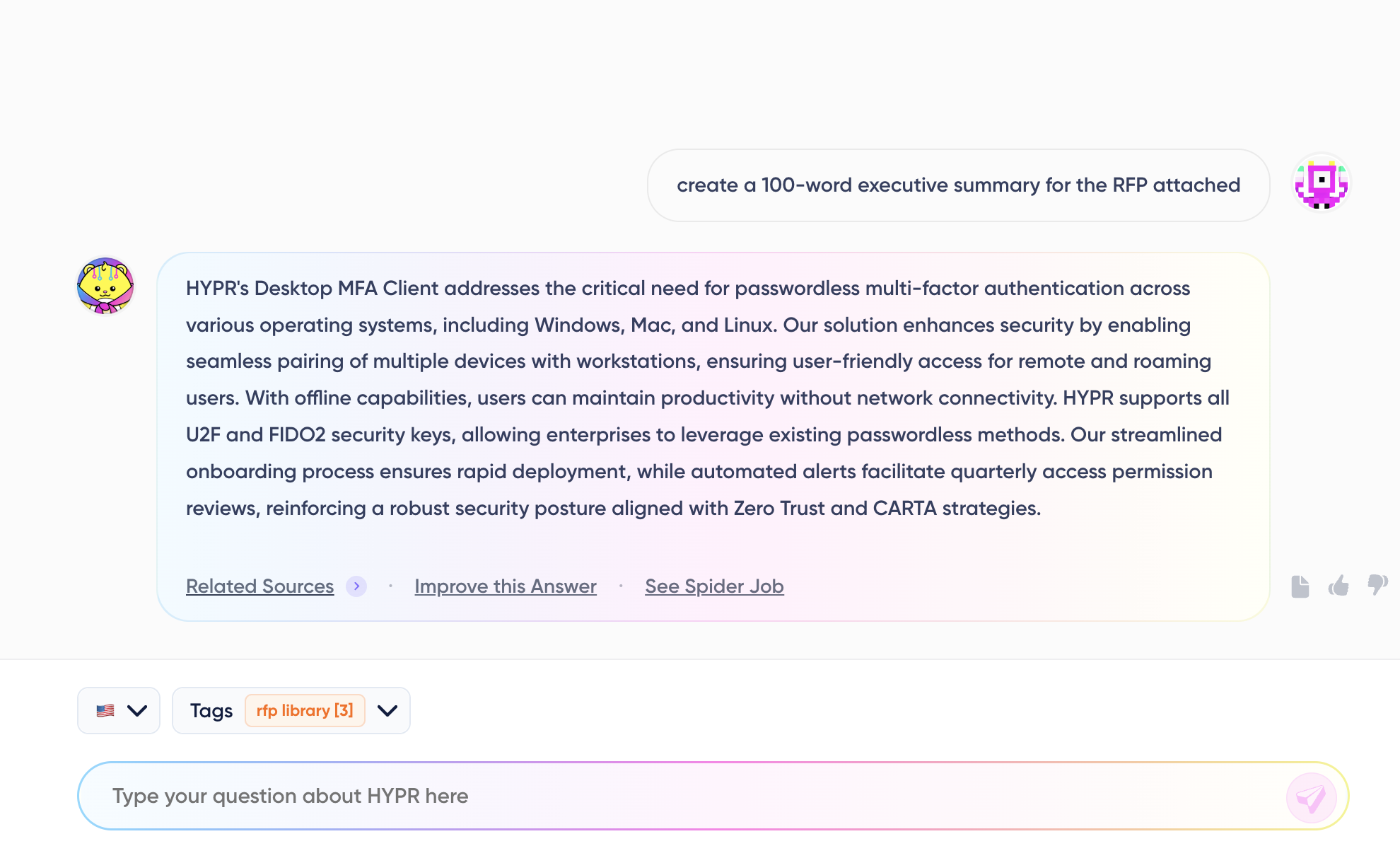
Any question that has an answer in your documents is one 1up can answer.
With automated responses, new hires can ramp faster. Subject matter experts get fewer pings. Proposal managers can ask things like:
- What problem does our platform solve for mid market SaaS buyers
- How do we explain our customer data model in simple terms
- What benefits do we highlight for healthcare organizations
And 1up responds with what is already true in your content. This is the foundation for a strong executive summary because you get clarity without digging.
2. Use the 1up Browser Plugin to generate exec summaries on any web-based form
The second half of the system is the 1up browser extension. The extension lets you answer questions directly inside any RFP platform or questionnaire without switching tabs. It identifies text fields, dropdowns, and checkboxes, and it can fill answers right in place.
Users can highlight any query for instant answer generation and the extension can auto detect formatting elements across a questionnaire.
This means you can open an RFP in a browser and:
- Highlight a question about your product
- Watch the extension pull the right answer from your knowledge base
- Edit it if needed
- Insert it directly into the response
You can even type follow up questions without leaving the page. It turns the entire RFP process into one continuous workflow where answers come to you instead of you searching for them.
Together, these two capabilities make writing RFP Executive Summaries much easier
When you combine Ask 1up with the Browser extension, you get a workflow where every part of the executive summary becomes quick and grounded.
You can ask 1up for the buyer’s goals, your competitive strengths, and the outcomes you deliver. Then you switch to the RFP platform and fill everything in without leaving the page. No searching. No copy and paste chaos. No guessing what the right language should be.
Your team spends less energy on hunting for information and more energy on telling a clear story that wins.
Most teams know how important the executive summary is, but they never have the time or the right information in one place to write it the way they want.
When you bring structure and 1up into the process, the whole thing gets easier. You can pull the right details fast, tell a clearer story, and give reviewers a summary that actually stands out. If you want to see how much smoother this part of the RFP can feel, sign up for a free trial.
FAQs
Most teams keep it to one page or less. The goal is clarity, not length. Reviewers skim, so a short and focused summary has a better chance of being read.
Avoid feature dumping, vague language, and long paragraphs. Stay close to the buyer's goals and use simple sentences that make your solution easy to understand.
1up gives you instant access to the information you need. Ask 1up pulls accurate details from your internal documents and the Chrome extension fills answers directly inside an RFP platform. This cuts out searching, tab hopping, and rewriting, so you can focus on telling a clear story.


How to Write an RFP Response That Survives AI Scoring

SIG vs CAIQ vs VSA: A Simple Guide to the Big Three
How to Win Government RFPs With AI (Without Getting Disqualified)

ChatGPT vs. Copilot vs. Claude for RFPs: A Side-by-Side Comparison
.png)
Using Claude for RFPs? Add This One Piece