




 LinkedIn
  Instagram
  X (Twitter)
  Youtube







Somewhere on your team right now, someone is answering the same question they answered yesterday. And the day before that. It might be a prospect asking what the product costs, or a customer who can’t figure something out. Either way, it’s time that adds up fast and mostly goes unnoticed until someone is totally underwater.
AI has gotten genuinely useful at automating customer questions. Not in a futuristic way, just in a practical “this saves us hours every week” way. Most companies are using it in one of three spots.
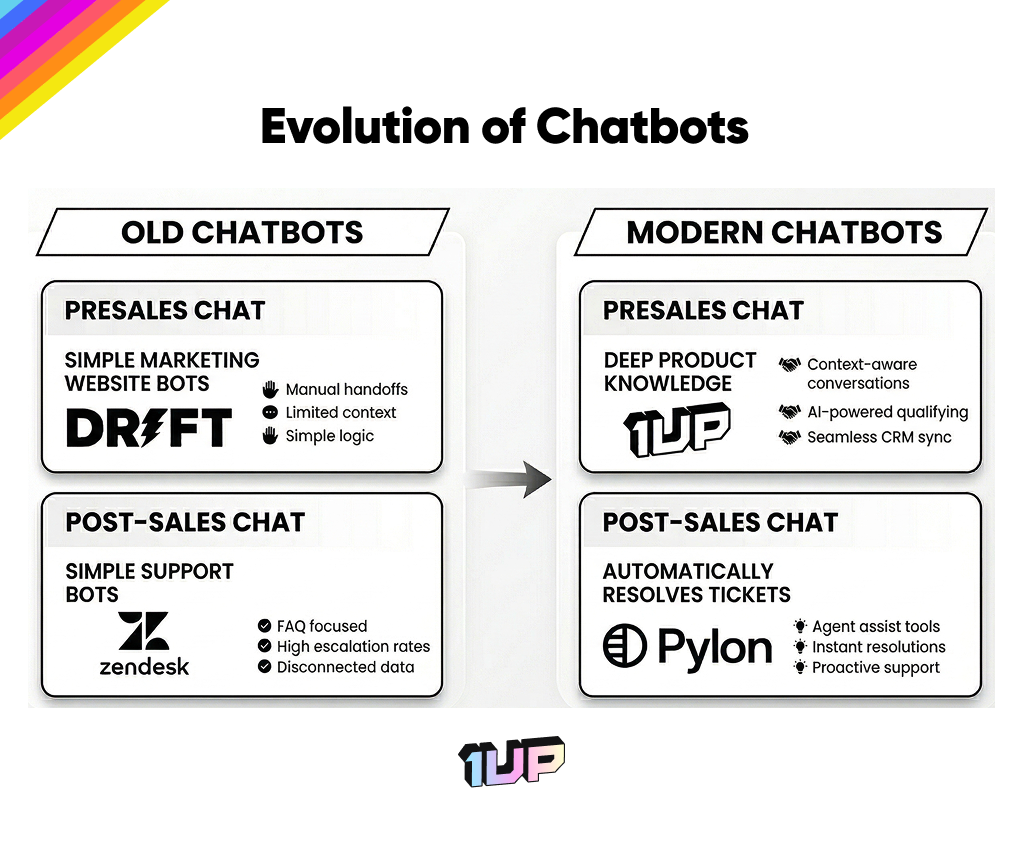
The first chatbots were pretty much just for support. Someone bought something, ran into a problem, and the bot was there to help, or at least try to. That use case is still around but AI has pushed things a lot further.
Now the same kind of technology is being used to answer questions from people who haven’t bought yet, and to help sales and support teams internally without any customer ever seeing it.
Here’s how things have changed over the past few years:
Choose your AI use case
When it comes to customer responses, there are 3 popular types of answer engine use cases.
- Pre-sales chatbots for driving pipeline and deals
- Post-sales support for existing customers who need help
- Internal chatbots for teams engaging with customers at all stages
Most teams don’t deploy all three at once.
A good way to figure out where to begin is to think about who you’re trying to help first. If you have a lot of prospects asking questions before they buy, start with a pre-sales bot. If your support queue is the bigger problem, start there. If your reps are the ones who keep getting stuck, build something internal first.
Here’s a quick selection guide:
| Goal | Who it’s for | Tool type | What it does |
| Help prospects and build pipeline | External prospects | Presales AI | Answers deep product questions instantly, no rep needed. Built on your actual product knowledge, not generic marketing copy. |
| Help existing customers get answers | Existing customers | Post-sales AI | Automatically resolves support tickets. Customers get answers without waiting for a person to dig through documentation. |
| Help your internal team move faster | Internal team | Internal AI answer engine | Pulls from your CRM, past conversations, and product docs. Lives inside Slack or Teams so reps get answers without switching tools. Also great for getting new hires up to speed fast. |
Each use case solves a different problem for a different audience. Pre-sales chatbots help your prospects and builds your pipeline. Post-sales support AI helps existing customers get answers without waiting. Internal team AI helps your own customer-facing team move faster and gets new hires up to speed without distracting teammates.
Pick the one that matches your biggest headache right now and go from there. That’s usually enough to see whether it’s worth going further.
Pre-sales Agents
Think of this as AI for capturing new prospects and moving deals forward.
The old flow was: prospect has a question, fills out a form, waits. Sometimes a rep follows up the same day. Sometimes it’s three days later and the person has already moved on.
Chatbots were supposed to solve this but the early versions were genuinely bad. Vague responses, dead ends, and almost always a handoff to a human anyway. People stopped trusting them for mission-critical work.
AI pre-sales chatbots like 1up’s Answer Hub work differently because they’re built on a real knowledge base. Prospects ask something specific and get something specific back.
What goes in the knowledge base
You decide. Pricing pages, product docs, API documentation, marketing content. Some teams also add competitive info. There’s no perfect list but this guide on building a company knowledge base is worth reading if you’re not sure where to start.
The most important thing you can add is deep product knowledge.
That means the stuff that actually answers hard questions, not just the high-level marketing copy. Think API docs, technical specs, detailed feature breakdowns, how-to guides. Prospects who are close to buying tend to ask specific questions. If your bot can only pull from a one-pager, it’s going to fall flat at exactly the moment it matters most. The more detailed your product documentation, the better the bot gets at handling the kind of questions a sales rep would normally have to answer.
Routing the right answer to the right person
You can set rules for how the chatbot responds depending on who’s asking. A prospect in Germany asking about enterprise pricing shouldn’t get the same response as a startup in Austin. Different regions, products, and business lines can each have their own setup so answers actually make sense for the person reading them.
Post-sales Support Chatbots
This classic use case creates a support channel that doesn’t make people wait for a human. It’s the one most people think of first and it’s been around the longest for good reason.
The customer has a problem, sends a message, gets an answer back without waiting for a person to dig through documentation.
An AI agent handles the lookup and reply. When it can’t answer something it kicks it over to a real person. Intercom, Zendesk, Pylon, and Decagon all do this.
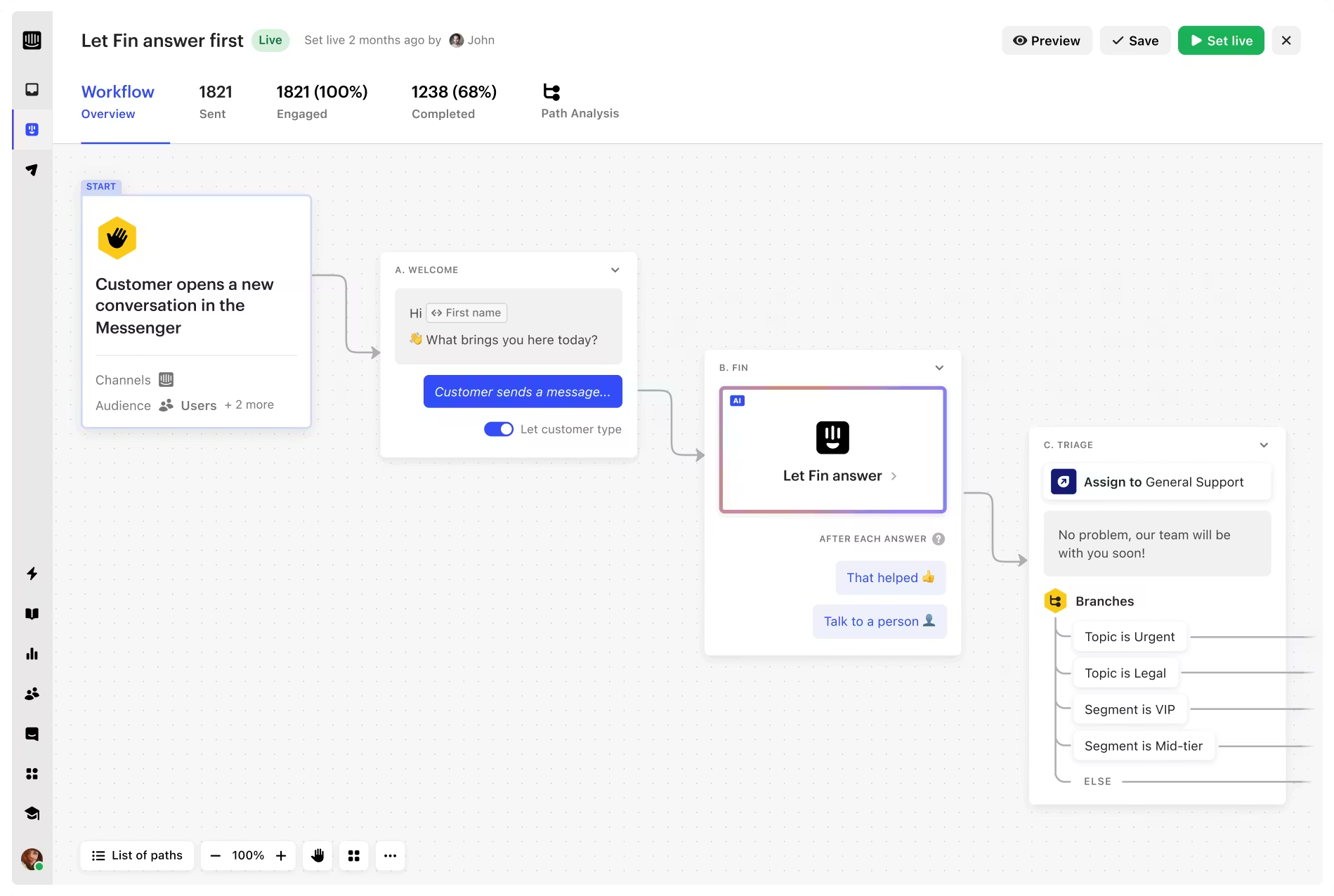
Intercom, for example, provides powerful workflows you can customize based on use case, persona, and various other triggers:
Teams that use these tools tend to close tickets faster and field fewer repeat requests.
Internal Knowledge Assistants
…for the humans doing the answering.
This one gets overlooked but it might be the most useful depending on how your sales team is structured. Instead of building something customer-facing, you build an internal-facing knowledge assistant. A tool your reps and agents use to get answers before they respond to someone.
It pulls from your CRM, past customer conversations, product docs, whatever you connect to it. The questions it handles tend to be more specific and the data is more sensitive, so there’s usually a bit more thought put into how it’s set up.Where this really clicks is when it lives inside the tools your team already uses such as Slack, Microsoft Teams, or Google Chat.
For example, here’s how internal teams use 1up’s Slack Connector to automate answers to customer questions:
Deploy your customer-facing AI chatbot
You don’t need a big IT project or a dedicated ops person to get something live. You pick your sources, add your branding, and decide who gets what. That’s basically it.
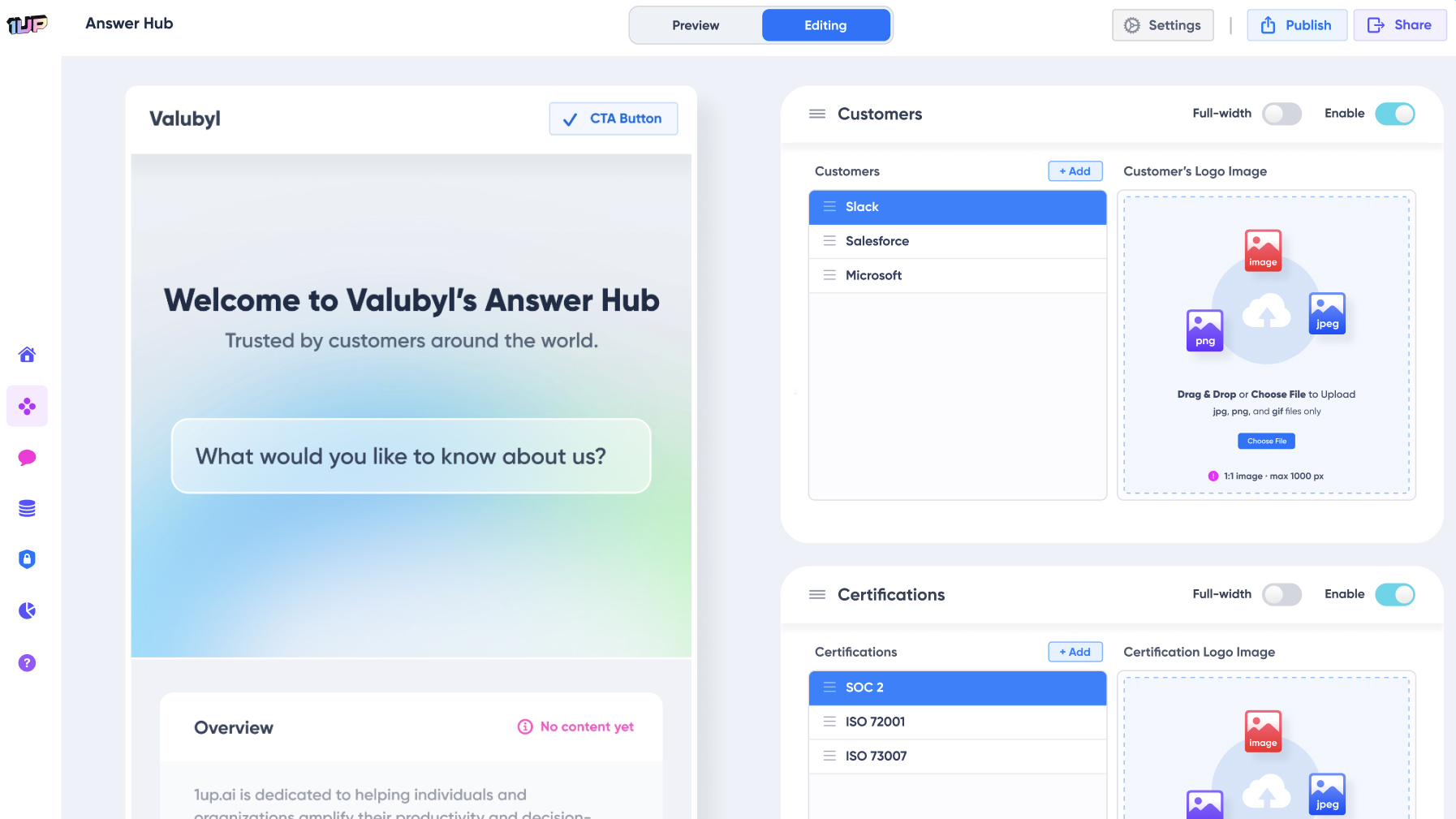
For this demo, we’ll be using 1up’s Answer Hub to create a customer-facing sales agent.
Setting up your 1up Answer Hub is straightforward enough that a sales or marketing person can handle it without looping in engineering. Here’s how:
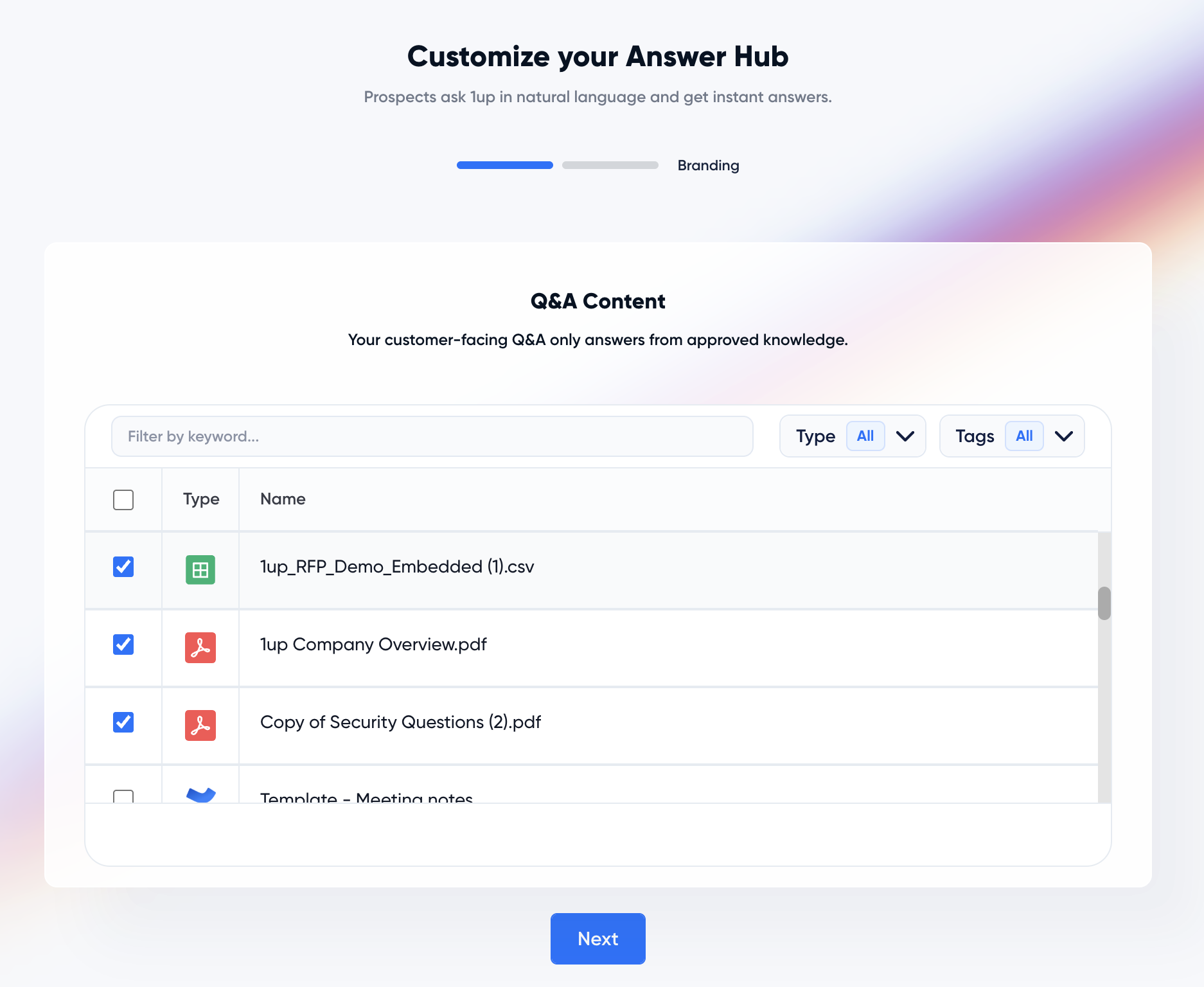
Step 1: Connect your knowledge sources
Start by selecting at least one file or URL from your Knowledge Base. Use your best stuff here. Technical docs, pricing pages, API references, detailed feature breakdowns. The more specific the content, the better the answers. If you’re already using 1up, you can pull straight from your existing Approved Answer Library instead of starting from scratch.
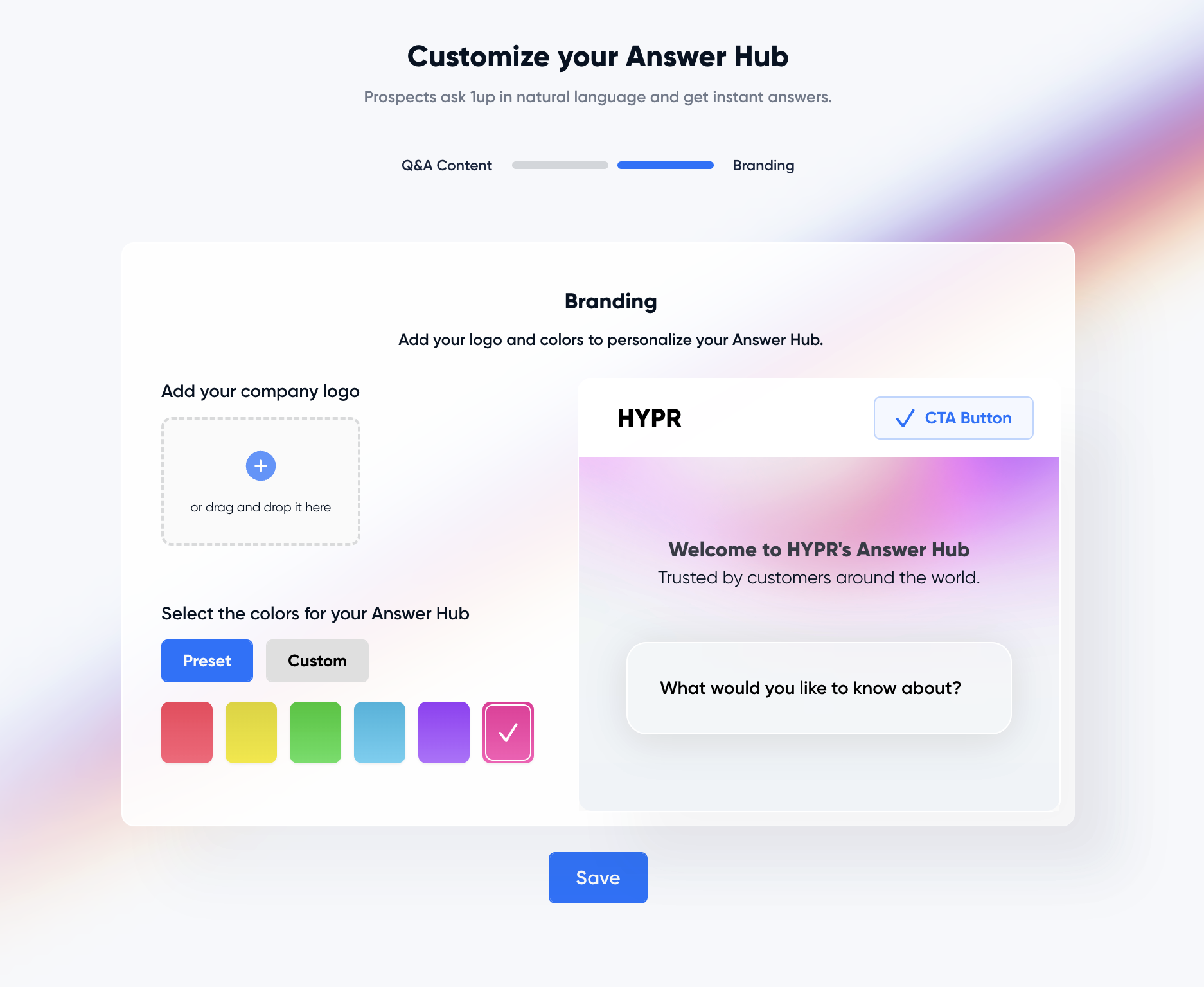
Step 2: Set your branding
Add your logo and pick your colors. After that, a live preview of your Answer Hub shows up in the dashboard so you can see exactly what customers will see before you publish anything.
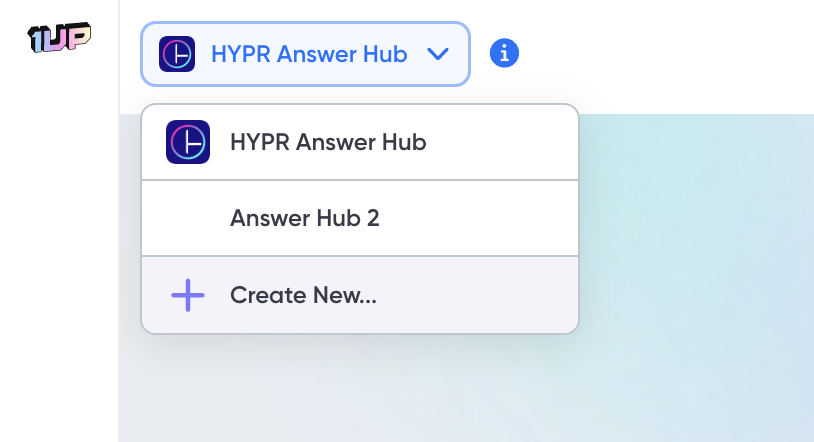
Step 3: Build separate hubs for different audiences
One hub doesn’t have to do everything. You can spin up different Answer Hubs for different products, regions, or topics. A prospect in Germany asking about enterprise pricing should get a different answer than a startup in Austin asking about a free trial. Meanwhile, Channel Partners can get their own hub with instant answers to product questions, messaging guidance, and brand positioning. Security-focused buyers can be sent to a dedicated trust center. Each audience gets what they actually need.
That’s all it takes to create a branded customer-facing bot.
Want to see it in action? Check out this live demo of Answer Hub.
As an optional step 4, you can embed Answer Hub on your own webpage. Head to your Hub Settings to copy the widget embed code.