Buyers are asking much harder questions these days. Before they sign any paperwork, they need to know exactly what they are getting into. They want to know how the product is made and if they can trust it with their data.
A good demo is not enough to make a sale anymore. Buyers now want reports and details about how the product is designed. They are asking things that your sales team probably did not hear just a few years ago.
We studied over 10,000 answers to supplier questionnaires from real business deals.
It turns out that *most* buyers ask the same stuff every time. It doesn't matter what industry they are in or how big the company is. In this post, we look at the top 10 technical questions that pop up the most. We will show you what buyers really want to know and how to give great answers that help you close deals faster.
What Is a Supplier Questionnaire?
A supplier questionnaire is an official document a buyer sends to a possible vendor (supplier) to check their skills, security, compliance with rules, and how they run their business. It is a main tool that buying and IT teams use before signing a contract, especially when sensitive information or important computer systems are involved.
You will also hear them called:
- Due Diligence Questionnaires (DDQs)
- RFPs (Requests for Proposal)
- Security questionnaires or InfoSec questionnaires
- Vendor assessments
They have different names depending on who sends them, but the main goal is the same: check out the vendor before making any commitment.
Technical Questions Are a Part of Every Sales Process
Whether you build computer programs or make physical products, technology is now part of almost every business relationship. Buyers know this, and they have questions.
They want to understand the product at a technical level before agreeing to anything.
Third-party involvement in breaches has doubled to 30%, and exploitation of vulnerabilities has surged by 34%, creating a concerning threat landscape for businesses globally.
Verizon 2025 Data Breach Investigations Report
The average cost of a vendor-related data breach has gone up to $5.08 million. The risks are very real, which is why buyers in technical fields like law,healthcare, banking, insurance, and large tech companies are asking harder and harder questions.
Most DDQs have 100 or more questions. Some in heavily regulated industries like finance and healthcare have over 200. They involve people from security, legal, IT, and buying teams. Teams that handle them confidently and consistently are the ones that close deals faster.
The 5 Categories Buyers Ask About Most
After looking at over 10,000 real questionnaire answers, we found that supplier questions fall into five main groups. No matter the industry or company size, buyers want to know about the same five things:
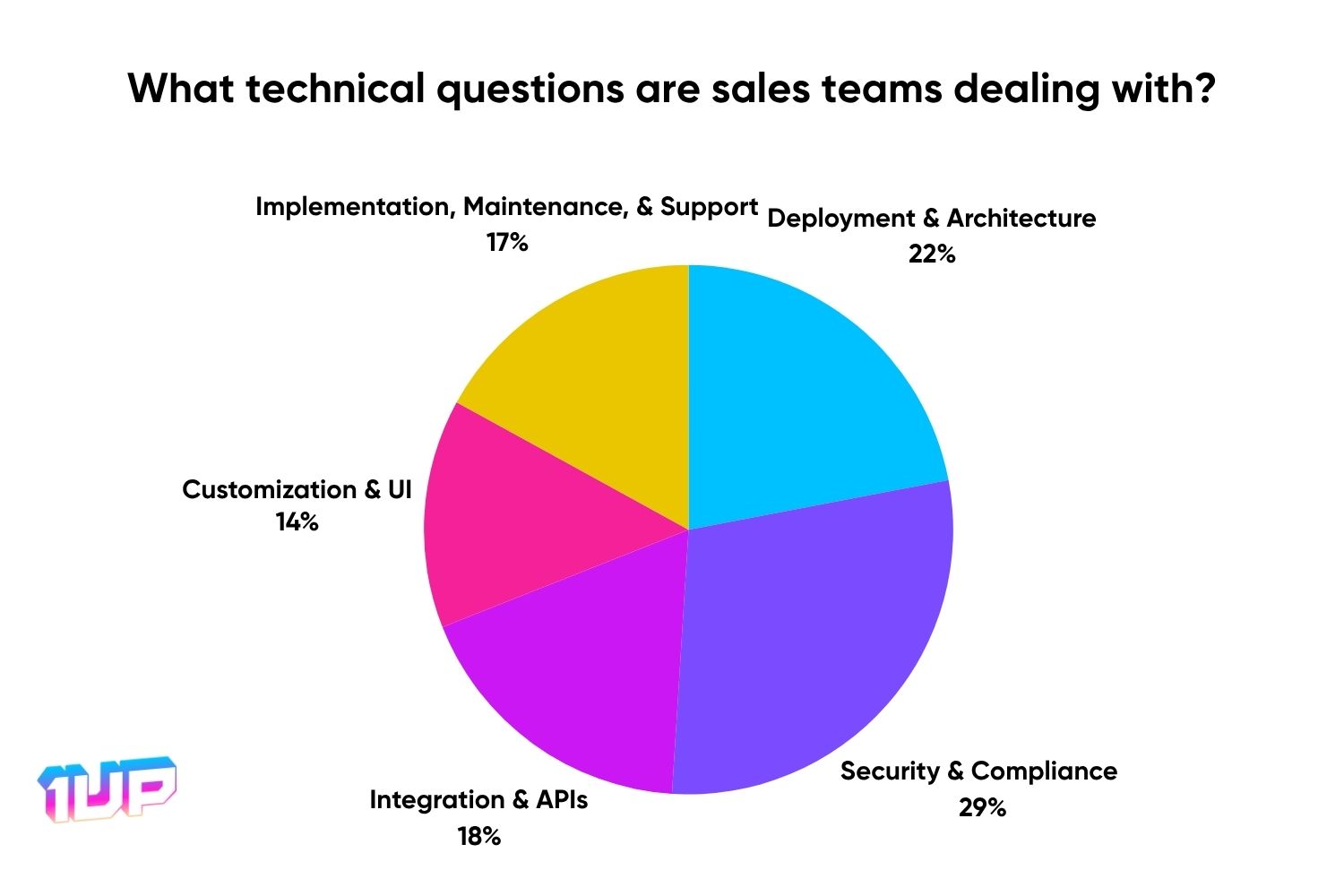
The results show that buyers focus most on security (29%), then on customization and how flexible the user screen is (22%). Integration and APIs (18%), implementation and maintenance (17%), and deployment and architecture (14%) are also important because they show how easily a solution fits into existing technology and how practical it is to use and manage.
As buyers check solutions more carefully, sales teams are expected more and more to answer detailed questions about product structure, security, integrations, and how to use the product before a deal can move forward.
These five topics cover the real worries of important people, from buying teams and IT to legal and the top company leaders. Sales teams that can answer them ahead of time and with proof build trust faster and create fewer problems at the end of a deal.
What are the top 10 Supplier Questions?
Here are the ten questions 1up sees most often in thousands of sales cycles, along with what buyers are truly looking for and how to answer them well.
1. What ways can we deploy your product (cloud, on-site, a mix), and what is needed for an on-site installation?

Why buyers ask this:
IT teams need to know if your product fits their setup before checking anything else. In banking, healthcare, and government, vendors who are cloud-only are often immediately disqualified because of rules about keeping data private or where it must be stored.
How to respond:
List every deployment choice you support: SaaS (cloud software), on-site (on the buyer's own computers), and hybrid (a mix). For on-site, be very clear about what operating systems work, what computer power is needed, and what other programs are required. Vague answers here are a warning sign.
Pro tip: Include a simple drawing of the product's structure and a document with all the installation requirements. Buyers who are seriously considering you will hand these directly to their infrastructure team.
2. Does your system support multi-tenancy, meaning separate, logically protected areas within one platform?

Why buyers ask this:
Large companies often need to keep data and access separate for different regions, business groups, or client accounts. Multi-tenancy is vital for products that serve many businesses or partners. Doing this wrong means the buyer could face problems with compliance.
How to respond:
Clearly describe your product's structure: shared versus separate databases, how role-based access control (RBAC) is set up, and how data is kept separate between different clients. Don't assume the buyer knows your default settings.
Pro tip: A simple diagram that shows the difference between single-tenant and multi-tenant setups will be more helpful than any written explanation.
3. What ways of logging in and controlling access do you support (SSO, SAML, MFA, RBAC)?

Why buyers ask this:
Managing identity and access is one of the top reasons for company data breaches. CIOs and CISOs need to confirm that your system works with their Identity Providers and that access can be strictly controlled.
How to respond:
List all the secure protocols you support: SAML 2.0, OAuth2, OpenID Connect. Also cover multi-factor authentication (MFA) options and SCIM support. Explain how role-based access control (RBAC) is configured, ideally with documents or a live demonstration.
Pro tip: Have your SAML metadata file or a setup example ready to share. Security-focused buyers often ask for this before the next meeting.
4. Does your platform offer RESTful APIs for major features, with documentation and versioning?

Why buyers ask this:
Modern companies expect products to be API-first. Developers who will build on or connect your product want to see the documentation before their company commits to anything. Good APIs reduce manual work, allow for more possibilities, and show that your product is well-developed.
How to respond:
Confirm how deeply your API covers the product: read/write access, admin actions, webhooks. Share your OpenAPI/Swagger documents, your policy for updates (versioning), limits on usage (rate limits), and example code calls.
Pro tip: If you offer SDKs (software development kits), mention them right away. They make the connection process much easier for companies with many developers.
5. How do you connect with other systems like HR software, payment processors, identity management, and outside data sources?

Why buyers ask this:
The average company uses more than 10 cloud software tools. They are not looking for another product that stands alone. They want something that connects smoothly to what they already have. Poor connection increases both operating costs and security risks.
How to respond:
Point out built-in connectors, API endpoints, and compatibility with popular integration platforms (Zapier, Workato, MuleSoft). Mention support for SCIM, JIT provisioning, and LDAP if relevant.
Pro tip: A real-life connection example, especially one with a tool the buyer already uses, is much better than a lot of documentation. Show it working.
6. What methods do you use for data security, including encryption, backups, data residency, and following rules?

Why buyers ask this:
Vendor-related data breaches cost an average of $5.08 million and are 40% more expensive to fix than internal incidents, according to IBM and Gartner. For buyers in regulated industries, a vendor's security is a direct risk to their compliance.
How to respond:
Cover all four areas clearly:
- Encryption: AES-256 for stored data, TLS 1.3 for data being moved, and whether customers can manage their own security keys.
- Backups: How often you back up, how long you keep them, and the process for getting data back.
- Data Residency: Where your data centers are located and what regional rules you follow.
- Compliance: Relevant certifications (SOC 2 Type II, ISO 27001) and rules you support (GDPR, CCPA, HIPAA).
Pro tip: Attach your latest compliance certificate. Buyers in banking and healthcare will eventually ask for it. Sharing it early speeds up the review.
7. What is your software release plan, including how often you release, how you manage bug fixes, the upgrade process, and how you handle older versions?

Why buyers ask this:
Buyers want stability and to know what to expect, not just new features. An update that breaks a current connection can cause serious problems later. Large companies need to plan their changes around your update schedule.
How to respond:
Clearly state your schedule (e.g., stable releases monthly, small bug fixes every two weeks). Explain how customers are told about updates, how bug fixes are applied, if downtime is ever needed, and how long you support older versions of your APIs.
Pro tip: Link to a real changelog or release notes page. This shows that your product is mature in a way that just writing about it cannot.
8. Describe your plans for disaster recovery and business continuity, including backup frequency, restoration, redundancy, and testing.

Why buyers ask this:
When your product becomes a critical part of the buyer's business, downtime is more than just an inconvenience. It is a financial risk. With 62% of organizations reporting a supply chain issue related to cybersecurity in the past year, buyers now treat disaster recovery planning as a necessary check.
How to respond:
Go through the full disaster recovery plan:
- Backup frequency and where they are stored.
- RPO (Recovery Point Objective – how much data you might lose) and RTO (Recovery Time Objective – how fast you can be back online).
- Geographic redundancy and the plan for switching over to a backup system.
- How often disaster recovery testing happens and what it covers.
Pro tip: If you have a Business Continuity Plan, share a summary or a cleaned-up version. It shows that disaster recovery is a real, active part of your operations.
9. What tools and methods does your development team use for testing, DevOps, and managing the software development lifecycle (SDLC)?

Why buyers ask this:
How mature your engineering process is shows how good your product quality is. Buyers want confidence that releases are stable, secure, and tested, especially as attacks through vendors keep rising. Teams without a clear plan for continuous integration/continuous delivery (CI/CD) raise immediate red flags.
How to respond:
Name your CI/CD tools (GitHub Actions, Jenkins, ArgoCD, etc.), the types of automated testing you run, and whether you use static code analysis or security scanning. Cover the checkpoints for releasing code and procedures for going back to an older version.
Pro tip: A simple drawing of your development pipeline is very effective here. It shows, instead of just telling, that your engineering process is real and organized.
10. What reporting, analytics, and dashboard features are included right out of the box? What options are there for exporting and connecting data?

Why buyers ask this:
Decision-makers need to see their data clearly, and analysts want to work with it in the tools they already know. A platform that hides insights inside its own user interface with no way to export or connect to business intelligence (BI) tools is a dealbreaker for companies that rely on data.
How to respond:
Show what your standard dashboards look like. Explain reporting filters, custom report options, and available export file types. Mention connections with Power BI, Tableau, or direct access to a data warehouse.
Pro tip: If users can directly search your data or send it to their data warehouse, lead with that. It is a big advantage and one that technical reviewers will strongly appreciate.
What are the Top Formats for Supplier Questionnaires?
Supplier questionnaires do not arrive in one standard format. They come in spreadsheets, Word docs, PDFs, and web portals. The format alone can determine how painful the process is to complete.
Here are the four most common formats you will encounter:
Excel-Based Questionnaires
Excel DDQs are often the most complicated. They have hundreds of questions, columns for scoring, and drop-down menus, sometimes spread across many tabs. Questionnaires about money and security often come this way.
Example question: "Do you use MFA for all employee logins? Yes/No. Please explain."
You have to type answers right into the spreadsheet. The format is stiff, which makes simply copying and pasting old answers unreliable. You will almost always have to change your answers to fit the column style.
Here’s how 1up automates Microsoft Excel questionnaires:
Word and Google Doc Questionnaires (Docx)
Docx questionnaires are filled out in Google Docs or Microsoft Word. They usually use tables, fields for detailed answers, and sometimes checkboxes. The format is more flexible than Excel but can still be hard to manage when you have a lot of them.
Example question: "List your business continuity plans in the event of a data center failure."
These are common in procurement evaluations and IT vendor reviews.
PDF Questionnaires
PDF-based DDQs are the least interactive type. They are usually read-only, which means you have to create a separate document and answer each question outside of the PDF.
Example question: "Please provide your most recent audited financial statements."
Financial DDQs often come this way, especially from larger organizations with specific document rules.
InfoSec or Security Questionnaires
InfoSec questionnaires are their own special group: longer, more technical, and usually connected to security rules like SOC 2 or ISO 27001. They can have 200 or more questions and need detailed input from legal, IT, HR, and finance teams all at once.
Example question: "Describe your vulnerability management process, including frequency of scans, remediation SLAs, and escalation procedures."
These are very common in healthcare, finance, and large tech deals, where a security breach at a vendor directly puts the buyer at risk.
How to Automate Supplier Questionnaire Responses
Answering these questions well once isn't the hard part. The hard part is doing it consistently, for dozens of questionnaires every three months, without taking legal, IT, security, and finance experts away from their real jobs every time a new one arrives.
Because there is no standard format in the industry, even the same question from two different buyers often looks different enough that it needs a fresh answer. Copy-pasting quickly fails. Shared documents become messy. Answers become inconsistent, and inconsistent answers raise flags at the very worst moment in a deal.
1up is built around this idea. It pulls information from your existing product specs, security policies, past questionnaires, and compliance certificates to create answers for any type of format. The more you use it, the more accurate it becomes as your team reviews and improves answers over time. Here's how:
The teams that handle this well do one thing differently: they treat their questionnaire answers as valuable company knowledge, not a single-time task. This means creating a central library of approved answers linked to your official documents, so that when a new questionnaire arrives, most of the work is already done.
FAQs
The terms are often used interchangeably. Supplier questionnaire is the broader term used in procurement. DDQ (Due Diligence Questionnaire) is more common in finance and security contexts. Both describe the same core practice: evaluating a vendor's capabilities and risk posture before a contract is signed.
Match the audience. Procurement and business stakeholders need clear, benefit-oriented answers. IT and security reviewers want specifics: protocols, certifications, architecture details, and supporting documentation. When in doubt, lead with the business answer and attach the technical detail as a supporting document.
Maintain a centralized answer library that is regularly updated. Better yet, use a platform like 1up to automate responses using your existing documentation. This reduces manual effort, cuts turnaround time significantly, and ensures consistency across every submission.


How to Write an RFP Response That Survives AI Scoring
SIG vs CAIQ vs VSA: A Simple Guide to the Big Three

How to Win Government RFPs With AI (Without Getting Disqualified)
Your Buyer Is in the Room and You're Not: 5 AI-Native Sales Rooms
How to NOT Use AI for Sales: 7 Mistakes That Lose Deals